Don't miss your chance to take the Fabric Data Engineer (DP-700) exam on us!
Learn moreWe've captured the moments from FabCon & SQLCon that everyone is talking about, and we are bringing them to the community, live and on-demand. Starts on April 14th. Register now
I have two tables.
The first is my main table with a bunch of information on items. One of the columns is an "Area Path". The following is a made-up example with similar information to what can be found in my actual table.
Produce\Fruit\Apples |
Produce\Fruit\Apples\Fuji |
Produce\Fruit\Apples\Gala |
Produce\Fruit\Apples\Granny Smith |
Produce\Fruit\Grapes\Red |
Produce\Fruit\Grapes\Green |
Produce\Fruit\Pears |
Produce\Vegetables\Squash\Zucchini\Green |
Produce\Vegetables\Squash\Zucchini\Yellow |
Produce\Vegetables\Squash\Acorn |
Produce\Vegetables\Squash\Butternut |
Produce\Vegetables\Broccoli |
Produce\Vegetables\Cauliflower |
Produce\Vegetables |
Produce\Mushroom\Cremini |
My second table has one column "Root Paths". These are mostly smaller substrings of what can be found in "Area Path". Everything in this table will be unique and this table is static. Here are examples:
Produce\Fruit\Apples |
Produce\Fruit\Apples\Fuji |
Produce\Fruit\Grapes |
Produce\Fruit |
Produce\Vegetables\Squash\Zucchini |
Produce\Vegetables\Squash\Acorn |
Produce\Vegetables\Squash |
Produce\Vegetables\Broccoli |
Produce\Vegetables |
Produce\Mushroom\Button |
I want to add a column to the first table with the corresponding Root Paths for each Area Path. The corresponding Root Path is going to be the most specific Root Path that is a substring of the Area Path. So for example, for Area Path: Produce\Fruit\Apples\Fuji, the Root Path would be Produce\Fruit\Apples\Fuji. For Area Path, Produce\Fruit\Apples\Gala, it would just be Produce\Fruit\Apples. If there isn't a match, then the Root Path would be null.
So for the first table this is what I want:
Area Path | Root Path |
Produce\Fruit\Apples | Produce\Fruit\Apples |
Produce\Fruit\Apples\Fuji | Produce\Fruit\Apples\Fuji |
Produce\Fruit\Apples\Gala | Produce\Fruit\Apples |
Produce\Fruit\Apples\Granny Smith | Produce\Fruit\Apples |
Produce\Fruit\Grapes\Red | Produce\Fruit\Grapes |
Produce\Fruit\Grapes\Green | Produce\Fruit\Grapes |
Produce\Fruit\Pears | Produce\Fruit |
Produce\Vegetables\Squash\Zucchini\Green | Produce\Vegetables\Squash\Zucchini |
Produce\Vegetables\Squash\Zucchini\Yellow | Produce\Vegetables\Squash\Zucchini |
Produce\Vegetables\Squash\Acorn | Produce\Vegetables\Squash\Acorn |
Produce\Vegetables\Squash\Butternut | Produce\Vegetables\Squash |
Produce\Vegetables\Broccoli | Produce\Vegetables\Broccoli |
Produce\Vegetables\Cauliflower | Produce\Vegetables |
Produce\Vegetables | Produce\Vegetables |
| Produce\Mushroom\Cremini | null |
I tried using Merge query with Left Outer (all from first, matching from second) with fuzzy matching. I can't get a value for fuzzy matching that gives me accurate results. It either misses correct matches or falsely matches.
I also tried to create a custom column by do this:
Table.SelectRows(#"Root Paths", (T) => Text.Contains([Area Path], T[Root Path]))
This gave me WAY too many null values and missed so many matches for a reason that I cannot determine.
Please let me know what I should be doing.
Hi,
This M code seems to work
let
Source = Table.NestedJoin(Area_path, {"Text"}, Root_path, {"Text"}, "Root_path", JoinKind.LeftOuter),
#"Expanded Root_path" = Table.ExpandTableColumn(Source, "Root_path", {"Text"}, {"Text.1"}),
#"Inserted Text Before Delimiter" = Table.AddColumn(#"Expanded Root_path", "Text Before Delimiter", each Text.BeforeDelimiter([Text], "\", {0, RelativePosition.FromEnd}), type text),
#"Merged Queries" = Table.NestedJoin(#"Inserted Text Before Delimiter", {"Text Before Delimiter"}, Root_path, {"Text"}, "Root_path", JoinKind.LeftOuter),
#"Expanded Root_path1" = Table.ExpandTableColumn(#"Merged Queries", "Root_path", {"Text"}, {"Text.2"}),
#"Added Custom" = Table.AddColumn(#"Expanded Root_path1", "Custom", each if [Text.1]=null then [Text.2] else [Text.1]),
#"Removed Columns" = Table.RemoveColumns(#"Added Custom",{"Text.1", "Text Before Delimiter", "Text.2"}),
#"Sorted Rows" = Table.Sort(#"Removed Columns",{{"Text", Order.Ascending}})
in
#"Sorted Rows"
Hope this helps.
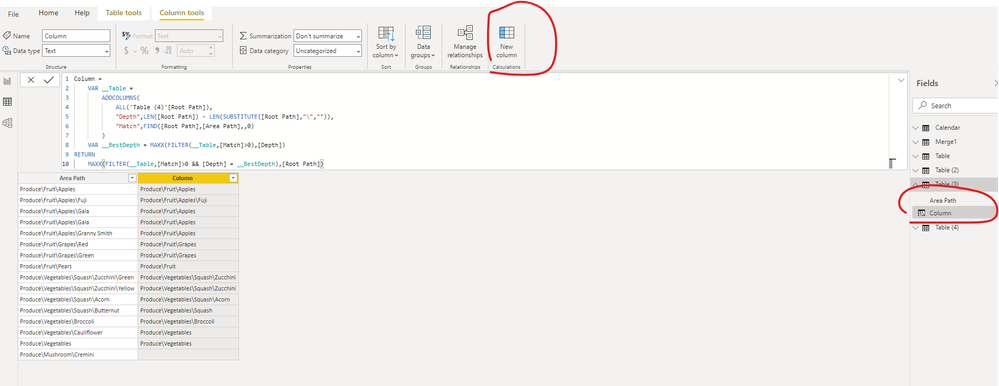
@samroth - I did it this way (below). PBIX is attached below sig.
Column =
VAR __Table =
ADDCOLUMNS(
ALL('Table (4)'[Root Path]),
"Depth",LEN([Root Path]) - LEN(SUBSTITUTE([Root Path],"\","")),
"Match",FIND([Root Path],[Area Path],,0)
)
VAR __BestDepth = MAXX(FILTER(__Table,[Match]>0),[Depth])
RETURN
MAXX(FILTER(__Table,[Match]>0 && [Depth] = __BestDepth),[Root Path])
Thanks Greg, where I am supposed to put this code to run in the pbix?
Hi , @samroth
As shown in the attached file provided by @Greg_Deckler ,you just need to create a calculated column.
Best Regards,
Community Support Team _ Eason
If this post helps, then please consider Accept it as the solution to help the other members find it more quickly.
If you have recently started exploring Fabric, we'd love to hear how it's going. Your feedback can help with product improvements.
A new Power BI DataViz World Championship is coming this June! Don't miss out on submitting your entry.
Share feedback directly with Fabric product managers, participate in targeted research studies and influence the Fabric roadmap.
| User | Count |
|---|---|
| 55 | |
| 40 | |
| 36 | |
| 20 | |
| 18 |
| User | Count |
|---|---|
| 73 | |
| 72 | |
| 38 | |
| 35 | |
| 26 |