cancel
Showing results for 
Search instead for 
Did you mean: 

The Power BI Data Visualization World Championships is back! Get ahead of the game and start preparing now! Learn more

Reply
Urumita
Frequent Visitor

Create boolean calculated column based on related table

Hi all,


I need help with the following issue: 

My Data model has a table production items on the one side and Production steps on the other. Each Item goes through different steps in the production line, I have an Info if a step has succeeded or failed.


Now, I need to calculate it at Item level: if an Item goes through all steps in the production line without failing it's boolean 0 if one single step has failed it's boolean 1.


TBL_Items:

Item1
Item2
Item3


TBL_Process

Item1 -Process1-Success
Item1 -Process2-Success
Item1 -Process3-Fail
Item2-Process1-Success
Item2 Process2Success


Result should be 


TBL_Items:

Item1-Fail
Item2-Success
Item3-null


Any Idea how I can calculate this as a calculated column?


Thanks and Kind regards

Urumita

1 ACCEPTED SOLUTION

@Urumita, Try the below steps,

  • Add Status Code (Numeric)
    1. Success = 1
    2. In Progress = 2
    3. Faile = 3

SivaMani_0-1664510006692.png

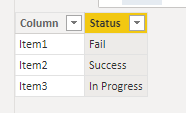
  • Create a Calculated Column in Item TBL_Items like below,


Status = 
    VAR StatusCode  = CALCULATE(MAX('TBL_Process'[Status Code]), RELATEDTABLE('TBL_Process'))
    VAR Result = SWITCH(
        StatusCode,
        1,
        "Success",
        3,
        "Fail",
        "In Progress"
)
RETURN
Result


SivaMani_1-1664510171043.png


Note: Make sure that you created a relationship between the tables.


If this post helps, please consider accepting it as the solution to help the other members find it more quickly.

Appreciate your Kudos!

MCT | Power BI Analyst | Azure Data Engineer

LinkedIn


View solution in original post

4 REPLIES 4
SivaMani
Resident Rockstar
Resident Rockstar

@Urumita can you share sample data?

@SivaMani updated the post above

@Urumita, Try the below steps,

  • Add Status Code (Numeric)
    1. Success = 1
    2. In Progress = 2
    3. Faile = 3

SivaMani_0-1664510006692.png

  • Create a Calculated Column in Item TBL_Items like below,


Status = 
    VAR StatusCode  = CALCULATE(MAX('TBL_Process'[Status Code]), RELATEDTABLE('TBL_Process'))
    VAR Result = SWITCH(
        StatusCode,
        1,
        "Success",
        3,
        "Fail",
        "In Progress"
)
RETURN
Result


SivaMani_1-1664510171043.png


Note: Make sure that you created a relationship between the tables.


If this post helps, please consider accepting it as the solution to help the other members find it more quickly.

Appreciate your Kudos!

MCT | Power BI Analyst | Azure Data Engineer

LinkedIn


Thanks ShivaMani, worked perfectly!

Helpful resources

Announcements
Power BI DataViz World Championships

Power BI Dataviz World Championships

The Power BI Data Visualization World Championships is back! Get ahead of the game and start preparing now!

December 2025 Power BI Update Carousel

Power BI Monthly Update - December 2025

Check out the December 2025 Power BI Holiday Recap!

FabCon Atlanta 2026 carousel

FabCon Atlanta 2026

Join us at FabCon Atlanta, March 16-20, for the ultimate Fabric, Power BI, AI and SQL community-led event. Save $200 with code FABCOMM.