Join us at FabCon Atlanta from March 16 - 20, 2026, for the ultimate Fabric, Power BI, AI and SQL community-led event. Save $200 with code FABCOMM.
Register now!The Power BI Data Visualization World Championships is back! Get ahead of the game and start preparing now! Learn more
Hello again,
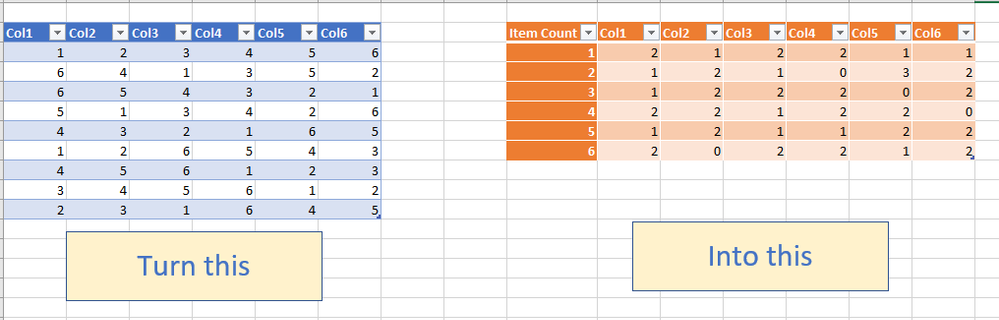
I have a 1000 row dataset from survey monkey. There are 6 columns of data (Col1,Col,...,Col6). The value in each row across all columns is a number, 1 - 6.
I'm new to Power BI so what I'm struggling with is how to create the row labels in my output table.
Thanks in advance,
Mark
Solved! Go to Solution.
Hi @67nmark
You can easily do it in QUERY EDITOR with a series of unpivoting, GROUPING and Pivoting back
Step#1
Select All Columns and unpivot them
Step # 2
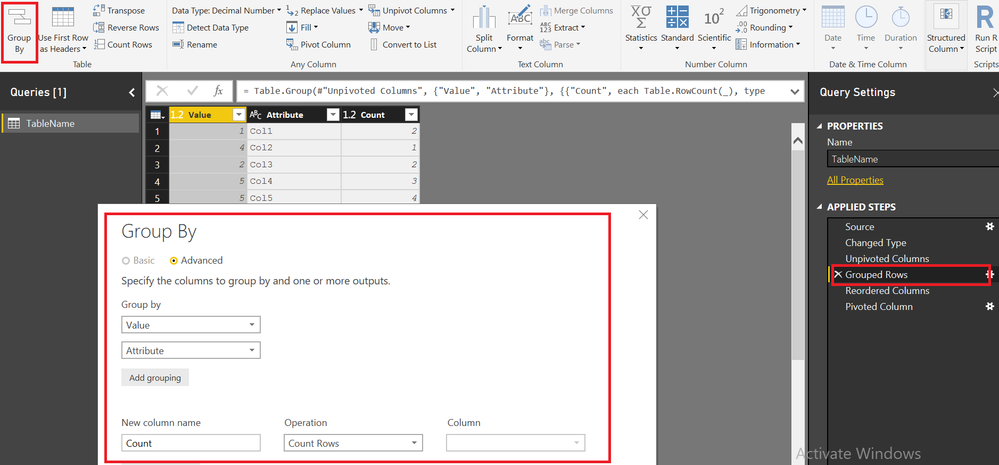
Group by VALUE and ATTRIBUTE and aggreagate by COUNTROWS
Step 3
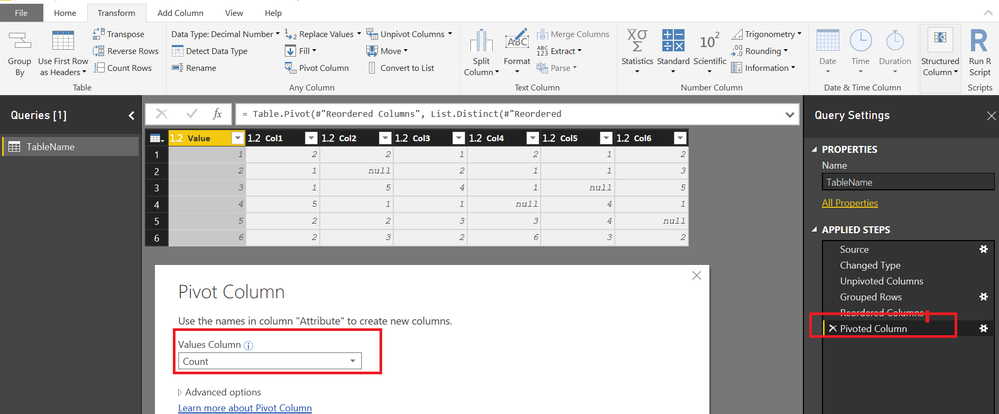
Pivot the attribute Column using Count column as Values
Hi @67nmark
You can easily do it in QUERY EDITOR with a series of unpivoting, GROUPING and Pivoting back
Step#1
Select All Columns and unpivot them
Step # 2
Group by VALUE and ATTRIBUTE and aggreagate by COUNTROWS
Step 3
Pivot the attribute Column using Count column as Values
@Zubair_Muhammad you've just opened a door in my Power Query knowledge. Thanks for the great set of instructions and the sample file, much appreciated.
Cheers,
Mark
The Power BI Data Visualization World Championships is back! Get ahead of the game and start preparing now!
| User | Count |
|---|---|
| 37 | |
| 37 | |
| 33 | |
| 32 | |
| 29 |
| User | Count |
|---|---|
| 130 | |
| 88 | |
| 82 | |
| 68 | |
| 64 |