
Join us at FabCon Atlanta from March 16 - 20, 2026, for the ultimate Fabric, Power BI, AI and SQL community-led event. Save $200 with code FABCOMM.
Register now!The Power BI Data Visualization World Championships is back! Get ahead of the game and start preparing now! Learn more
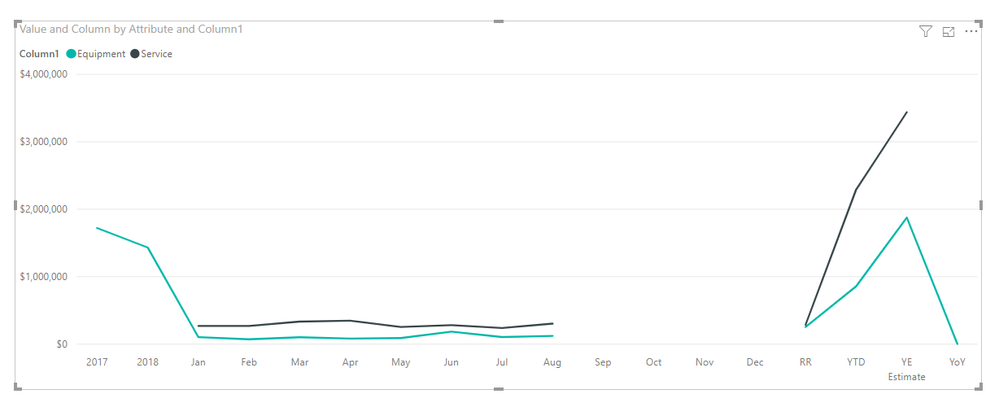
Sorry if this is too elementary for the forum, but I am having difficulty creating what I thought would be an easy line chart. I have created it in Excel previously, but wanted to convert to Power BI. Any assistance is greatly appreciated. Example data is below.
| 2017 | 2018 | Jan | Feb | Mar | Apr | May | Jun | Jul | Aug | Sep | Oct | Nov | Dec | RR | YTD | YE Estimate | YoY | |
| Equipment | $ 1,721,134 | $ 1,431,589 | $ 103,937 | $ 70,845 | $ 101,801 | $ 82,148 | $ 89,361 | $ 184,363 | $ 104,676 | $ 121,039 | $ 254,418 | $ 858,171 | $ 1,875,842 | 31% | ||||
| Service | $ 268,921 | $ 268,943 | $ 333,308 | $ 346,741 | $ 252,655 | $ 279,932 | $ 237,840 | $ 303,724 | $ 286,508 | $ 2,292,064 | $ 3,438,096 |
Solved! Go to Solution.
Hi @Anonymous ,
You can use "UnPivot" firstly. This is my PBIX file.
Best Regards,
Icey
If this post helps, then please consider Accept it as the solution to help the other members find it more quickly.
Hi @Anonymous ,
You can use "UnPivot" firstly. This is my PBIX file.
Best Regards,
Icey
If this post helps, then please consider Accept it as the solution to help the other members find it more quickly.
Thank you very much!!
If your data is in that format, you will want to unpivot your month columns or something to get it more into a format like:
Type,Month,Value
Service,Jan,xxxx
Equipment,Jan,yyyy
...
Thanks. I am not sure why that did not occur to me.
The Power BI Data Visualization World Championships is back! Get ahead of the game and start preparing now!
| User | Count |
|---|---|
| 40 | |
| 37 | |
| 35 | |
| 31 | |
| 28 |
| User | Count |
|---|---|
| 137 | |
| 102 | |
| 71 | |
| 67 | |
| 65 |