cancel
Showing results for 
Search instead for 
Did you mean: 

Data Days is here! Join us now for 60+ days of learning, challenges, and connection. Learn more

Reply
Andwu
Helper I
Helper I

Create a custom Shape map

Hi,


I have a file containing the mapping us postal codes --> internally defined territories --> internally defined Regions.
Our data is provided on the territory level and I'd like to show the data on region level with the possibility to drill down on territory level. Thus I need a shape map containing our definition of territories and regions. Is there a smart way how to create this type of map based on the data I have, where I can say, e.g. postal codes 90002 - 90312, 97005 - 97338 --> Territory WestCoast?


Thanks a lot,


Andre

4 REPLIES 4
mjfulke
Microsoft Employee
Microsoft Employee

Check out this tutorial on creating your own custom shape maps for Power BI.   Create Your Own Custom Shape Map

v-ljerr-msft
Microsoft Employee
Microsoft Employee

@Andwu


I have a file containing the mapping us postal codes --> internally defined territories --> internally defined Regions.
Our data is provided on the territory level and I'd like to show the data on region level with the possibility to drill down on territory level. Thus I need a shape map containing our definition of territories and regions.


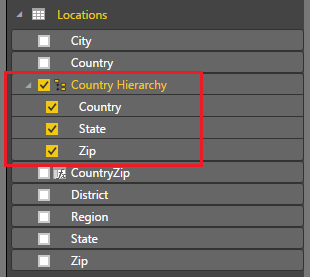
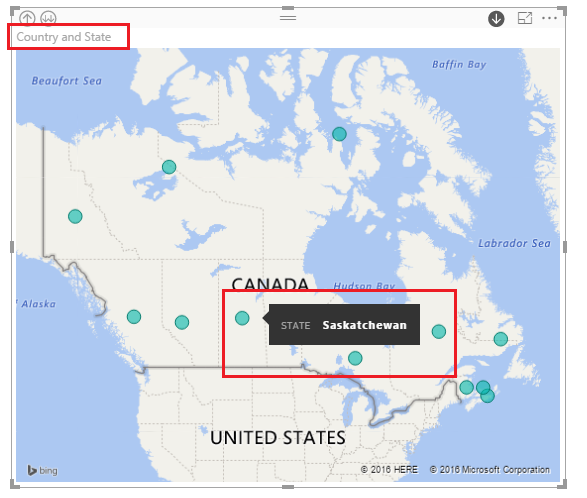
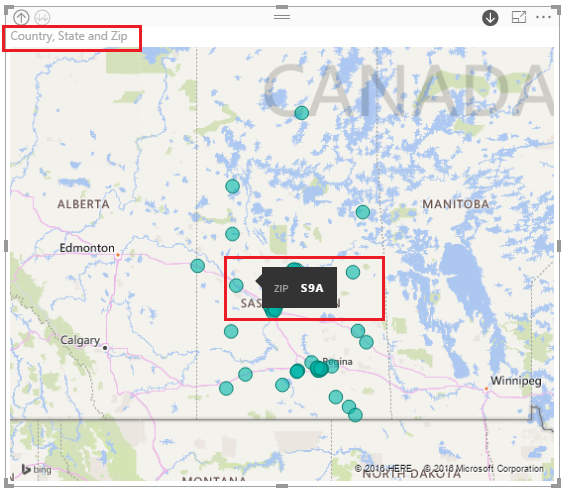
You can create a hierarchy like Regions-->Territories-->Postal Codes first, then show the created hierarchy in the Map. So that you should be able to drill down from Regions to Territories, and to Postal Codes in the Map.


The sample below is for your reference.


The hierarchy(Country-->State-->Zip) I created.

h.PNG

Show the hierarchy in Map.

m.PNG

Drill down from Country to State, and to Zip.

d1.PNGd2.PNG

Regards

Hi,


I tried it, however this seems to be working only, if the different hierarchy levels are itself locations, e.g. Country - State - City. However in my data the Regions are defined from R1 - R5, the Territories as R1001 - R5999. Only the ZIP codes are correct and know locations.

@Andwu


Yes, if we want something shown in the map, it must be a known location which can be recognized by the map.


Regards

Helpful resources

Announcements
Fabric Data Days is here Carousel

Fabric Data Days 2026

Don't miss out on Data Days, June 15 through August 7. Learn Fabric, Power BI, SQL, AI and more.

May Power BI Update Carousel

Power BI Monthly Update - May 2026

Check out the May 2026 Power BI update to learn about new features.

Power BI DataViz World Championships carousel

Power BI DataViz World Championships - June 2026

A new Power BI DataViz World Championship is coming this June! Don't miss out on submitting your entry.