This time we’re going bigger than ever. Fabric, Power BI, SQL, AI and more. We're covering it all. You won't want to miss it.
Learn moreDid you hear? There's a new SQL AI Developer certification (DP-800). Start preparing now and be one of the first to get certified. Register now
Hello!
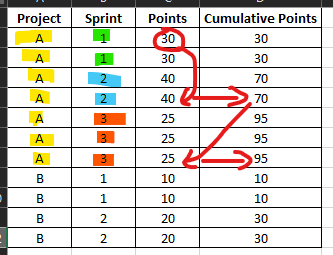
I need to create a column of running totals based on a previous column. However, the previous column contains multiple iterations of one value. I need to be able to add my next value to just one unique value (not all iterations of it). Please see the referenced Excel screenshot for a better explanation. Please notice that the values will need to keep "Project" and "Sprint" in mind as filter criteria.
Thank you!
Solved! Go to Solution.
Hi @JLambs20 ,
You can create a calculated column or measure as below to achieve it:
1. Calculated column
Column for Cumulative Points =
VAR _tab =
SUMMARIZE (
FILTER (
ALL ( 'AZUP - Apollo Main Data' ),
'AZUP - Apollo Main Data'[Project]
= EARLIER( 'AZUP - Apollo Main Data'[Project] )
&& 'AZUP - Apollo Main Data'[Sprint]
<= EARLIER ( 'AZUP - Apollo Main Data'[Sprint] )
),
'AZUP - Apollo Main Data'[Project],
'AZUP - Apollo Main Data'[Sprint],
"point", MAX ( 'AZUP - Apollo Main Data'[Points] )
)
RETURN
SUMX ( _tab, [point] )
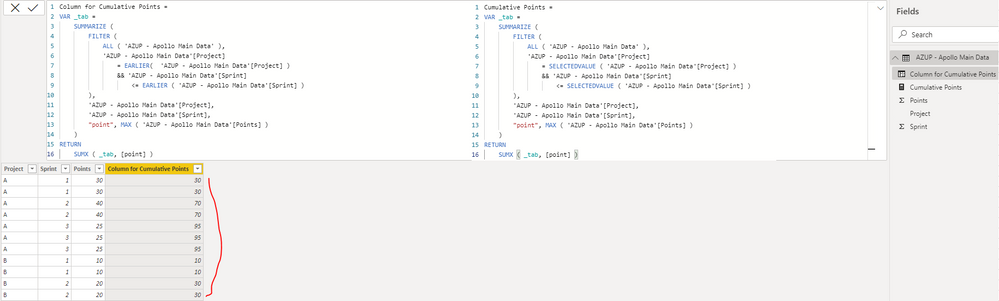
2. Measure
Cumulative Points =
VAR _tab =
SUMMARIZE (
FILTER (
ALL ( 'AZUP - Apollo Main Data' ),
'AZUP - Apollo Main Data'[Project]
= SELECTEDVALUE ( 'AZUP - Apollo Main Data'[Project] )
&& 'AZUP - Apollo Main Data'[Sprint]
<= SELECTEDVALUE ( 'AZUP - Apollo Main Data'[Sprint] )
),
'AZUP - Apollo Main Data'[Project],
'AZUP - Apollo Main Data'[Sprint],
"point", MAX ( 'AZUP - Apollo Main Data'[Points] )
)
RETURN
SUMX ( _tab, [point] )
Best Regards
Hi @JLambs20 ,
You can create a calculated column or measure as below to achieve it:
1. Calculated column
Column for Cumulative Points =
VAR _tab =
SUMMARIZE (
FILTER (
ALL ( 'AZUP - Apollo Main Data' ),
'AZUP - Apollo Main Data'[Project]
= EARLIER( 'AZUP - Apollo Main Data'[Project] )
&& 'AZUP - Apollo Main Data'[Sprint]
<= EARLIER ( 'AZUP - Apollo Main Data'[Sprint] )
),
'AZUP - Apollo Main Data'[Project],
'AZUP - Apollo Main Data'[Sprint],
"point", MAX ( 'AZUP - Apollo Main Data'[Points] )
)
RETURN
SUMX ( _tab, [point] )
2. Measure
Cumulative Points =
VAR _tab =
SUMMARIZE (
FILTER (
ALL ( 'AZUP - Apollo Main Data' ),
'AZUP - Apollo Main Data'[Project]
= SELECTEDVALUE ( 'AZUP - Apollo Main Data'[Project] )
&& 'AZUP - Apollo Main Data'[Sprint]
<= SELECTEDVALUE ( 'AZUP - Apollo Main Data'[Sprint] )
),
'AZUP - Apollo Main Data'[Project],
'AZUP - Apollo Main Data'[Sprint],
"point", MAX ( 'AZUP - Apollo Main Data'[Points] )
)
RETURN
SUMX ( _tab, [point] )
Best Regards
Hi,
Please show the expected result in a simple Table.
@JLambs20 , Try a measure like
sumx(addcolumns(summarize(Table, Table[project], Table[sprint], Table[points]), "_1",calculate(sum(Table[points]),filter(allselected(Table), [sprint] <=max([sprint]) && [project] = max([project])))),[_1])
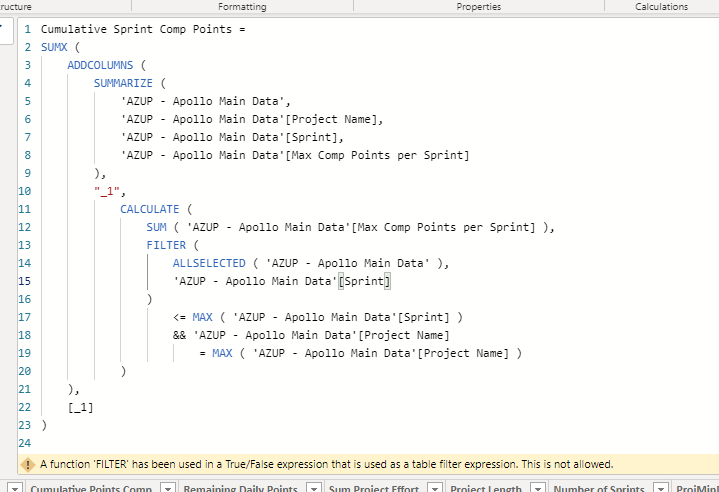
Unfortunately, I'm getting an error. What am I missing?
\
Check out the April 2026 Power BI update to learn about new features.
If you have recently started exploring Fabric, we'd love to hear how it's going. Your feedback can help with product improvements.
| User | Count |
|---|---|
| 36 | |
| 33 | |
| 31 | |
| 21 | |
| 16 |
| User | Count |
|---|---|
| 66 | |
| 55 | |
| 31 | |
| 26 | |
| 23 |