cancel
Showing results for 
Search instead for 
Did you mean: 

The Power BI Data Visualization World Championships is back! Get ahead of the game and start preparing now! Learn more

Reply
PBE
Helper II
Helper II

Create Variables from a table

Hi, I would like to create variables from a table which relate to the row number and a specific column.


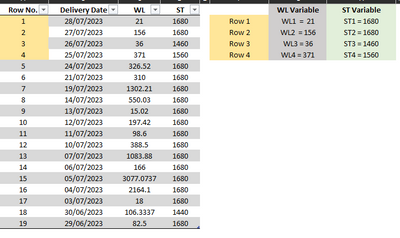
There are two columns WL and ST. Each variable will be numbered in relation to Row No. As shown below, for example:-

For Row 1 the two variables will be WL1 and ST1. Where WL1 = 21 and ST1 = 1680

For Row 2 the two variables will be WL2 and ST2. Where WL2 = 156 and ST2 = 1680

and so on up to a maximum of 30 rows.

PBE_1-1692200974888.png


I will then use the variables in different formulas such as

Formula 1 = WL1 + ST1

Formula 2 = Formula 1 + WL1 - ST1

Is it possible to extract a figure in a column and relate to row no. such as WL1 = 21 or ST1 = 1680?


I hope this makes sense. Any question let me know.

Thank you for any help in advance.

PBE


1 ACCEPTED SOLUTION
v-zhangti
Community Support
Community Support

Hi, @PBE 


You can try the following methods.

New table:

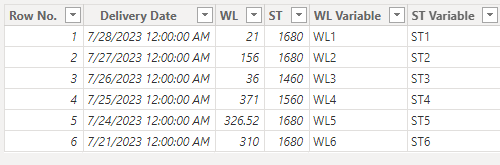
New table = ADDCOLUMNS('Table',"WL Variable","WL"&[Row No.],"ST Variable","ST"&[Row No.])

vzhangti_0-1692604344179.png

Column:

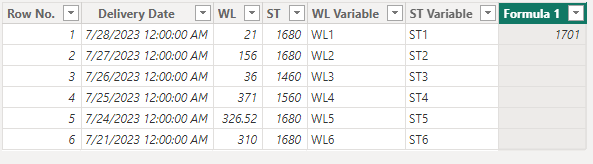
Formula 1 = IF([WL Variable]="WL1"&&[ST Variable]="ST1",[ST]+[WL])

vzhangti_1-1692604388730.png

Is this the result you expect?


Best Regards,

Community Support Team _Charlotte

If this post helps, then please consider Accept it as the solution to help the other members find it more quickly.


View solution in original post

3 REPLIES 3
v-zhangti
Community Support
Community Support

Hi, @PBE 


You can try the following methods.

New table:

New table = ADDCOLUMNS('Table',"WL Variable","WL"&[Row No.],"ST Variable","ST"&[Row No.])

vzhangti_0-1692604344179.png

Column:

Formula 1 = IF([WL Variable]="WL1"&&[ST Variable]="ST1",[ST]+[WL])

vzhangti_1-1692604388730.png

Is this the result you expect?


Best Regards,

Community Support Team _Charlotte

If this post helps, then please consider Accept it as the solution to help the other members find it more quickly.


Thank you that worked

Hi @v-zhangti 

Thanks for this, it looks good. I'll try it out and let you know how I get on.

Helpful resources

Announcements
November Power BI Update Carousel

Power BI Monthly Update - November 2025

Check out the November 2025 Power BI update to learn about new features.

Fabric Data Days Carousel

Fabric Data Days

Advance your Data & AI career with 50 days of live learning, contests, hands-on challenges, study groups & certifications and more!

FabCon Atlanta 2026 carousel

FabCon Atlanta 2026

Join us at FabCon Atlanta, March 16-20, for the ultimate Fabric, Power BI, AI and SQL community-led event. Save $200 with code FABCOMM.

Top Kudoed Authors