Join us at FabCon Atlanta from March 16 - 20, 2026, for the ultimate Fabric, Power BI, AI and SQL community-led event. Save $200 with code FABCOMM.
Register now!The Power BI Data Visualization World Championships is back! Get ahead of the game and start preparing now! Learn more
Hi Guys,
Need challenge for you today!
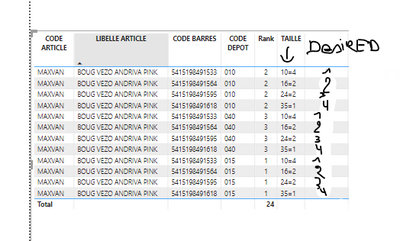
I have this Table
I'd like to Split one available (which is in [Stock]) quantity by [CODE ARTICLE]
However i Have 3 Sizes with Each One quantity in stock.
So one of each Size Must go to one unique warehouse! 😛
I'd like to Create an Index Based on each [TAILLE] associated to each [CODE ARTICLE]
So i could Share 1 quantity By [TAILLE] Rank for Each [Rank] by Warehouse !
Any way to achieve this?
Here is the link to download my sample.
Thanks guys you roxx!!
Hi @SebSchoon1
Can you share the expected rank result along with the sample data? Currently I have difficulty understanding the expected result. I don't see "Size" and "Warehouse" in the data.
Best Regards,
Community Support Team _ Jing
The Power BI Data Visualization World Championships is back! Get ahead of the game and start preparing now!
| User | Count |
|---|---|
| 39 | |
| 37 | |
| 33 | |
| 32 | |
| 29 |
| User | Count |
|---|---|
| 133 | |
| 88 | |
| 85 | |
| 68 | |
| 64 |