cancel
Showing results for 
Search instead for 
Did you mean: 

Next up in the FabCon + SQLCon recap series: The roadmap for Microsoft SQL and Maximizing Developer experiences in Fabric. All sessions are available on-demand after the live show. Register now

Reply
swan1099
Helper I
Helper I

Create Multiple Cumulative Columns

Hello,


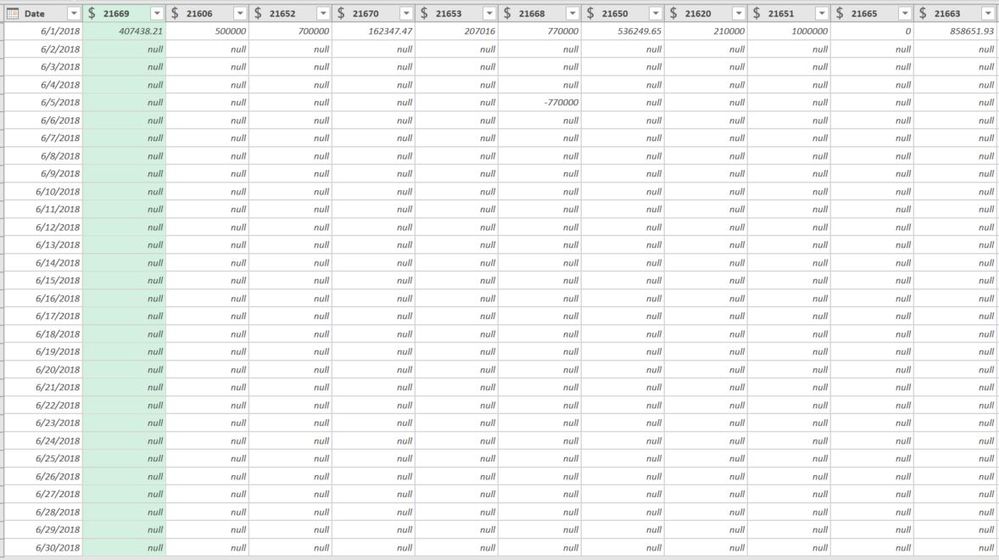
I've extracted a simple GL Dataset out of my GL (have it set up so I can extract by the month to keep things simple). Within PowerQuery (Get & Transform) I've shaped my data so that it's pivoted by the date (y axis in pic) and GL Account (x axis in pic). Is it possible for me to now put a command into PowerQuery so that it will simply cumulatively total each of the GL columns top to bottom?


In the example attached, the first 5 columns would remain unchanged from 6/1-6/30 as no balances were added to them. Conversly, in the sixth column (headed by GL 21668), it would read 770000 through June 5th, to then it would read 0 to the bottom.


After this my plan is to then unpivot the columns and I will be left with a cumulative total by date & by GL code.Capture.JPG


Any help would be much appreciated, thanks!

5 REPLIES 5
Ashish_Mathur
Super User
Super User

Hi,


I would suggest that you unpivot your dataseta and have the GL codes in a single column.  So your dataset should be a 3 column one - Date. GL code and Amount.  From this dataset build your visual.


Regards,
Ashish Mathur
http://www.ashishmathur.com
https://www.linkedin.com/in/excelenthusiasts/

Hi Ashish,


Agreed on the unpivot, but prior to doing that, I need to get each GL column cumulatively summed downwards. is this possible without too much sophistication?

Don't know.  Sorry.


Regards,
Ashish Mathur
http://www.ashishmathur.com
https://www.linkedin.com/in/excelenthusiasts/

@swan1099have you tried a DAX table solution? I believe this would be the right approach. With the right filters and functions you can do single month, MTD, YTD, CumulativeTD, you may not even need the actual table but if you do SUMMARIZE should do the things trick.
Seward12533
Solution Sage
Solution Sage

Not sure about the M but perhaps an easier way is to use create a Measure that calculated Cumulative totals and then use the Summarize in DAX to build a table using DAX (the New Table) button is on the Modeling TAB) that will build a table by Date and GL codes with the Cumulative totals. After the table is created you can link it into your model as you would any other table. 

Helpful resources

Announcements
New to Fabric survey Carousel

New to Fabric Survey

If you have recently started exploring Fabric, we'd love to hear how it's going. Your feedback can help with product improvements.

Power BI DataViz World Championships carousel

Power BI DataViz World Championships - June 2026

A new Power BI DataViz World Championship is coming this June! Don't miss out on submitting your entry.

Join our Fabric User Panel

Join our Fabric User Panel

Share feedback directly with Fabric product managers, participate in targeted research studies and influence the Fabric roadmap.

March Power BI Update Carousel

Power BI Community Update - March 2026

Check out the March 2026 Power BI update to learn about new features.