cancel
Showing results for 
Search instead for 
Did you mean: 

Join the FabCon + SQLCon recap series. Up next: Power BI, Real-Time Intelligence, IQ and AI, and Data Factory take center stage. All sessions are available on-demand after the live show. Register now

Reply
Anonymous
Not applicable

Create Histogram using Quartiles

Hi Everyone,

I am looking at creating a histogram that will show the average tenure of employees by quartiles. 


I used the below code to try and get quartiles however I can't seem to use this in a bar chart to mimic a histogram.  So basically I would like the quartiels across the bottom of the histogram/bar chart as the X axis and then count of employees that fall into each bucket. 


The other issue I noticed with the below code is I seem to have to pull in Tenure into the table in order for the below calculation to show the quartiles.  I would like a user to be able to select different locations and then get the quartiles for that location. 


I also want to apply this to employee wages as well but am using tenure as a test.


Quartile Avg Tenure = 
VAR FirstQ =
    PERCENTILEX.INC (
        ALL ( 'DimEmployees'[Tenure] ),
        'DimEmployees'[Tenure],
        .25
    )
VAR SecondQ =
    PERCENTILEX.INC (
        ALL ( 'DimEmployees'[Tenure] ),
        'DimEmployees'[Tenure],
        .50
    )
VAR ThirdQ =
    PERCENTILEX.INC (
        ALL ( 'DimEmployees'[Tenure] ),
        'DimEmployees'[Tenure],
        .75
    )
VAR ThisVal =
    SELECTEDVALUE ( 'DimEmployees'[Tenure] )
RETURN
    IF (
        ThisVal <= FirstQ,
        1,
        IF (
            ThisVal > FirstQ
                && ThisVal <= SecondQ,
            2,
            IF ( ThisVal > SecondQ && ThisVal <= ThirdQ, 3, 4 )
        )
    )


2 REPLIES 2
v-xuding-msft
Community Support
Community Support

Hi @Anonymous ,

Can you please share a dummy file? If you can't, please share some sample data and your expected results that will make us understand clearly about your requirement.


Please see this post regarding How to Get Your Question Answered Quickly: 

https://community.powerbi.com/t5/Community-Blog/How-to-Get-Your-Question-Answered-Quickly/ba-p/38490


Best Regards,

Xue Ding

If this post helps, then please consider Accept it as the solution to help the other members find it more quickly.

Best Regards,
Xue Ding
If this post helps, then please consider Accept it as the solution to help the other members find it more quickly.
Anonymous
Not applicable

@v-xuding-msft , how is this?  and thanks for the reply.


sample data:


Employee ID            Tenure      Location

abc                               .4           A

def                              1.2           B

g                                  .5            B

h                                  5              A

i                                    4.2            B


Expected Results:

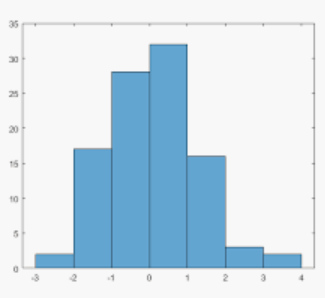
These are assigned quartiles dynamically which I can then put into a histogram.  So above another column of Quartiles/percentiles would be added but it can change depending on what location(s) you choose.  The histogram can be a bar chart but would look somethign like below.  Where the X axis are the quartiles and the Y axis is the employee count.


Does this help?


histogram.png


Helpful resources

Announcements
April Power BI Update Carousel

Power BI Monthly Update - April 2026

Check out the April 2026 Power BI update to learn about new features.

New to Fabric survey Carousel

New to Fabric Survey

If you have recently started exploring Fabric, we'd love to hear how it's going. Your feedback can help with product improvements.

Power BI DataViz World Championships carousel

Power BI DataViz World Championships - June 2026

A new Power BI DataViz World Championship is coming this June! Don't miss out on submitting your entry.

FabCon and SQLCon Highlights Carousel

FabCon &SQLCon Highlights

Experience the highlights from FabCon & SQLCon, available live and on-demand starting April 14th.