cancel
Showing results for 
Search instead for 
Did you mean: 

We've captured the moments from FabCon & SQLCon that everyone is talking about, and we are bringing them to the community, live and on-demand. Starts on April 14th. Register now

Reply
Syndicate_Admin
Administrator
Administrator

Create Filtered Table Between Two Tables

Hello:

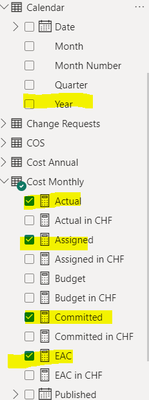
I have the following tables, which are related to each other with a common ID number for both,

Jprada_3-1708003467689.png

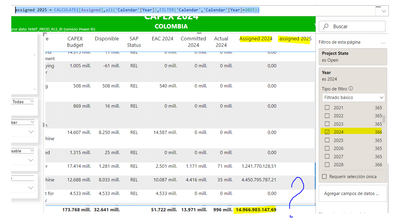
I need to show data from a table, filtered data for the year 2024 and 2025 for which I made the table with a filter on the page for 2024 and then a measure for the 2025 data:

Jprada_2-1708003387717.png

To calculate the data for 2025 I made the following measurement: (Seeking to remove the filter from the page and applying a new filter)

assigned 2025 = CALCULATE([Assigned],all('Calendar'[Year]),FILTER('Calendar','Calendar'[Year]=2025))

But the result comes out blank.

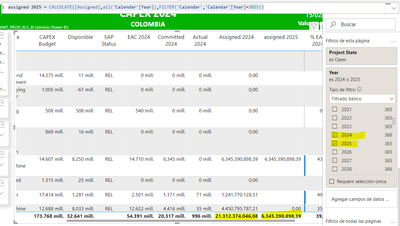
If I apply a filter to the page for 2024 and 2025 if it shows me data but they are no longer the same for 2024:

Jprada_4-1708003755043.png

What would be the correct way to calculate the measure for 2025?

As a second option I was thinking of creating a filtered table of the COST MONTHLY table and applying a data filter to it only for the year 2025, but since they are in two different tables I don't know how to do it.

Thanks for the help.

On a board I have fli

1 REPLY 1
amitchandak
Super User
Super User

@Syndicate_Admin , Try like


assigned 2025 = CALCULATE([Assigned],FILTER(all('Calendar'),'Calendar'[Year]=2025))

Share with Power BI Enthusiasts: Full Power BI Video (20 Hours) YouTube
Microsoft Fabric Series 60+ Videos YouTube
Microsoft Fabric Hindi End to End YouTube

Helpful resources

Announcements
New to Fabric survey Carousel

New to Fabric Survey

If you have recently started exploring Fabric, we'd love to hear how it's going. Your feedback can help with product improvements.

Power BI DataViz World Championships carousel

Power BI DataViz World Championships - June 2026

A new Power BI DataViz World Championship is coming this June! Don't miss out on submitting your entry.

Join our Fabric User Panel

Join our Fabric User Panel

Share feedback directly with Fabric product managers, participate in targeted research studies and influence the Fabric roadmap.

March Power BI Update Carousel

Power BI Community Update - March 2026

Check out the March 2026 Power BI update to learn about new features.