Forum Discussion

Anonymous's avatar
Anonymous
Not applicable
6 years ago
Solved

Create 2 different multi-row cards to compare data

Hi,

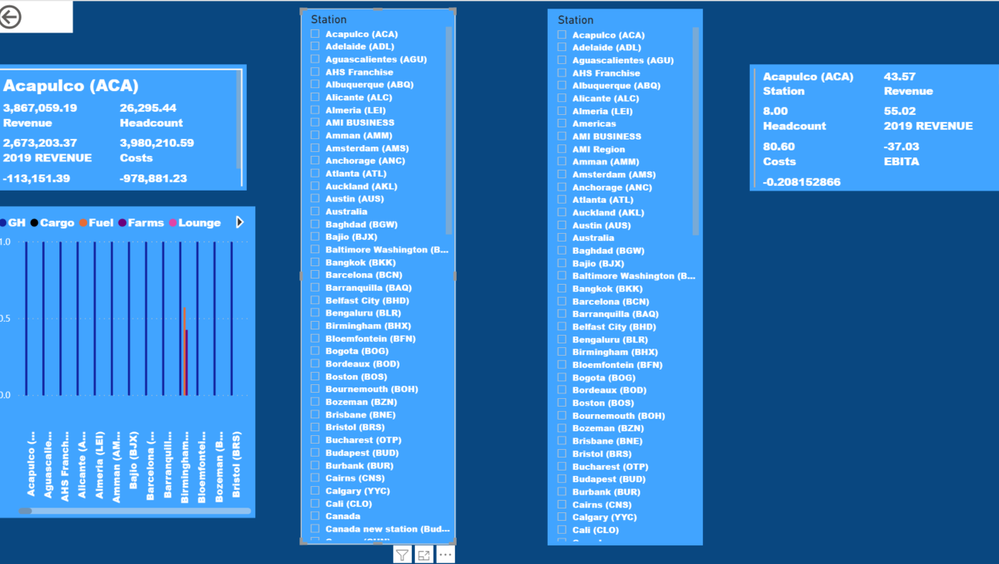
I am looking for some advise on how to create 2 different multi-row cards to compare data from same table. When I create second multi-row  card is showing same data as first one, I want to be able to check and compare 2 different ones. Thanks

4 Replies

  • Anonymous , The information you have provided is not making the problem clear to me. Can you please explain with an example.
    Can you share sample data and sample output in table format?


    You can show 1-month data on one and another month data on the second month '


    MTD Sales = CALCULATE(SUM(Sales[Sales Amount]),DATESMTD('Date'[Date]))
    last MTD Sales = CALCULATE(SUM(Sales[Sales Amount]),DATESMTD(dateadd('Date'[Date],-1,MONTH)))


    Power BI — MTD
    https://medium.com/@amitchandak.1978/power-bi-mtd-questions-time-intelligence-3-5-64b0b4a4090e


    Appreciate your Kudos.


    • Anonymous's avatar
      Anonymous
      Not applicable

      Hello

      I have a slicer with a list of cities

      I have created a multi-row card and every time I select a city the card shows me data from that city

      I created a second multi-row card and wanted to be able to select a second city from the slicer to compare on the screen the data of both cities.

      I hope this will clear up my doubt?

    • Anonymous's avatar
      Anonymous
      Not applicable

      amitchandak thanks for your response. I am working with Cities and I want to compare 2 cities data in same page.

      Find below a screen shot of my visual but when select one city I haven't got the option to select a second one.


      Thanks