cancel
Showing results for 
Search instead for 
Did you mean: 

Level up your Power BI skills this month - build one visual each week and tell better stories with data! Get started

Reply

Counting consecutive values

Hi I'm trying to count consecutive rows that match.


I have an ID column, a date column, and then a value column. I'm sorting by the ID then the date and I'd like for it to tell me the length of the chain of values in a calculated column. For example:


ID, Date, Value, Consecutive Values

1, 1/1/2019, A, 0

1, 1/2/2019, A, 2

2, 1/1/2019, P, 1

2, 1/2/2019, A, 1

3, 1/1/2019, P, 0

3, 1/2/2019, P, 2


I hope that isn't too confusing.

1 ACCEPTED SOLUTION

Hi davidgaribaldi,

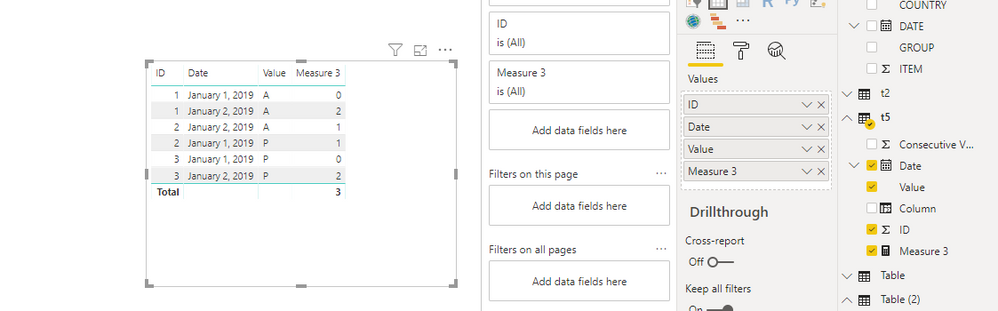
You could try below measure to see whether it work or not

Measure 3 =
VAR temp =
    CALCULATE (
        COUNT ( t5[ID] ),
        FILTER ( ALLEXCEPT ( t5, t5[ID], t5[ Value] ), t5[ Date] <= MIN ( t5[ Date] ) )
    )
RETURN
    IF (
        CALCULATE ( COUNT ( t5[ Value] ), ALLEXCEPT ( t5, t5[ID], t5[ Value] ) ) > 1
            && temp = 1,
        0,
        temp
    )

447.PNG

Best Regards,
Zoe Zhi

If this post helps, then please consider Accept it as the solution to help the other members find it more quickly.


View solution in original post

4 REPLIES 4
dax
Community Support
Community Support

Hi davidgaribaldi,

I don't understand the logic of your sample, so if possible, could you please  expain this to me? Then I will help you more corretly.

Thanks for your understanding and support.
Best Regards,
Zoe Zhi

PattemManohar
Community Champion
Community Champion

@davidgaribaldi Just a quick question, why you have the second duplicate row as 2 instead of 1 as your chain starts at 0.

For Example, 1, 1/2/2019, A, 2 (this should be 1, as the previous same row started it's count from 0)


Did I answer your question? Mark my post as a solution!

Proud to be a PBI Community Champion


Because I only want the end number so I don't want it to increment I just want 0's and the last number in the chain with the amount of that value. I'd gladly settle for something like 1, 1/1/19, A, 2; 1, 1/2/19, A, 2


Basically I want to be able to tell the amount of 'A's' and 'P's' in each chain quickly.


If you can think of a more elegant way to accomplish this I'm open to it.

Hi davidgaribaldi,

You could try below measure to see whether it work or not

Measure 3 =
VAR temp =
    CALCULATE (
        COUNT ( t5[ID] ),
        FILTER ( ALLEXCEPT ( t5, t5[ID], t5[ Value] ), t5[ Date] <= MIN ( t5[ Date] ) )
    )
RETURN
    IF (
        CALCULATE ( COUNT ( t5[ Value] ), ALLEXCEPT ( t5, t5[ID], t5[ Value] ) ) > 1
            && temp = 1,
        0,
        temp
    )

447.PNG

Best Regards,
Zoe Zhi

If this post helps, then please consider Accept it as the solution to help the other members find it more quickly.


Helpful resources

Announcements
April Power BI Update Carousel

Power BI Monthly Update - April 2026

Check out the April 2026 Power BI update to learn about new features.

Fabric SQL PBI Data Days

Data Days 2026 coming soon!

Sign up to receive a private message when registration opens and key events begin.

New to Fabric survey Carousel

New to Fabric Survey

If you have recently started exploring Fabric, we'd love to hear how it's going. Your feedback can help with product improvements.

Power BI DataViz World Championships carousel

Power BI DataViz World Championships - June 2026

A new Power BI DataViz World Championship is coming this June! Don't miss out on submitting your entry.