cancel
Showing results for 
Search instead for 
Did you mean: 

The Power BI Data Visualization World Championships is back! Get ahead of the game and start preparing now! Learn more

Reply
Anonymous
Not applicable

Count

Hello Community


My data is as follows and i am expecting get the results as the last column (Lines Count) in bold letter

basically i would like to display how many lines are there in a perticular order using a count function in a measure

(i am trying to get this total count of order, for each line)


Order#

Line#

Qty

Lines Count

123

1.1

10

2

123

2.1

20

2

228

1.1

15

3

228

3.1

30

3

228

4.1

18

3

213

2.1

12

1


Using count function i am able to get the expected results, when i just take Order number column, but as soon as i add additional columns (Line#, Qty) in the table visulization, i am getting the Lines count as 1 for all lines..


Order#

Count of Lines

123

2

228

3

213

1


Appreciate your help..


Thanks,


6 REPLIES 6
v-yuta-msft
Community Support
Community Support

@Anonymous,


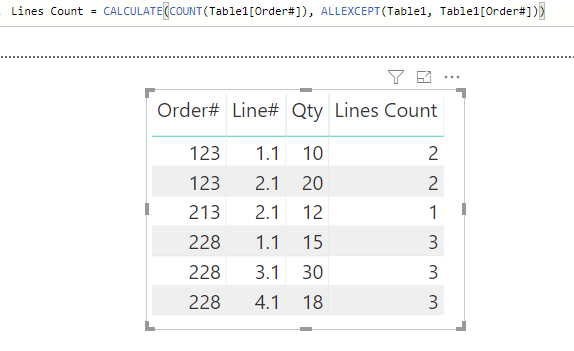
Modify your measure like below and try again:

Lines Count = CALCULATE(COUNT(Table1[Order#]), ALLEXCEPT(Table1, Table1[Order#]))

Capture.PNG 


Community Support Team _ Jimmy Tao

If this post helps, then please consider Accept it as the solution to help the other members find it more quickly.

Anonymous
Not applicable

Hello Support team,


thanks for quick turn around..


I tried the below formula, it works good with lines count, but the problem is, some rows are getting duplicated, i am now getting more rows with my original data..


Regards,

Anonymous
Not applicable

I have a join to another table, and one of the column from 2nd table is also displayed, in such cases i am getting a duplicate row for that order..

@Anonymous ,


Just remove Line and #Qty column in values field.

Capture.PNG 


Community Support Team _ Jimmy Tao

If this post helps, then please consider Accept it as the solution to help the other members find it more quickly.

Anonymous
Not applicable

Dear Support Team


as i indicated in my original request, i am getting the count when i just display the order number

but my requirement is to the count when all the fields are in the table


thanks,


@Anonymous ,


In query editor, click transform and then click remove duplicate rows.


Community Support Team _ Jimmy Tao

If this post helps, then please consider Accept it as the solution to help the other members find it more quickly.

Helpful resources

Announcements
Power BI DataViz World Championships

Power BI Dataviz World Championships

The Power BI Data Visualization World Championships is back! Get ahead of the game and start preparing now!

December 2025 Power BI Update Carousel

Power BI Monthly Update - December 2025

Check out the December 2025 Power BI Holiday Recap!

FabCon Atlanta 2026 carousel

FabCon Atlanta 2026

Join us at FabCon Atlanta, March 16-20, for the ultimate Fabric, Power BI, AI and SQL community-led event. Save $200 with code FABCOMM.

Top Solution Authors