cancel
Showing results for 
Search instead for 
Did you mean: 

Get Fabric Certified for FREE during Fabric Data Days. Don't miss your chance! Request now

Reply
abukapsoun
Post Patron
Post Patron

Count value in different columns

Hi All,


I am very new to Power BI and still exploring it.  Suppose we have the following Excel table


Name    Country       Comp1    Col2     Col3

A              X                 cs        ps

B              Y                 ps       ip          cs

C              Z                 ip


I want to count how many there is a cs ,ps and ip.

And in the visual when i press on CS i want the map representing the Country to highlight the countries that includes the CS 


Many thanks


1 ACCEPTED SOLUTION

Hi @abukapsoun,


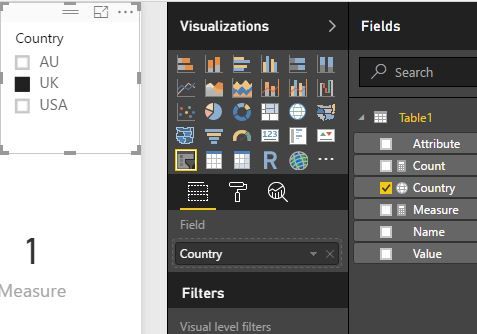
If this is the only problem, I would suggest to use a new function "DISTINCTCOUNT".

Measure =
DISTINCTCOUNT ( Table1[Name] )


Count value in different columns1.JPG


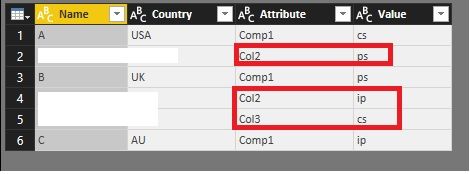
Because only keeping one row would lead another problem that the connection between "country" and "value" would be broken. (the data in red rectangle belongs to no country.)


Count value in different columns2.JPG


Best Regards!

Dale


Community Support Team _ Dale
If this post helps, then please consider Accept it as the solution to help the other members find it more quickly.

View solution in original post

3 REPLIES 3
v-jiascu-msft
Microsoft Employee
Microsoft Employee

Hi @abukapsoun,


Firstly, we need to import the data into Power BI from excel.

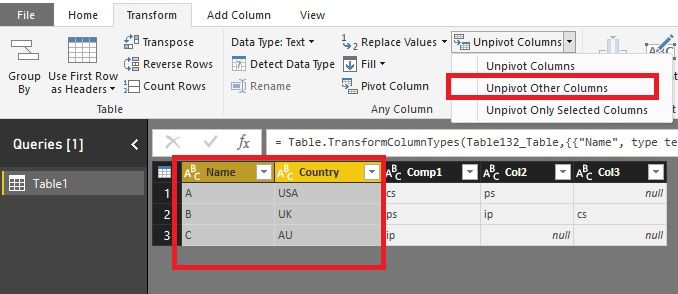
Secondly, select "Name" and "Country" with "Ctrl" key. Unpivot three columns "Comp1, Col2, Col3".Count value in different columns .jpg


Thirdly, create a measure.

Count = COUNT(Table1[Value])

I attached the file, you can try it yourself. https://1drv.ms/u/s!ArTqPk2pu-BkgQt-qNdTYX9b5zow


Best Regards!

Dale

Community Support Team _ Dale
If this post helps, then please consider Accept it as the solution to help the other members find it more quickly.

@v-jiascu-msft


Thank you very much Dale.. 

The unpivot trick worked, but created me another problem.

When unpivotting, it will create extra rows but duplication. So if I unpivot Col1 2 3, and I want to count how many person there is in UK, the value would be 3 instead of 1. 

Is there a way I can overcome this problem? Like when unpivotting, only the new created column is filled with values and not the whole row. 


Thanks again

Hi @abukapsoun,


If this is the only problem, I would suggest to use a new function "DISTINCTCOUNT".

Measure =
DISTINCTCOUNT ( Table1[Name] )


Count value in different columns1.JPG


Because only keeping one row would lead another problem that the connection between "country" and "value" would be broken. (the data in red rectangle belongs to no country.)


Count value in different columns2.JPG


Best Regards!

Dale


Community Support Team _ Dale
If this post helps, then please consider Accept it as the solution to help the other members find it more quickly.

Helpful resources

Announcements
November Power BI Update Carousel

Power BI Monthly Update - November 2025

Check out the November 2025 Power BI update to learn about new features.

Fabric Data Days Carousel

Fabric Data Days

Advance your Data & AI career with 50 days of live learning, contests, hands-on challenges, study groups & certifications and more!

FabCon Atlanta 2026 carousel

FabCon Atlanta 2026

Join us at FabCon Atlanta, March 16-20, for the ultimate Fabric, Power BI, AI and SQL community-led event. Save $200 with code FABCOMM.

Top Solution Authors
Top Kudoed Authors