Get certified for free when you join Fabric Data Days 2026 and dive into Fabric, Power BI, SQL, AI, and other essential data skills.
Join nowData Days is here! Join us now for 60+ days of learning, challenges, and connection. Learn more
Hi, I have a challenge and I need your help.
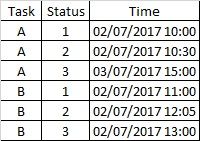
I have a status log per tasks, in which I have the record of the changes status of each task.
For example, task "A" goes through states 1, 2 and 3 at such times.
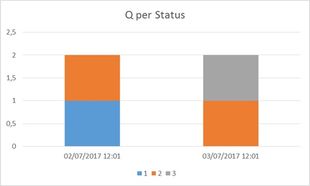
What I want to achieve, is to be able to graph the number of tasks in each state at a certain moment, at a certain moment of time should show the last state of each task before that time.
For example, in the following graph I show the quantities in the table above.
The challenge is to be able to explore by month, day and hours and count the status for each time.
Solved! Go to Solution.
In this scenario, I assume you have a Date/Time to get those certain moments. However, since there's no direct relationship between these certain moments and your source table. You can't include the fields from these two tables into same chart visual.
For your requirement, you can only create a slicer for those certain moments, the build a measure to get the last status for each task.
Last Status = var MaxTime = CALCULATE(MAX(Table3[Time]),FILTER(Table3,Table3[Time]<=MAX(Table4[Time]))) return CALCULATE(MAX(Table3[Status]),FILTER(Table3,Table3[Time]=MaxTime))
And to calculate the number of tasks for each status, we have to summarize above table into calculated table. However, it's not possible to generate a dynamic table. And we can't assign different aggregation on different hierarchy level. So these calculation can't be explored on different level.
Rergards,
In this scenario, I assume you have a Date/Time to get those certain moments. However, since there's no direct relationship between these certain moments and your source table. You can't include the fields from these two tables into same chart visual.
For your requirement, you can only create a slicer for those certain moments, the build a measure to get the last status for each task.
Last Status = var MaxTime = CALCULATE(MAX(Table3[Time]),FILTER(Table3,Table3[Time]<=MAX(Table4[Time]))) return CALCULATE(MAX(Table3[Status]),FILTER(Table3,Table3[Time]=MaxTime))
And to calculate the number of tasks for each status, we have to summarize above table into calculated table. However, it's not possible to generate a dynamic table. And we can't assign different aggregation on different hierarchy level. So these calculation can't be explored on different level.
Rergards,
Don't miss out on Data Days, June 15 through August 7. Learn Fabric, Power BI, SQL, AI and more.
Check out the May 2026 Power BI update to learn about new features.
| User | Count |
|---|---|
| 23 | |
| 21 | |
| 20 | |
| 19 | |
| 13 |
| User | Count |
|---|---|
| 58 | |
| 52 | |
| 37 | |
| 31 | |
| 27 |