Get certified for free when you join Fabric Data Days 2026 and dive into Fabric, Power BI, SQL, AI, and other essential data skills.
Join nowJuly 7 - July 17 | Round 2 of the Power BI Dataviz World Championships. Don't miss your chance! Learn more
I have a table "Sales _Offers"
and i have a column "Name_trimmed_striped"
I want to add a new column that make a count for each line how many times it occures
(NOT IN DAX, but still in the import Power Query Editor)
customer | Name_trimmed_striped | the column i want to make |
| a | road123 | 2 |
| a | vestroad412 | 1 |
| v | road123 | 2 |
| b | vestroad41234165 | 1 |
it would be easy to use groupe by, but i need all the lines intact.
it would also be easy to make a new table then group by in that, then merge to 2 to get a value looked up (but since its 19 million lines this seems like a bad idea)
tried to use Table.RowCount and im guessing that is what i need.. but cant fugure out how to make it work
I did not accept this as a solution, sinces it does exactly what i did not want, It was NOT supose to happen in DAX but during import. - also if you want to do it in dax, then there is a much shortwer and more efficiant way to do it using "Earlier"
Count number of occurences = CALCULATE(COUNT('Sales_Offers'[Name_trimmed_striped]), 'Sales_Offers'[Name_trimmed_striped] = EARLIER('Sales_Offers'[Name_trimmed_striped]))
But thank you for taking time to try and help me - and sorry if I did not formulate the question precise in the opening question @Anonymous
This is still not the solution i wanted since i wanted it in import, but it is better than the one that was accepted as a solution (not by me)
Hi @Rygaard ,
Please try below steps:
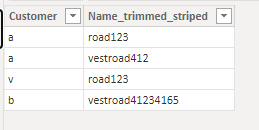
1. below is my test table
Table:
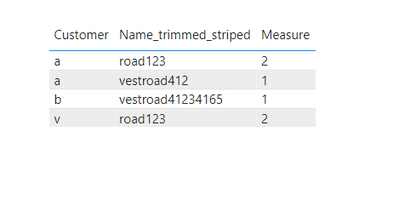
2. create measure with below dax formula
Measure =
VAR cur_nts =
SELECTEDVALUE ( 'Table'[Name_trimmed_striped] )
VAR tmp =
FILTER ( ALL ( 'Table' ), 'Table'[Name_trimmed_striped] = cur_nts )
VAR tmp1 =
SUMMARIZE ( tmp, [Name_trimmed_striped], "CTR", COUNT ( [Customer] ) )
VAR _str =
CONCATENATEX ( tmp1, [Name_trimmed_striped] & [CTR], "" )
VAR num =
LEN ( cur_nts )
VAR _val =
MID ( _str, num + 1, LEN ( _str ) )
RETURN
_val
3. add a table visual with fields and measure
Please refer the attached .pbix file.
Best regards,
Community Support Team_Binbin Yu
If this post helps, then please consider Accept it as the solution to help the other members find it more quickly.
Join us in Barcelona for FabCon and SQLCon, the Fabric, Power BI, SQL, and AI community event. Save €200 with code FABCMTY200.
Join Fabric Data Days 2026: 60 days of free live/on-demand sessions, challenges, study groups, and certification opportunities.
| User | Count |
|---|---|
| 22 | |
| 22 | |
| 18 | |
| 17 | |
| 13 |
| User | Count |
|---|---|
| 63 | |
| 50 | |
| 46 | |
| 41 | |
| 39 |