cancel
Showing results for 
Search instead for 
Did you mean: 

The Power BI Data Visualization World Championships is back! Get ahead of the game and start preparing now! Learn more

Reply
Anonymous
Not applicable

Count qualified employees based on their distinct or common training

Hi everyone,


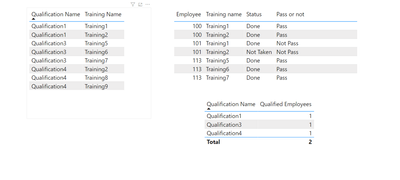
I have two tables as the screenshot below. I have created a measure that counts the qualified employees based on their training results.


pic.PNG


The measure to count the qualified employees


Qulaified Employees = CALCULATE(DISTINCTCOUNT(Table1[Employee]),FILTER(Table1,[Pass or not]="Pass"))


My issue is whenever there is a common training between 2 different qualifications, the measure doubles the counts of the qualified employees.


As you can see in the screenshot, I have no employee who is qualified for ( qualification4 ) though it's counting as one due to the common training between qualification1 and qualification4, I'm trying to make a measure which does this dynamically and not hard coded.

1 ACCEPTED SOLUTION
v-kelly-msft
Community Support
Community Support

Hi @Anonymous ,


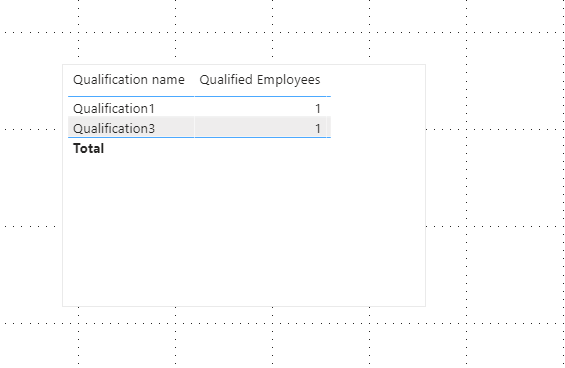
What Greg suggested works,here is the related .pbix file you can refer to .


Annotation 2020-04-06 122052.png


Best Regards,
Kelly
Did I answer your question? Mark my post as a solution!
 

View solution in original post

2 REPLIES 2
v-kelly-msft
Community Support
Community Support

Hi @Anonymous ,


What Greg suggested works,here is the related .pbix file you can refer to .


Annotation 2020-04-06 122052.png


Best Regards,
Kelly
Did I answer your question? Mark my post as a solution!
 
Greg_Deckler
Community Champion
Community Champion

Perhaps something like this:


Qualified Employees = 
  VAR __Table = FILTER('Table1',[Pass or not]="Pass")
  VAR __Trainings = SELECTCOLUMNS(__Table,"__Training",[Training name])
  VAR __Employees = SELECTCOLUMNS(__Table,"__Employees",[Employee])
  VAR __Qualifications = 
    ADDCOLUMNS(
      'Qualifications'
      "__In",IF('Qualifications'[Training Name] IN __Trainings,"Yes","No")
    )
RETURN
  IF(
    COUNTROWS(FILTER(__Qualifications,[__In] = "No"))>0,
    BLANK(),
    COUNTROWS(DISTINCT(__Employees))


Please see this post regarding How to Get Your Question Answered Quickly: https://community.powerbi.com/t5/Community-Blog/How-to-Get-Your-Question-Answered-Quickly/ba-p/38490


Follow on LinkedIn
@ me in replies or I'll lose your thread!!!
Instead of a Kudo, please vote for this idea
Become an expert!: Enterprise DNA
External Tools: MSHGQM
YouTube Channel!: Microsoft Hates Greg
Latest book!:
DAX For Humans

DAX is easy, CALCULATE makes DAX hard...

Helpful resources

Announcements
Power BI DataViz World Championships

Power BI Dataviz World Championships

The Power BI Data Visualization World Championships is back! Get ahead of the game and start preparing now!

December 2025 Power BI Update Carousel

Power BI Monthly Update - December 2025

Check out the December 2025 Power BI Holiday Recap!

FabCon Atlanta 2026 carousel

FabCon Atlanta 2026

Join us at FabCon Atlanta, March 16-20, for the ultimate Fabric, Power BI, AI and SQL community-led event. Save $200 with code FABCOMM.