cancel
Showing results for 
Search instead for 
Did you mean: 

Get Fabric Certified for FREE during Fabric Data Days. Don't miss your chance! Request now

Reply
rrafferty37
Helper I
Helper I

Count of resulting measures

Hello,


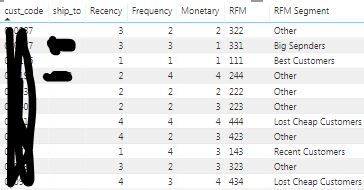
I have a table that has been filtered down and the resulting measures are as such:

RFM.JPG


The Recency, Frequency, and Monetary columns are all measures (RFM just concatenates them).  Based on the resulting RFM value, I have a lookup table to pull in the customer segment: Big spender, lost customer, loyal customer, etc.


As it's a measure, I am not sure how to have a new table that summarizes this intial table.  I want to have just the customer segment and the count of customers that fall into those categories so that I can have a new table/visualization of these results.  


Anyhelp would be greatly appreciated!

2 REPLIES 2
v-diye-msft
Community Support
Community Support

Hi @rrafferty37 


You might consider creating pbix file that will contain some sample data, upload the pbix to onedrive or dropbox and share the link to the file. Please do not forget to describe the expected results based on this sample data.


Community Support Team _ Dina Ye
If this post helps, then please consider Accept it as the solution to help the other members find it more
quickly.
rrafferty37
Helper I
Helper I

I can create new measures for each segment and count them, but this presents a problem of filtering between tables, as well as pulling in additional data based on segment (such as sales, order volume, etc.). Still working on this. 

Helpful resources

Announcements
November Power BI Update Carousel

Power BI Monthly Update - November 2025

Check out the November 2025 Power BI update to learn about new features.

Fabric Data Days Carousel

Fabric Data Days

Advance your Data & AI career with 50 days of live learning, contests, hands-on challenges, study groups & certifications and more!

FabCon Atlanta 2026 carousel

FabCon Atlanta 2026

Join us at FabCon Atlanta, March 16-20, for the ultimate Fabric, Power BI, AI and SQL community-led event. Save $200 with code FABCOMM.

Top Solution Authors
Top Kudoed Authors