Join us at FabCon Atlanta from March 16 - 20, 2026, for the ultimate Fabric, Power BI, AI and SQL community-led event. Save $200 with code FABCOMM.
Register now!The Power BI Data Visualization World Championships is back! Get ahead of the game and start preparing now! Learn more
Hi,
I want to calculate the count of not closed tickets for everyday.
I have created another table with the list of dates with below formula.
DateTable = CALENDAR(MINX(TT, TT[Opened At].[Date]),MAXX(TT,TT[Opened At].[Date]))
to have a comparision, but could not make it.
I am unable to find a way to count the non closed tickest with respect to a date in "DateTable" row item.
As show below, we wanted have not closed tickets, i.e open tickets as of a day.
Desired output as below.
Table: DateTable.
Date CountOfTicketsAsOfToday
16-05-2017 3
17-05-2017 8
18-05-2017 11
Table : TicketList
Ticket ID OpenDate TicketStatus Expected count Y33161599 16-05-2017 Closed Y33161690 16-05-2017 Open Y33161741 16-05-2017 Accepted Y33161758 16-05-2017 Closed Y33161765 16-05-2017 Accepted 3 Y33161781 17-05-2017 Open Y33161794 17-05-2017 Open Y33161797 17-05-2017 Open Y33161832 17-05-2017 Open Y33161861 17-05-2017 Work In Progress Y33161867 17-05-2017 Closed 8 Y33161906 17-05-2017 Open Y33161932 18-05-2017 Open Y33161943 18-05-2017 Open 11
Solved! Go to Solution.
Hi @snsrkrishna,
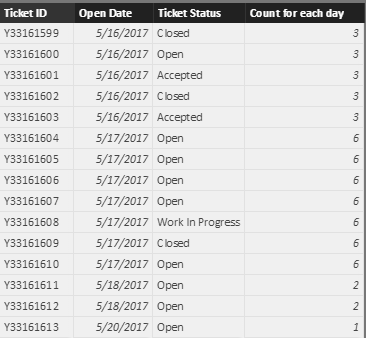
In ticket table, create a calculated column like below:
Count for each day =
CALCULATE (
COUNT ( 'TT'[Open Date] ),
FILTER ( ALLEXCEPT ( 'TT', 'TT'[Open Date] ), 'TT'[Ticket Status] <> "Closed" )
)
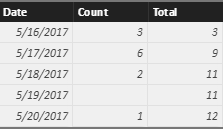
In date table, add two new columns which shows the count of open tickects for everyday.
Count =
LOOKUPVALUE ( 'TT'[Count for each day], 'TT'[Open Date], 'Date Table'[Date] )
Total =
CALCULATE (
SUM ( 'Date Table'[Count] ),
FILTER ( 'Date Table', 'Date Table'[Date] <= EARLIER ( 'Date Table'[Date] ) )
)
Best regards,
Yuliana Gu
Hi @snsrkrishna,
In ticket table, create a calculated column like below:
Count for each day =
CALCULATE (
COUNT ( 'TT'[Open Date] ),
FILTER ( ALLEXCEPT ( 'TT', 'TT'[Open Date] ), 'TT'[Ticket Status] <> "Closed" )
)
In date table, add two new columns which shows the count of open tickects for everyday.
Count =
LOOKUPVALUE ( 'TT'[Count for each day], 'TT'[Open Date], 'Date Table'[Date] )
Total =
CALCULATE (
SUM ( 'Date Table'[Count] ),
FILTER ( 'Date Table', 'Date Table'[Date] <= EARLIER ( 'Date Table'[Date] ) )
)
Best regards,
Yuliana Gu
Google/Bing for the term "DAX Events in Progress" and you should find some great resources on this problem.
Check out the November 2025 Power BI update to learn about new features.
Advance your Data & AI career with 50 days of live learning, contests, hands-on challenges, study groups & certifications and more!
| User | Count |
|---|---|
| 58 | |
| 45 | |
| 42 | |
| 21 | |
| 18 |