Join us at FabCon Atlanta from March 16 - 20, 2026, for the ultimate Fabric, Power BI, AI and SQL community-led event. Save $200 with code FABCOMM.
Register now!Get Fabric Certified for FREE during Fabric Data Days. Don't miss your chance! Request now
Hi all, I'am struggling with calculation so it takes into account a user filter (for example slicer) on source data.
Basically, I am trying to create a measure which represents first-click campaign attribution weight. In data language, it means to count campaigns which occured first per opportunity. The first is the campaign with highest number of days to conversion.
I have data like this:
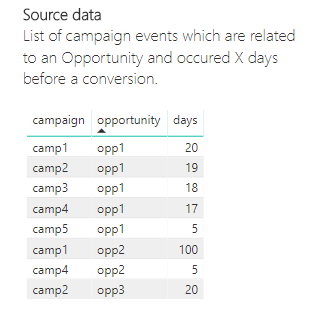
I have created following two measures and they work okay until user filters data 😕 . I'd like to have the source data filtered based on the slicers, not the results. I tried to replace ALL with ALLSELECTED and many more tweaks but it doesn't work.
See screenshot or attached Sample PBIX workbook, there are sample data and expected result.
Thanks for any help 🙂
Is first occurence of campaign per opportunity =
IF (
SUM ( attribution[days] )
= CALCULATE (
MAX ( attribution[days] ),
ALL ( attribution ),
VALUES ( attribution[opportunity] )
),
1,
0
)Count of first occurence of campaign per opportunity =
CALCULATE (
SUMX ( attribution, [Is first occurence of campaign per opportunity] )
)
Solved! Go to Solution.
Hi @Anonymous,
Please try out these two new measures.
Is first new =
VAR maxDays =
CALCULATE (
MAX ( attribution[days] ),
ALLSELECTED ( attribution[days] ),
ALL ( attribution[campaign] ),
ALLSELECTED ( attribution[campaign] )
)
RETURN
IF ( MAX ( attribution[days] ) = maxDays, 1, 0 )count new =
SUMX (
SUMMARIZE (
attribution,
attribution[opportunity],
"maxd", MAX ( attribution[days] )
),
[Is first new]
)
Best Regards,
Dale
Hi all, I'am struggling with calculation so it takes into account a user filter (for example slicer) on source data.
Basically, I am trying to create a measure which represents first-click campaign attribution weight. In data language, it means to count campaigns which occured first per opportunity. The first is the campaign with highest number of days to conversion.
I have data like this:
I have created following two measures and they work okay until user filters data 😕 . I'd like to have the source data filtered based on the slicers, not the results. I tried to replace ALL with ALLSELECTED and many more tweaks but it doesn't work.
See screenshot or attached Sample PBIX workbook, there are sample data and expected result.
Thanks for any help 
Is first occurence of campaign per opportunity =
IF (
SUM ( attribution[days] )
= CALCULATE (
MAX ( attribution[days] ),
ALL ( attribution ),
VALUES ( attribution[opportunity] )
),
1,
0
)Count of first occurence of campaign per opportunity =
CALCULATE (
SUMX ( attribution, [Is first occurence of campaign per opportunity] )
)
Hi @Anonymous,
Please try out these two new measures.
Is first new =
VAR maxDays =
CALCULATE (
MAX ( attribution[days] ),
ALLSELECTED ( attribution[days] ),
ALL ( attribution[campaign] ),
ALLSELECTED ( attribution[campaign] )
)
RETURN
IF ( MAX ( attribution[days] ) = maxDays, 1, 0 )count new =
SUMX (
SUMMARIZE (
attribution,
attribution[opportunity],
"maxd", MAX ( attribution[days] )
),
[Is first new]
)
Best Regards,
Dale
Supeeerb, thank you Dale @v-jiascu-msft, it is exactly what I needed, you are my hero 😉
It even works universaly when I add new columns and use them for filtering! So simple yet powerful.
Thanks again.
Michal
Check out the November 2025 Power BI update to learn about new features.
Advance your Data & AI career with 50 days of live learning, contests, hands-on challenges, study groups & certifications and more!