Get certified for free when you join Fabric Data Days 2026 and dive into Fabric, Power BI, SQL, AI, and other essential data skills.
Join nowData Days is here! Join us now for 60+ days of learning, challenges, and connection. Learn more
Hey!
I've got the following data:
| time | state |
| 2018-07-27 03:35:33.0000000 | 4 |
| 2018-07-27 03:35:35.0000000 | 4 |
| 2018-07-27 03:35:37.0000000 | 4 |
| 2018-07-27 03:35:39.0000000 | 4 |
| 2018-07-27 03:35:41.0000000 | 5 |
| 2018-07-27 03:35:43.0000000 | 5 |
| 2018-07-27 03:35:45.0000000 | 4 |
| 2018-07-27 03:35:47.0000000 | 4 |
| 2018-07-27 03:35:49.0000000 | 4 |
| 2018-07-27 03:35:51.0000000 | 6 |
| 2018-07-27 03:35:53.0000000 | 6 |
| 2018-07-27 03:35:55.0000000 | 6 |
| 2018-07-27 03:35:57.0000000 | 6 |
| 2018-07-27 03:35:59.0000000 | 4 |
| 2018-07-27 03:36:01.0000000 | 4 |
| 2018-07-27 03:36:03.0000000 | 6 |
| 2018-07-27 03:36:05.0000000 | 6 |
Now, i want to count how many times the state changes from 4 to 6. So the answer for this particular sample should be 2. NOTE: this has to be done with a measure, since I can not currently create calculated columns for my data set.
Is this at all possible? And if yes, how do I do this??
Thanks in advance!
Ralph
Solved! Go to Solution.
Hi @RalphO,
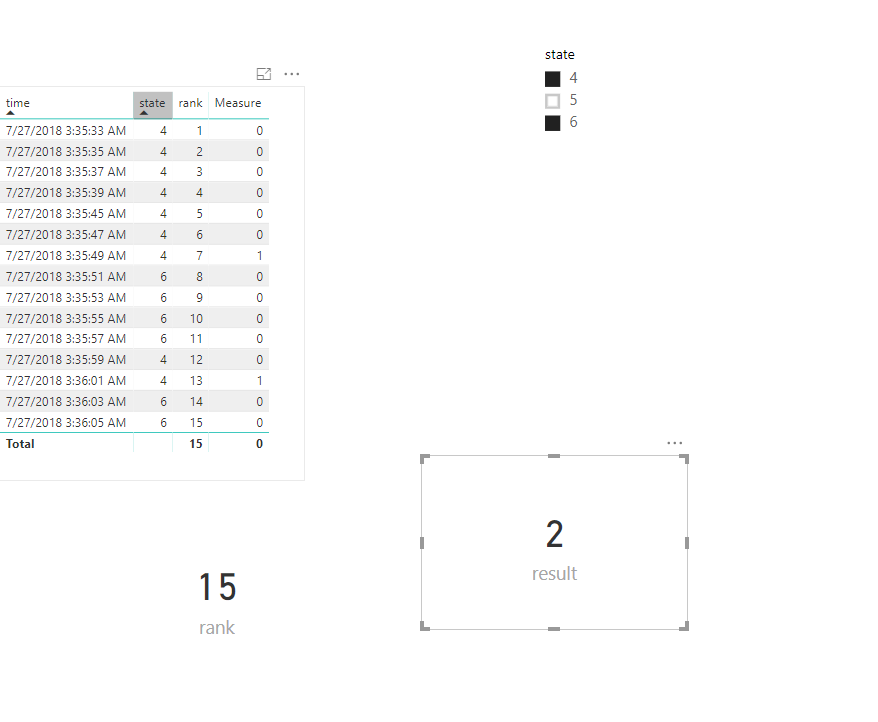
We can create the measures as below to achieve your goal.
rank = RANKX(ALLSELECTED(Table1),CALCULATE(MAX(Table1[time])),,ASC,Dense)
Measure = var pl = [rank]+1 var sta = MAX(Table1[state]) return IF(sta=4 && CALCULATE(MAX(Table1[state]),FILTER(ALLSELECTED(Table1),[rank]=pl))=6,1,0)
result = SUMX(Table1,[Measure])
For more details, please check the pbix as attached.
Regards,
Frank
Hi @RalphO,
We can create the measures as below to achieve your goal.
rank = RANKX(ALLSELECTED(Table1),CALCULATE(MAX(Table1[time])),,ASC,Dense)
Measure = var pl = [rank]+1 var sta = MAX(Table1[state]) return IF(sta=4 && CALCULATE(MAX(Table1[state]),FILTER(ALLSELECTED(Table1),[rank]=pl))=6,1,0)
result = SUMX(Table1,[Measure])
For more details, please check the pbix as attached.
Regards,
Frank
That works, thank you!
Don't miss out on Data Days, June 15 through August 7. Learn Fabric, Power BI, SQL, AI and more.
Check out the May 2026 Power BI update to learn about new features.
| User | Count |
|---|---|
| 23 | |
| 23 | |
| 21 | |
| 17 | |
| 13 |
| User | Count |
|---|---|
| 58 | |
| 50 | |
| 37 | |
| 29 | |
| 24 |