Join us at FabCon Atlanta from March 16 - 20, 2026, for the ultimate Fabric, Power BI, AI and SQL community-led event. Save $200 with code FABCOMM.
Register now!The Power BI Data Visualization World Championships is back! Get ahead of the game and start preparing now! Learn more
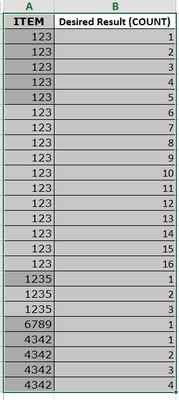
How can I do runining count/ Count occurrence in Power BI based on the item. I search in Power BI forum and I can't found anything similerly . Can you please advise.
Can you please advise both solution New calculated column and Measure
| ITEM | Desired Result (COUNT) |
| 123 | 1 |
| 123 | 2 |
| 123 | 3 |
| 123 | 4 |
| 123 | 5 |
| 123 | 6 |
| 123 | 7 |
| 123 | 8 |
| 123 | 9 |
| 123 | 10 |
| 123 | 11 |
| 123 | 12 |
| 123 | 13 |
| 123 | 14 |
| 123 | 15 |
| 123 | 16 |
| 1235 | 1 |
| 1235 | 2 |
| 1235 | 3 |
| 6789 | 1 |
| 4342 | 1 |
| 4342 | 2 |
| 4342 | 3 |
| 4342 | 4 |
Solved! Go to Solution.
I'm not sure how you'd do it using Dax but this is how I'd do it in Power Query
let
Source = Table.FromRows(Json.Document(Binary.Decompress(Binary.FromText("i45WMjQyVorVGVDaFAfDzNzCEswwMTYxwsuIBQA=", BinaryEncoding.Base64), Compression.Deflate)), let _t = ((type nullable text) meta [Serialized.Text = true]) in type table [Input = _t]),
#"Grouped Rows" = Table.Group(Source, {"Input"}, {{"Desired Result (COUNT)", each _, type table [Input=text]}}),
#"Add Index to tbl" = Table.TransformColumns( #"Grouped Rows", {{ "Desired Result (COUNT)", each Table.AddIndexColumn( _, "Index", 1, 1 ) , type table [Input=text, Index=number] }} ),
#"Expanded tbl" = Table.ExpandTableColumn(#"Add Index to tbl", "Desired Result (COUNT)", {"Index"}, {"Desired Result (COUNT)"})
in
#"Expanded tbl"
To solve it in Dax, you'd need an index column adding also -
Solved: [DAX] Running count of occurrence by category, res... - Microsoft Power BI Community
I'm not sure how you'd do it using Dax but this is how I'd do it in Power Query
let
Source = Table.FromRows(Json.Document(Binary.Decompress(Binary.FromText("i45WMjQyVorVGVDaFAfDzNzCEswwMTYxwsuIBQA=", BinaryEncoding.Base64), Compression.Deflate)), let _t = ((type nullable text) meta [Serialized.Text = true]) in type table [Input = _t]),
#"Grouped Rows" = Table.Group(Source, {"Input"}, {{"Desired Result (COUNT)", each _, type table [Input=text]}}),
#"Add Index to tbl" = Table.TransformColumns( #"Grouped Rows", {{ "Desired Result (COUNT)", each Table.AddIndexColumn( _, "Index", 1, 1 ) , type table [Input=text, Index=number] }} ),
#"Expanded tbl" = Table.ExpandTableColumn(#"Add Index to tbl", "Desired Result (COUNT)", {"Index"}, {"Desired Result (COUNT)"})
in
#"Expanded tbl"
To solve it in Dax, you'd need an index column adding also -
Solved: [DAX] Running count of occurrence by category, res... - Microsoft Power BI Community
Hi,
Thanks for your reply and solution and relevant article. The item column came from another dax so I can't use it the query option because the item column won't be there in power query.
Can you please advise how can I generate index column by using DAX _New calculate column so I will try tp apply solution based on the link you provided.
If you're trying to generate it in Dax, it depends on what other columns you have that you can reference because the Item column alone won't be enough. If you can use power query, it's a click of a button.
Thanks for your reply and advice.
The Power BI Data Visualization World Championships is back! Get ahead of the game and start preparing now!
| User | Count |
|---|---|
| 41 | |
| 38 | |
| 36 | |
| 31 | |
| 28 |
| User | Count |
|---|---|
| 128 | |
| 88 | |
| 79 | |
| 68 | |
| 63 |