Join us at FabCon Atlanta from March 16 - 20, 2026, for the ultimate Fabric, Power BI, AI and SQL community-led event. Save $200 with code FABCOMM.
Register now!The Power BI Data Visualization World Championships is back! Get ahead of the game and start preparing now! Learn more
Hello
I'm relatively new in PowerBI - DAX
I have one doubt,
I want to create a measure that show in every "Date" in my Table "Date Time" the number of employees.
To do that I have,
one table with
| Code | Entry Time | FiredTime | Ending Contract |
| 001 | 01-01-2010 | 02-05-2010 | |
| 002 | 01-04-2010 | 01-09-2012 | |
| 003 | 01-05-2010 |
and a table time with all the dates.
the result I would like is
| Date | Number employes |
| 01-01-2010 | 1 |
| ... | 1 |
| 01-04-2010 | 2 |
| ... | 2 |
| 01-05-2010 | 3 |
| 02-05-2010 | 2 |
Thank you
Solved! Go to Solution.
@Anonymous , refer if the blog on a similar topic can help
Hi @Anonymous ,
You can try this measure:
Result =
VAR _date =
SELECTEDVALUE ( 'Date Time'[Date] )
VAR tab =
SUMMARIZE (
ALL ( 'Table' ),
'Table'[Code],
'Table'[Entry Time],
'Table'[Fired Time],
'Table'[Ending Contract],
"flag", IF (
NOT ( ISBLANK ( [Fired Time] ) ),
IF ( ( _date >= [Entry Time] && _date < [Fired Time] ), 1, 0 ),
IF (
NOT ( ISBLANK ( [Ending Contract] ) ),
IF ( _date >= [Entry Time] && _date < [Ending Contract], 1, 0 ),
IF ( _date >= [Entry Time], 1, 0 )
)
)
)
RETURN
SUMX ( FILTER ( tab, [flag] = 1 && NOT ( ISBLANK ( [Code] ) ) ), [flag] )
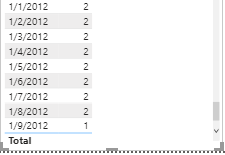
The result may your expected:
Attached my sample file that hopes to help you: Count number of employees.pbix
Best Regards,
Yingjie Li
If this post helps then please consider Accept it as the solution to help the other members find it more quickly.
@Anonymous , refer if the blog on a similar topic can help
The Power BI Data Visualization World Championships is back! Get ahead of the game and start preparing now!
| User | Count |
|---|---|
| 41 | |
| 38 | |
| 36 | |
| 30 | |
| 28 |
| User | Count |
|---|---|
| 128 | |
| 88 | |
| 79 | |
| 67 | |
| 62 |