cancel
Showing results for 
Search instead for 
Did you mean: 

The Power BI Data Visualization World Championships is back! Get ahead of the game and start preparing now! Learn more

Reply
LonnekedeLeeuw
Frequent Visitor

Count Measure category in Donut Chart


Hello,


I have a measure that calculates a yield percentage. I also have a measure that determine the %category (<80%, 80-85% ect).

I mannaged to make a column chart with a colours for each category by creating a measure for every category.


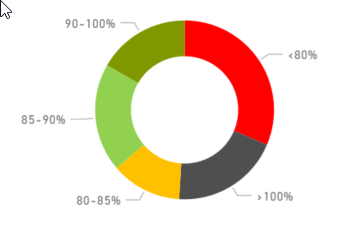
But I also want to show the numbre of object for each category (preferably in a donut chart).

Like this:

2017-05-02 16_36_38-.png

This chart has to change depending on the period that is selected on the page.


I have tried some methodes but I can't seem te get the same results as the column chart (with the example above the column chart shows a lot of grey en red and no dark green).


Has anyone an idea how to solve this? 
If more information is needed to help, please let me know.


Thanks in advance!


3 REPLIES 3
Greg_Deckler
Community Champion
Community Champion

Sample data and measure calculations to recreate please.


Follow on LinkedIn
@ me in replies or I'll lose your thread!!!
Instead of a Kudo, please vote for this idea
Become an expert!: Enterprise DNA
External Tools: MSHGQM
YouTube Channel!: Microsoft Hates Greg
Latest book!:
DAX For Humans

DAX is easy, CALCULATE makes DAX hard...

I don't know a easy way to supply sample data.


I have 3 tables;

1: Object information;     Id, address, gas_ID, heat_ID

2: RegisterID;     gas_ID / heat_ID, address, type (gas or heat) (there is a relationship with Object info based on address)

3: Usage;     Date, gas_ID / heat_ID, usage; also a couple of calculated columns to seperate the gas and heat usage

Table 3 has a relationship with table 2 based on gas_ID/heat_ID


In the table 3 I have the following measures:

YieldPercentage = IFERROR( (sum(heat usages)/sum(gas usage));0)

PercentageCategory = if(or(ISBLANK([YieldPercentage]);[Rendement%]=0);"Blank";     if([YieldPercentage]<0,80;"<80%";   if([YieldPercentage]<0,85;"80-85%";     if([YieldPercentage]<0,9;"85-90%";      if([YieldPercentage]<1;"90-100%";">100%")))))


For the column chart I have the following measures:

<80% = IFERROR(if([YieldPercentage]<0,8;[YieldPercentage];0);0)

80-85% = IFERROR(if(and([YieldPercentage]<0,85;[YieldPercentage]>0,8);[YieldPercentage];0);0)

85-90% = IFERROR(if(and([YieldPercentage]<0,9;[YieldPercentage]>0,85);[YieldPercentage];0);0)

90-100% = IFERROR(if(and([YieldPercentage]<1;[YieldPercentage]>0,9);[YieldPercentage];0);0)

>100% = IFERROR(if([YieldPercentage]>1;[YieldPercentage];0);0)


I made a measure for every category so I could determine the colours of the bars.


Please let me know how I can give better/more informatie without showing actual customer data

Hi @LonnekedeLeeuw,

You can copy your data here, or you can supply data using file as attachments.

Best Regards,
Angelia

Helpful resources

Announcements
Power BI DataViz World Championships

Power BI Dataviz World Championships

The Power BI Data Visualization World Championships is back! Get ahead of the game and start preparing now!

December 2025 Power BI Update Carousel

Power BI Monthly Update - December 2025

Check out the December 2025 Power BI Holiday Recap!

FabCon Atlanta 2026 carousel

FabCon Atlanta 2026

Join us at FabCon Atlanta, March 16-20, for the ultimate Fabric, Power BI, AI and SQL community-led event. Save $200 with code FABCOMM.