This time we’re going bigger than ever. Fabric, Power BI, SQL, AI and more. We're covering it all. You won't want to miss it.
Learn moreDid you hear? There's a new SQL AI Developer certification (DP-800). Start preparing now and be one of the first to get certified. Register now
I have employee number from Sharepoint list and Name and Employee number from a excel. How can I show a report with Name and number of tasks raised by each person by correlating both the data sources?
Please supply sample data and expected output.
@mussaenda wrote:Please supply sample data and expected output.
I have employee number for example 12345 from Sharepoint online list and Employee name and Employee ID in another excel file (On same sheet, adjacent coloumn), Now I want to take out names correlating Employee number. Does it give clarity?
No. Please refer here.
Thank you
Based on my understanding from your explanation,
employee ID and employee number are the same?
if yes then create a relationship between two tables and use the employee number and put the employee name from your excel table.
Yes, you are right Employee number and ID are same. But I doesnt know how to create relationship to show Employee Name in reporting
Below data from a excel sheet
| Sl.No | GPN No | Name |
| 1 | TR101 | XXXX |
| 2 | TR101 | YYY |
| 3 | TR101 | ZZZZ |
| 4 | TR101 | AAA |
| 5 | TR101 | III |
| 6 | TR101 | BBB |
| 7 | TR101 | CCC |
| 8 | TR101 | DDD |
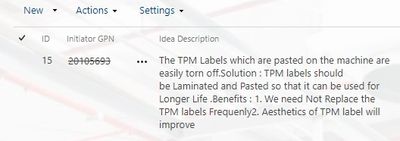
Below image from Sharepoint online list (Empoyee ID = GPN number)
Image from sharepoint list, where Employee ID (GPN number) alone available
How do i correlate these data to show names in reports?
from your given data, what is your expected result?
elaborate more because I do not see any connection between the two data you provided.
I want to take out names against GPN number.... I want to build a report on howmany task raised or completed by each employee with names and not with Number as it will be difficult to recognise names with numbers
Check out the April 2026 Power BI update to learn about new features.
If you have recently started exploring Fabric, we'd love to hear how it's going. Your feedback can help with product improvements.
| User | Count |
|---|---|
| 37 | |
| 37 | |
| 31 | |
| 21 | |
| 16 |
| User | Count |
|---|---|
| 66 | |
| 56 | |
| 31 | |
| 26 | |
| 23 |