Join us at FabCon Atlanta from March 16 - 20, 2026, for the ultimate Fabric, Power BI, AI and SQL community-led event. Save $200 with code FABCOMM.
Register now!The Power BI Data Visualization World Championships is back! Get ahead of the game and start preparing now! Learn more
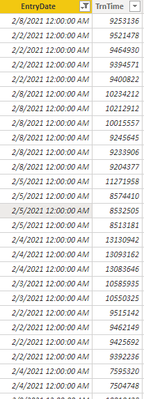
Can someone help me conver this data to a time?
I need the TrnTime to be in HH:MM:SS:MS
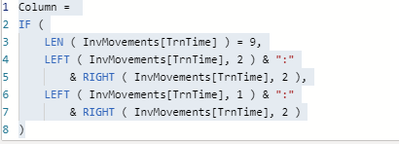
I tried to modify this but I'm not having much luck.
Solved! Go to Solution.
HI @bsharp ,
You can try this
HHMMSS =
INT(Table[TimeSpent] / 3600) & ":" &
RIGHT("0" & INT((Table[TimeSpent] - INT(Table[TimeSpent] / 3600) * 3600) / 60), 2) & ":" &
RIGHT("0" & MOD(Table[TimeSpent], 3600), 2)
You can also have a look at this article
https://gist.github.com/jongio/5b8dcf13ab957cecfec3932a42db0e58
https://community.powerbi.com/t5/Quick-Measures-Gallery/Milliseconds-Duration/m-p/406698
Regards,
Harsh Nathani
Did I answer your question? Mark my post as a solution! Appreciate with a Kudos!! (Click the Thumbs Up Button)
Use Column From Example in Power Query and give few examples like 9:10:11:12 and 11:12:10:09 to get the resulte and then change the data type
Proud to be a Super User!
HI @bsharp ,
You can try this
HHMMSS =
INT(Table[TimeSpent] / 3600) & ":" &
RIGHT("0" & INT((Table[TimeSpent] - INT(Table[TimeSpent] / 3600) * 3600) / 60), 2) & ":" &
RIGHT("0" & MOD(Table[TimeSpent], 3600), 2)
You can also have a look at this article
https://gist.github.com/jongio/5b8dcf13ab957cecfec3932a42db0e58
https://community.powerbi.com/t5/Quick-Measures-Gallery/Milliseconds-Duration/m-p/406698
Regards,
Harsh Nathani
Did I answer your question? Mark my post as a solution! Appreciate with a Kudos!! (Click the Thumbs Up Button)
The Power BI Data Visualization World Championships is back! Get ahead of the game and start preparing now!
| User | Count |
|---|---|
| 41 | |
| 38 | |
| 36 | |
| 31 | |
| 28 |
| User | Count |
|---|---|
| 129 | |
| 88 | |
| 79 | |
| 68 | |
| 63 |