Get Fabric or SQL Certified for Free.
Get certified for free when you join Fabric Data Days 2026 and dive into Fabric, Power BI, SQL, AI, and other essential data skills.
Join now- Power BI forums
- Get Help with Power BI
- Desktop
- Service
- Report Server
- Power Query
- Mobile Apps
- Developer
- DAX Commands and Tips
- Custom Visuals Development Discussion
- Health and Life Sciences
- Power BI Spanish forums
- Translated Spanish Desktop
- Training and Consulting
- Instructor Led Training
- Dashboard in a Day for Women, by Women
- Galleries
- Data Stories Gallery
- Themes Gallery
- Contests Gallery
- QuickViz Gallery
- Quick Measures Gallery
- Visual Calculations Gallery
- Notebook Gallery
- Translytical Task Flow Gallery
- TMDL Gallery
- R Script Showcase
- Webinars and Video Gallery
- Ideas
- Custom Visuals Ideas (read-only)
- Issues
- Issues
- Events
- Upcoming Events
Data Days is here! Join us now for 60+ days of learning, challenges, and connection. Learn more
- Power BI forums
- Forums
- Get Help with Power BI
- Desktop
- Converting a table to javascript array of objects
- Subscribe to RSS Feed
- Mark Topic as New
- Mark Topic as Read
- Float this Topic for Current User
- Bookmark
- Subscribe
- Printer Friendly Page


- Mark as New
- Bookmark
- Subscribe
- Mute
- Subscribe to RSS Feed
- Permalink
- Report Inappropriate Content
Converting a table to javascript array of objects
I am trying to convert a table
let
    Source = Table.FromRows(Json.Document(Binary.Decompress(Binary.FromText("Jc65DQAxCETRXog34PTgWiz338ZiCJ8YpH8OCX0kni50v0NaUveFlpWQrtby0mKVUZQSGrNc70/C54aWYZS9tDXapWBDtoTfdEN8+GqUBVMjLwfMseneHw==", BinaryEncoding.Base64), Compression.Deflate)), let _t = ((type nullable text) meta [Serialized.Text = true]) in type table [Month = _t, Value = _t])
in
Source
| Month | Value |
|-------|-------|
| 1 | 14841 |
| 2 | 24467 |
| 3 | 78423 |
| 4 | 60213 |
| 5 | 87257 |
| 6 | 21543 |
| 7 | 21373 |
| 8 | 87363 |
| 9 | 50378 |
| 10 | 29714 |
| 11 | 20171 |
| 12 | 70059 |into a javascript array of objects
const tbl = [{
    "Month": 1,
    "Value": 14841
}, {
    "Month": 2,
    "Value": 24467
}, {
    "Month": 3,
    "Value": 78423
}, {
    "Month": 4,
    "Value": 60213
}, {
    "Month": 5,
    "Value": 87257
}, {
    "Month": 6,
    "Value": 21543
}, {
    "Month": 7,
    "Value": 21373
}, {
    "Month": 8,
    "Value": 87363
}, {
    "Month": 9,
    "Value": 50378
}, {
    "Month": 10,
    "Value": 29714
}, {
    "Month": 11,
    "Value": 20171
}, {
    "Month": 12,
    "Value": 70059
}]
I came across this brilliant code which does what I need, but once loaded, the data comes out as the following, which is of no use to me
"[{""Month"":1,""Value"":14841},{""Month"":2,""Value"":24467},{""Month"":3,""Value"":78423},{""Month"":4,""Value"":60213},{""Month"":5,""Value"":87257},{""Month"":6,""Value"":21543},{""Month"":7,""Value"":21373},{""Month"":8,""Value"":87363},{""Month"":9,""Value"":50378},{""Month"":10,""Value"":29714},{""Month"":11,""Value"":20171},{""Month"":12,""Value"":70059}]"

However, when I take it from the PQ console, it comes out correct.

How can I have the resulting table loaded as to my desired output? I would be running this on big data and I can't go back to PQ console after every run to copy from the console. I want to avoid doing that.
Thank you in advance.
The full code
let
    Source = Table.FromRows(Json.Document(Binary.Decompress(Binary.FromText("Jc65DQAxCETRXog34PTgWiz338ZiCJ8YpH8OCX0kni50v0NaUveFlpWQrtby0mKVUZQSGrNc70/C54aWYZS9tDXapWBDtoTfdEN8+GqUBVMjLwfMseneHw==", BinaryEncoding.Base64), Compression.Deflate)), let _t = ((type nullable text) meta [Serialized.Text = true]) in type table [Month = _t, Value = _t]),
    #"Changed Type" = Table.TransformColumnTypes(Source,{{"Month", Int64.Type}, {"Value", Int64.Type}}),
    Custom1 = Json.FromValue(#"Changed Type"),
    Custom2 = Text.FromBinary(Custom1)
in
    Custom2
and the pbix is attached
========================
Did I answer your question? Mark my post as a solution!
Proud to be a Super User
My Custom Visualization Projects
• Plotting Live Sound: Live Sound
• Beautiful News: Women in Parliament, Energy Mix, Shrinking Armies
• Visual Capitalist: Working Hrs
• Others: Easing Graph, Animated Calendar
MayViz Submissions
• Week 1: View
• Week 2: View
• Week 3: View
• Week 4: View
========================
Solved! Go to Solution.


- Mark as New
- Bookmark
- Subscribe
- Mute
- Subscribe to RSS Feed
- Permalink
- Report Inappropriate Content
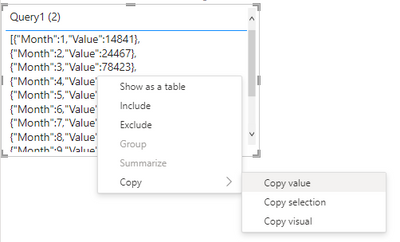
Try putting the value into a table visual then copying it from there.

Did my post answer your question(s)? Mark my post as a solution. This will help others find the solution.
Proud to be a Super User!
- Mark as New
- Bookmark
- Subscribe
- Mute
- Subscribe to RSS Feed
- Permalink
- Report Inappropriate Content
Thanks. I am not doing CTRL+C on the PQ console.
I am doing this
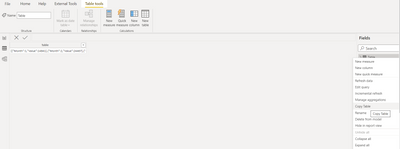
and pasting in chrome DEV tools, which comes out like this and it is not what I want.

Is it possible that it gets loaded to the correct js array of object format so that, I don't have to take any extra steps?
========================
Did I answer your question? Mark my post as a solution!
Proud to be a Super User
My Custom Visualization Projects
• Plotting Live Sound: Live Sound
• Beautiful News: Women in Parliament, Energy Mix, Shrinking Armies
• Visual Capitalist: Working Hrs
• Others: Easing Graph, Animated Calendar
MayViz Submissions
• Week 1: View
• Week 2: View
• Week 3: View
• Week 4: View
========================


- Mark as New
- Bookmark
- Subscribe
- Mute
- Subscribe to RSS Feed
- Permalink
- Report Inappropriate Content
If you paste this in a text based editor, then this is bound to happen for strings containing quotes.
To avoid this, you will have to first paste in non text based editor like Word and then copy from Word and then paste into a Chrome editor. If you take right click in Word / Wordpad and paste as text, then additional quotes will appear again.
But above workaround is an additional step which you don't want. I did try to experiment with Chrome Dev tool to see if some setting or any other trick can bypass this. But I was not successful as core of Chrome Dev tool looks to be text only.
Let's see if somebody can find a way to bypass this in Chrome dev tool.
- Mark as New
- Bookmark
- Subscribe
- Mute
- Subscribe to RSS Feed
- Permalink
- Report Inappropriate Content
Try putting the value into a table visual then copying it from there.
Did my post answer your question(s)? Mark my post as a solution. This will help others find the solution.
Proud to be a Super User!
- Mark as New
- Bookmark
- Subscribe
- Mute
- Subscribe to RSS Feed
- Permalink
- Report Inappropriate Content
Anyone coming back to this thread in future, just so you know, @Watsky 's method works but only for a small dataset. For large tables, only partial values get loaded into DAX tables as DAX has limitations for datatype `string`. The only safe way to make it to work is to take the values from PQ Console once it gets transferred to JSON.
========================
Did I answer your question? Mark my post as a solution!
Proud to be a Super User
My Custom Visualization Projects
• Plotting Live Sound: Live Sound
• Beautiful News: Women in Parliament, Energy Mix, Shrinking Armies
• Visual Capitalist: Working Hrs
• Others: Easing Graph, Animated Calendar
MayViz Submissions
• Week 1: View
• Week 2: View
• Week 3: View
• Week 4: View
========================
- Mark as New
- Bookmark
- Subscribe
- Mute
- Subscribe to RSS Feed
- Permalink
- Report Inappropriate Content
Your table is containing correct value and should not be a cause of concern as right values are contained in PQ console.
Looks like you are doing CTRL+C in PQ table directly and then copying in some text editor which introduces additional quotes because the string contains quotes. If you copy the same in Word or Excel, you will see that string is copied the way it should be.

Helpful resources

Fabric Data Days 2026
Don't miss out on Data Days, June 15 through August 7. Learn Fabric, Power BI, SQL, AI and more.

Power BI Monthly Update - May 2026
Check out the May 2026 Power BI update to learn about new features.

Power BI DataViz World Championships - June 2026
A new Power BI DataViz World Championship is coming this June! Don't miss out on submitting your entry.

| User | Count |
|---|---|
| 23 | |
| 23 | |
| 20 | |
| 18 | |
| 14 |


| User | Count |
|---|---|
| 58 | |
| 53 | |
| 42 | |
| 30 | |
| 24 |


