FabCon is coming to Atlanta
Join us at FabCon Atlanta from March 16 - 20, 2026, for the ultimate Fabric, Power BI, AI and SQL community-led event. Save $200 with code FABCOMM.
Register now!- Power BI forums
- Get Help with Power BI
- Desktop
- Service
- Report Server
- Power Query
- Mobile Apps
- Developer
- DAX Commands and Tips
- Custom Visuals Development Discussion
- Health and Life Sciences
- Power BI Spanish forums
- Translated Spanish Desktop
- Training and Consulting
- Instructor Led Training
- Dashboard in a Day for Women, by Women
- Galleries
- Data Stories Gallery
- Themes Gallery
- Contests Gallery
- QuickViz Gallery
- Quick Measures Gallery
- Visual Calculations Gallery
- Notebook Gallery
- Translytical Task Flow Gallery
- TMDL Gallery
- R Script Showcase
- Webinars and Video Gallery
- Ideas
- Custom Visuals Ideas (read-only)
- Issues
- Issues
- Events
- Upcoming Events
The Power BI Data Visualization World Championships is back! Get ahead of the game and start preparing now! Learn more
- Power BI forums
- Forums
- Get Help with Power BI
- Desktop
- Convert multiple column values to rows
- Subscribe to RSS Feed
- Mark Topic as New
- Mark Topic as Read
- Float this Topic for Current User
- Bookmark
- Subscribe
- Printer Friendly Page


- Mark as New
- Bookmark
- Subscribe
- Mute
- Subscribe to RSS Feed
- Permalink
- Report Inappropriate Content
Convert multiple column values to rows
I have 4 columns are Type, Id, Area & result and those 4 columns return multiple values. I would like to group the Type, Id and Area into one table.
Currently I am using multiple matrix table to achieve my desired result but it's painful so I would like to see all of them in one matrix visual table instead of multiple matrix visual tables.
I found similar query here but it was power query solution but I am looking DAX solution.
https://community.powerbi.com/t5/Desktop/Multiple-Rows-into-Multiple-Columns/m-p/543527
Any suggestion and advise please
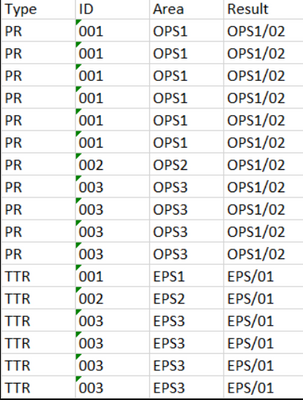
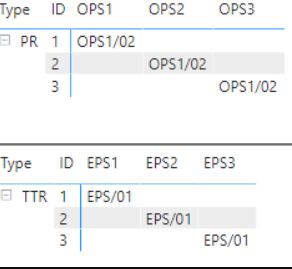
Desired Result
I would like to achieve my desired result in one matrix table

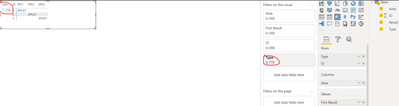
Solved! Go to Solution.


- Mark as New
- Bookmark
- Subscribe
- Mute
- Subscribe to RSS Feed
- Permalink
- Report Inappropriate Content
Well... I created a new calculated column:
Area# = "Area" & RIGHT ( Data[Area], 1 )
and placed it in the column field in the matrix visual.
Then created a new measure and added it to the matrix values:
MyValues =
IF (
    ISINSCOPE ( Data[ID] ),
    VALUES ( Data[Result] ),
    VALUES ( Data[Area] )
)
In the Matrix Row I added both the Type and ID.
In Power BI file options, I disabled the use of modern visual headers.
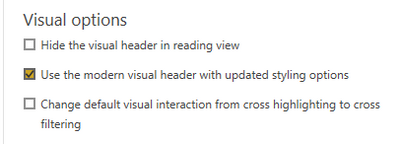
And in the matrix visual format, I adjusted the subtotals as follows:
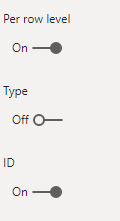
and made the column headers white (same as background to make them invisible).
Please check this sample file.
- Mark as New
- Bookmark
- Subscribe
- Mute
- Subscribe to RSS Feed
- Permalink
- Report Inappropriate Content
Hi @Saxon10 , can you share an example of the desired output? You can just draft the values in Excel sheet.
- Mark as New
- Bookmark
- Subscribe
- Mute
- Subscribe to RSS Feed
- Permalink
- Report Inappropriate Content
Thanks for your reply.
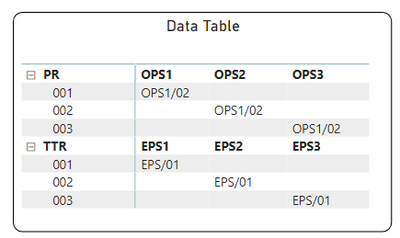
In Excel, Based on my raw data I used two pivot tables and fillter by PR and TTR.
- Mark as New
- Bookmark
- Subscribe
- Mute
- Subscribe to RSS Feed
- Permalink
- Report Inappropriate Content
- Mark as New
- Bookmark
- Subscribe
- Mute
- Subscribe to RSS Feed
- Permalink
- Report Inappropriate Content
Thanks for your reply again.
Yes.This is I want. Can you please advise how do you get the final result? its manual or did you make any formula or measure?
Could you please share the PBI file and I will try to replicate the same thing at my end.
- Mark as New
- Bookmark
- Subscribe
- Mute
- Subscribe to RSS Feed
- Permalink
- Report Inappropriate Content
Well... I created a new calculated column:
Area# = "Area" & RIGHT ( Data[Area], 1 )
and placed it in the column field in the matrix visual.
Then created a new measure and added it to the matrix values:
MyValues =
IF (
    ISINSCOPE ( Data[ID] ),
    VALUES ( Data[Result] ),
    VALUES ( Data[Area] )
)
In the Matrix Row I added both the Type and ID.
In Power BI file options, I disabled the use of modern visual headers.
And in the matrix visual format, I adjusted the subtotals as follows:
and made the column headers white (same as background to make them invisible).
Please check this sample file.
- Mark as New
- Bookmark
- Subscribe
- Mute
- Subscribe to RSS Feed
- Permalink
- Report Inappropriate Content
Hi. Thanks you again and this is brilliant solution. You provide new solutions for more than one layer of column headers in matrix visual.
Can you please advise one more thing here, if I changed the settings based on the your advice it don't affect exiting visual reports?
- Mark as New
- Bookmark
- Subscribe
- Mute
- Subscribe to RSS Feed
- Permalink
- Report Inappropriate Content
It is independent from other visuals as we calculated a custom value specifically for this visual (MyValues measure)
#update: disabling modern visual headers will affect all your visuals.
- Mark as New
- Bookmark
- Subscribe
- Mute
- Subscribe to RSS Feed
- Permalink
- Report Inappropriate Content
Thank you so much for your help. Much appreciated. I will check and update the feedback to you.
- Mark as New
- Bookmark
- Subscribe
- Mute
- Subscribe to RSS Feed
- Permalink
- Report Inappropriate Content
Did it work? or needs some optimization?
- Mark as New
- Bookmark
- Subscribe
- Mute
- Subscribe to RSS Feed
- Permalink
- Report Inappropriate Content
Most welcome... Good luck
- Mark as New
- Bookmark
- Subscribe
- Mute
- Subscribe to RSS Feed
- Permalink
- Report Inappropriate Content
I am not aware of any possibility to have more than one layer of column headers in matrix or table visuals (OPS1/OPS2/OPS2 and EPS1/EPS2/EPS3).

Helpful resources

Power BI Dataviz World Championships
The Power BI Data Visualization World Championships is back! Get ahead of the game and start preparing now!

Power BI Monthly Update - December 2025
Check out the December 2025 Power BI Holiday Recap!

FabCon Atlanta 2026
Join us at FabCon Atlanta, March 16-20, for the ultimate Fabric, Power BI, AI and SQL community-led event. Save $200 with code FABCOMM.


| User | Count |
|---|---|
| 158 | |
| 132 | |
| 116 | |
| 79 | |
| 54 |


