- Power BI forums
- Get Help with Power BI
- Desktop
- Service
- Report Server
- Power Query
- Mobile Apps
- Developer
- DAX Commands and Tips
- Custom Visuals Development Discussion
- Health and Life Sciences
- Power BI Spanish forums
- Translated Spanish Desktop
- Training and Consulting
- Instructor Led Training
- Dashboard in a Day for Women, by Women
- Galleries
- Data Stories Gallery
- Themes Gallery
- Contests Gallery
- QuickViz Gallery
- Quick Measures Gallery
- Visual Calculations Gallery
- Notebook Gallery
- Translytical Task Flow Gallery
- TMDL Gallery
- R Script Showcase
- Webinars and Video Gallery
- Ideas
- Custom Visuals Ideas (read-only)
- Issues
- Issues
- Events
- Upcoming Events
Learn from the best! Meet the four finalists headed to the FINALS of the Power BI Dataviz World Championships! Register now
- Power BI forums
- Forums
- Get Help with Power BI
- Desktop
- Convert data from HTML into plain text in a table-...
- Subscribe to RSS Feed
- Mark Topic as New
- Mark Topic as Read
- Float this Topic for Current User
- Bookmark
- Subscribe
- Printer Friendly Page


- Mark as New
- Bookmark
- Subscribe
- Mute
- Subscribe to RSS Feed
- Permalink
- Report Inappropriate Content
Convert data from HTML into plain text in a table- Data from SQL table
I am bringing field from a SQL table- Azure that is saved in rich text format. When thos field is brought into a table visual, it is not presented in simple text format. I tried several workaround I searched, but nothing worked. Any solution to this?
e.g. <p>next milestone due Nov 12</p>
I want it to be shown:
next milestone due Nov 12

- Mark as New
- Bookmark
- Subscribe
- Mute
- Subscribe to RSS Feed
- Permalink
- Report Inappropriate Content
Hi @Fair-UL ,
I think to replace tags not a simple way to handle this scenario, it means you need to configure a dictionary table with all HTML tags and use it in replace functions. (in addition, it also hard to find out specific text from replaced text value)
In my opinion, I'd like to you can try to add a custom column with HTML connector(Html.Table) to receive these string that contains HTML elements and extract specific characters from the result table.
Removing HTML Tags From Text In Power Query/Power BI
Regards,
XIaoxni Sheng
- Mark as New
- Bookmark
- Subscribe
- Mute
- Subscribe to RSS Feed
- Permalink
- Report Inappropriate Content
Thank you for your response. I have seen this solution but I had difficulty implementing it.
let source= "[detail_text]",
removetags= Html.Table(source, {{"text", ":root"}}),
GetText= removetags [text] {0}
in
GetText
this is what I used in custom column, but its returning the text [detail_text] in all fields.
detail_field is the column header of the column that contains html text coming from the database
the address of server is (xxxhub-prod.database.windows.net), and the database is xxx
not sure how to implement this code you advised to use
- Mark as New
- Bookmark
- Subscribe
- Mute
- Subscribe to RSS Feed
- Permalink
- Report Inappropriate Content
You can replace <p> and </p> with blank space in Query Editor using Replace Values transformation.
- Mark as New
- Bookmark
- Subscribe
- Mute
- Subscribe to RSS Feed
- Permalink
- Report Inappropriate Content
I started with this approach, but there were too many of them. the html library is huge to be cleaned using replace function.
there is so many <li>, </li>, <p>, </p>, </ol>, etc
but thanks for the idea. might help other readers.
- Mark as New
- Bookmark
- Subscribe
- Mute
- Subscribe to RSS Feed
- Permalink
- Report Inappropriate Content
Hi @Fair-UL ,
In fact, it requires you to typing the 'column selector' parameter in HTML.table to extract specific element values.
I create a table with 'index' and 'html' strings, I add a custom column store 'h1' element that extracts from 'body' element, below is the query table formula and snapshot of the result:
let
    Source = #table({"Index","HTML"},
    {
        {1,"<!DOCTYPE html><html><body><h1>A Heading</h1><p>A paragraph</p></body></html>"},
        {2,"<!DOCTYPE html><html><body><h1>B Heading</h1><p>B paragraph</p></body></html>"},
        {3,"<!DOCTYPE html><html><body><h1>C Heading</h1><p>C paragraph</p></body></html>"}
    }),
    #"Added Custom" = Table.AddColumn(Source, "H1", each Html.Table([HTML],{{"body","h1"}})[body]{0})
in
    #"Added Custom"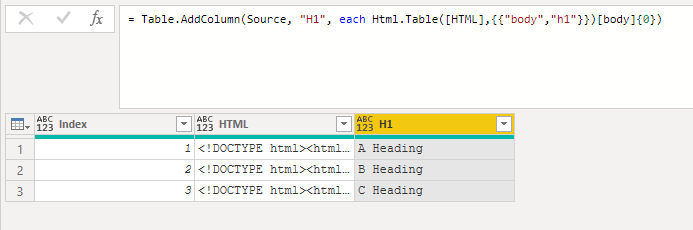
Reference links:
Web Scraping with Html.Table in Power Query
New Web Scraping experience in Power BI / Power Query (Using CSS Selectors)
Expressions, values, and let expression
If you still confused about extract specific elements, you can also share some sample data and expected result for test. (do mask on sensitive data before share)
Regards,
Xiaoxin Sheng
- Mark as New
- Bookmark
- Subscribe
- Mute
- Subscribe to RSS Feed
- Permalink
- Report Inappropriate Content
Hi,
Thank you for your illustration, however, it is still confusing to me.
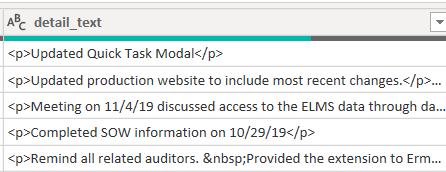
The field that I have is a free text field and users input string in and I am pulling this field into a table in power BI.
The way it looks in power BI depends on any spaces, enter, numbering the users have used while inputting their text
can include any of the html tags in between text
- Mark as New
- Bookmark
- Subscribe
- Mute
- Subscribe to RSS Feed
- Permalink
- Report Inappropriate Content
HI @Fair-UL ,
If your text contains randomly HTML tag, maybe you can try to use the following custom function to remove all characters that package with '<>'.
Recursive custom function:
let
    RemoveTag = (input as text) as text =>
    let
        length = Text.Length(input),
        position = Text.PositionOf(input, "<"),
        positionEnd = Text.PositionOf(input, ">"),
        range = positionEnd-position+1,
        replaced = if position >= 0 then Text.ReplaceRange(input, position, range, "") else input,
        result= if Text.Contains(replaced,"<") then RemoveTag(replaced) else replaced
    in
        result
in
    RemoveTag
Usage:
let
    Source = RemoveTag("<!DOCTYPE html><html><body><h1>A Heading</h1><p>A paragraph</p></body></html>")
in
    Source
Reference link:
Robust function to remove HTML tags
If above not help, can you please share some sample data as table format for test?
Regards,
Xiaoxin Sheng


- Mark as New
- Bookmark
- Subscribe
- Mute
- Subscribe to RSS Feed
- Permalink
- Report Inappropriate Content
test
- Mark as New
- Bookmark
- Subscribe
- Mute
- Subscribe to RSS Feed
- Permalink
- Report Inappropriate Content
Hi Xiaoxin,
Can you please provide some help with this sample data. The data has random html tags that not only include <xxx> but also tags like  
| Column_Text |
| <p>Updated Quick Task Model</p> |
| <p>need to update some missing trainings </p> |
| <p>initial response due Nov 11</p> |
| <p>in process</p> |
| <p>video in process, plan to launch Nov 14</p> |
- Mark as New
- Bookmark
- Subscribe
- Mute
- Subscribe to RSS Feed
- Permalink
- Report Inappropriate Content
HI @Fair-UL ,
Maybe you can refer to v-yuezhe-msft 's suggestion to do these conversions on SQL side then load the converted data to power bi:
I have a column in DQ that is stored in HTML format
Regards,
Xiaoxin Sheng
Helpful resources

Join our Fabric User Panel
Share feedback directly with Fabric product managers, participate in targeted research studies and influence the Fabric roadmap.

Power BI Community Update - March 2026
Check out the March 2026 Power BI update to learn about new features.

| User | Count |
|---|---|
| 54 | |
| 37 | |
| 27 | |
| 18 | |
| 16 |


| User | Count |
|---|---|
| 69 | |
| 57 | |
| 38 | |
| 21 | |
| 21 |


