FabCon is coming to Atlanta
Join us at FabCon Atlanta from March 16 - 20, 2026, for the ultimate Fabric, Power BI, AI and SQL community-led event. Save $200 with code FABCOMM.
Register now!- Power BI forums
- Get Help with Power BI
- Desktop
- Service
- Report Server
- Power Query
- Mobile Apps
- Developer
- DAX Commands and Tips
- Custom Visuals Development Discussion
- Health and Life Sciences
- Power BI Spanish forums
- Translated Spanish Desktop
- Training and Consulting
- Instructor Led Training
- Dashboard in a Day for Women, by Women
- Galleries
- Data Stories Gallery
- Themes Gallery
- Contests Gallery
- QuickViz Gallery
- Quick Measures Gallery
- Visual Calculations Gallery
- Notebook Gallery
- Translytical Task Flow Gallery
- TMDL Gallery
- R Script Showcase
- Webinars and Video Gallery
- Ideas
- Custom Visuals Ideas (read-only)
- Issues
- Issues
- Events
- Upcoming Events
The Power BI Data Visualization World Championships is back! Get ahead of the game and start preparing now! Learn more
- Power BI forums
- Forums
- Get Help with Power BI
- Desktop
- Control Charting-ALLSELECTED
- Subscribe to RSS Feed
- Mark Topic as New
- Mark Topic as Read
- Float this Topic for Current User
- Bookmark
- Subscribe
- Printer Friendly Page


- Mark as New
- Bookmark
- Subscribe
- Mute
- Subscribe to RSS Feed
- Permalink
- Report Inappropriate Content
Control Charting-ALLSELECTED
Hello All,
I've previosuly created control charts using a dataset with only the data needed. I am now trying to use the same measures to create the control charts where the data needed is only a subset.
I am using 4 measures, the two below and one to make the upper and lower limits.
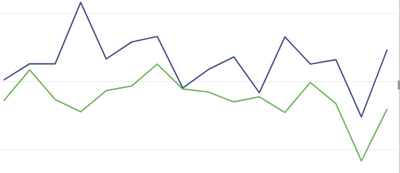
With ALLSELECTED
Solved! Go to Solution.
- Mark as New
- Bookmark
- Subscribe
- Mute
- Subscribe to RSS Feed
- Permalink
- Report Inappropriate Content
I was finally able to get this to work.
I used AllSELECTED as I described initially. What I had to do to make it work however was to duplicate my source table and filter it to be only the needed information. In this case the sample IDs.

- Mark as New
- Bookmark
- Subscribe
- Mute
- Subscribe to RSS Feed
- Permalink
- Report Inappropriate Content
Hi @PBI_Rookie ,
Has your problem been solved? If it has been solved, please accept the correct reply as the standard answer to help the other members find it more quickly.Thank you very much for your kind cooperation!
Community Support Team _ Caitlyn Yan
If this post helps then please consider Accept it as the solution to help the other members find it more quickly.


- Mark as New
- Bookmark
- Subscribe
- Mute
- Subscribe to RSS Feed
- Permalink
- Report Inappropriate Content
Hi! Try changing ALLSELECTED() to KEEPFILTERS(Identifier I want to sort by]).
- Mark as New
- Bookmark
- Subscribe
- Mute
- Subscribe to RSS Feed
- Permalink
- Report Inappropriate Content
Hi,
Ok I tried replacing the ALLSLECTED in both measures with KEEPFILTERS. I get an error that "Cannot convert value (identifier) of type TEXT to type True/False"
- Mark as New
- Bookmark
- Subscribe
- Mute
- Subscribe to RSS Feed
- Permalink
- Report Inappropriate Content
😮 Well that is certainly an unusual error message...
Can you provide some sample data to play with?
- Mark as New
- Bookmark
- Subscribe
- Mute
- Subscribe to RSS Feed
- Permalink
- Report Inappropriate Content
Playing with KeepFilters a bit I can see why it is giving me that error. If I alter it a bit i.e. KeepFilters(Column="") i will not get the error. Unfortunately it also does not solve the initial issue.
- Mark as New
- Bookmark
- Subscribe
- Mute
- Subscribe to RSS Feed
- Permalink
- Report Inappropriate Content
I think I was a little off...try KEEPFILTERS() with whatever is on the X axis
- Mark as New
- Bookmark
- Subscribe
- Mute
- Subscribe to RSS Feed
- Permalink
- Report Inappropriate Content
I was finally able to get this to work.
I used AllSELECTED as I described initially. What I had to do to make it work however was to duplicate my source table and filter it to be only the needed information. In this case the sample IDs.

- Mark as New
- Bookmark
- Subscribe
- Mute
- Subscribe to RSS Feed
- Permalink
- Report Inappropriate Content
Could you please describe more of your solution.
Is dublicate source related to original table?
Do you use new table's ID on x-axle?
How do you filter new ID-table? Can you still use slicers?
I have similar case with control charts.
In my case there is quality data from different machines in the same table. On control chart I want to show only selected machine on selected timerange. I use slicer for that as I don't want to create 20 dublicate tables for each machine.
Evertyhing works fine until I add a measure that includes ALLSELECTED. See below.

Next I want to add AVG line, but this happens:

AVG-line is calculated correctly (includes only rows I have selected) but x-axle is still showing all the rows that should be filtered off.
DAX for AVG-line is: CALCULATE( [AVG_RH%], ALLSELECTED(Inspections[Id]))
Visual is filtered by using slicer, that actually filters 'machines' table. 'Machines' table is related to 'Inspections' table. Slicer filters linevalues on visual but x-axle values stay.
Helpful resources

Power BI Dataviz World Championships
The Power BI Data Visualization World Championships is back! Get ahead of the game and start preparing now!

Power BI Monthly Update - December 2025
Check out the December 2025 Power BI Holiday Recap!

FabCon Atlanta 2026
Join us at FabCon Atlanta, March 16-20, for the ultimate Fabric, Power BI, AI and SQL community-led event. Save $200 with code FABCOMM.

| User | Count |
|---|---|
| 37 | |
| 37 | |
| 33 | |
| 32 | |
| 29 |


| User | Count |
|---|---|
| 132 | |
| 88 | |
| 82 | |
| 68 | |
| 64 |


