cancel
Showing results for 
Search instead for 
Did you mean: 

The Power BI Data Visualization World Championships is back! Get ahead of the game and start preparing now! Learn more

Reply
Anonymous
Not applicable

Context Issue

Hi,


I am having an issue with the context transition issue which breaks my measures. I have the following measures and it works fine

but when I use "Year" in the slicer, it breaks. Would highly appreciate correction of the measures and any further guidance. Thanks


Applications =   CALCULATE ( DISTINCTCOUNT(Transactions[Transaction ID]) )

ProgPerSchool =    CALCULATE (  
                  DISTINCTCOUNT ( 'Dim Programs'[Program Code] ),
                  ALLEXCEPT('Dim Programs', Dim Programs'[School Name]),
				  Dim Programs'[Transaction_Count]>0  )

AppPerSchool =  CALCULATE ( [Applications], ALLEXCEPT ('Dim Programs','Dim Programs'[School Name]))

AppAverageSchl = DIVIDE([AppPerSchool],[ProgPerSchool],99999)

ProgAboveAvg= 
COUNTX (
    FILTER (
        SUMMARIZE (
            ALL ( 'Dim Programs'[Program Name] );
            'Dim Programs'[Program Name];
            "ApplicationCount"; [Applications]
        );
        [ApplicationCount] > [AppAverageSchool] )
    );
    [ApplicationCount])

program image1.PNG


1 ACCEPTED SOLUTION
v-eachen-msft
Community Support
Community Support

Hi @Anonymous ,


I downloaded your file. After my test, I think you should replace "[AppAverageSch]" with "[AppAverageSchl]" in your two measures: "ProgAboveAvg" and "ProgBelowAvg".

ProgBelowAvg =
COUNTX (
    FILTER (
        SUMMARIZE (
            'Dim Programs',
            'Dim Programs'[Program ID],
            'Dim Programs'[Program Name],
            "AppCt", COUNT ( Transactions[Transaction ID] )
        ),
        [AppCt] < [AppAverageSchl]
    ),
    [AppCt]
)
ProgAboveAvg =
COUNTX (
    FILTER (
        SUMMARIZE (
            'Dim Programs',
            'Dim Programs'[Program ID],
            'Dim Programs'[Program Name],
            "AppCt", COUNT ( Transactions[Transaction ID] )
        ),
        [AppCt] >= [AppAverageSchl]
    ),
    [AppCt]
)

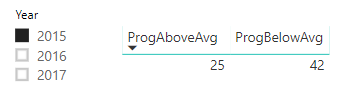
Here is the result.
5-1.PNG


Community Support Team _ Eads
If this post helps, then please consider Accept it as the solution to help the other members find it.

View solution in original post

4 REPLIES 4
v-eachen-msft
Community Support
Community Support

Hi @Anonymous ,


I downloaded your file. After my test, I think you should replace "[AppAverageSch]" with "[AppAverageSchl]" in your two measures: "ProgAboveAvg" and "ProgBelowAvg".

ProgBelowAvg =
COUNTX (
    FILTER (
        SUMMARIZE (
            'Dim Programs',
            'Dim Programs'[Program ID],
            'Dim Programs'[Program Name],
            "AppCt", COUNT ( Transactions[Transaction ID] )
        ),
        [AppCt] < [AppAverageSchl]
    ),
    [AppCt]
)
ProgAboveAvg =
COUNTX (
    FILTER (
        SUMMARIZE (
            'Dim Programs',
            'Dim Programs'[Program ID],
            'Dim Programs'[Program Name],
            "AppCt", COUNT ( Transactions[Transaction ID] )
        ),
        [AppCt] >= [AppAverageSchl]
    ),
    [AppCt]
)

Here is the result.
5-1.PNG


Community Support Team _ Eads
If this post helps, then please consider Accept it as the solution to help the other members find it.
Anonymous
Not applicable

Hi @v-eachen-msft ,


Thanks a lot, it works well, it just made my day!

AlB
Community Champion
Community Champion

Hi @Anonymous 

Can you share the actual data model? i.e. the tables involved and their relationships... and all the fields/slicers that are being used in the visuals, since they will affect the result. If you can share the pbix (of a simplified version that reproduces the problem ) even better. What do you exactly mean the measure "breaks"? What is the expected result?  

Anonymous
Not applicable

Hi @AlB 


Please find the pbix file here


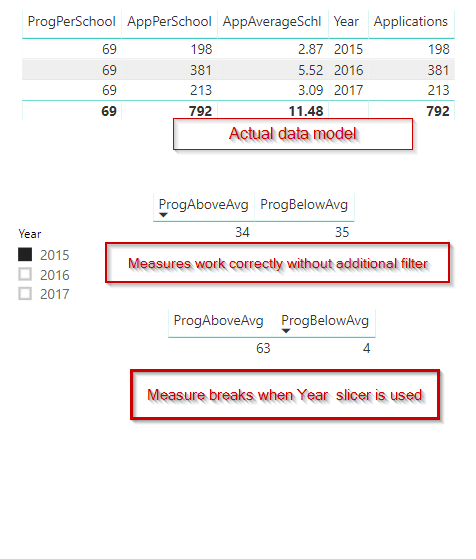
The dataset has around 157 distinct programs and only 69 of them are having applications and my distinct count measure calculates only these 69 programs.  The school received 792 applications during the entire duration which yields an average of 11.48 application per program. Both the measures as well as when the filter is applied manually on applications for programs with > and < to 11.48 give the correct result of  34 and 35 programs respectively.


In 2015, School received 198 applications for the distinct 69 programs which yield an average of 2.87 application per program. When I apply a filter on programs where applications are greater or equal to 2.87, it filters 69 programs to 25 programs with applications more than average of school application with a sub-total of 118. Similarly, programs with less than 2.87 applications are filtered to 42 programs with application less than average of school application with a sub-total of 80. (118+80 =198).   However, the measures give an incorrect result of 63 and 4.


Thanks for your time and support.


Helpful resources

Announcements
Power BI DataViz World Championships

Power BI Dataviz World Championships

The Power BI Data Visualization World Championships is back! Get ahead of the game and start preparing now!

December 2025 Power BI Update Carousel

Power BI Monthly Update - December 2025

Check out the December 2025 Power BI Holiday Recap!

FabCon Atlanta 2026 carousel

FabCon Atlanta 2026

Join us at FabCon Atlanta, March 16-20, for the ultimate Fabric, Power BI, AI and SQL community-led event. Save $200 with code FABCOMM.

Top Solution Authors