cancel
Showing results for 
Search instead for 
Did you mean: 

Get Fabric Certified for FREE during Fabric Data Days. Don't miss your chance! Request now

Reply
saranyasaran
Regular Visitor

Connectivity between Filters

i am creating a filter which will be linked to another filter. Eg : i created 2 filters say Country and Region. so if i click on Country filter, the region filter should change accordingly based on the country filter selection. How is this possible in Power BI desktop? Any idea?

2 ACCEPTED SOLUTIONS
MFelix
Super User
Super User

Hi  @saranyasaran,


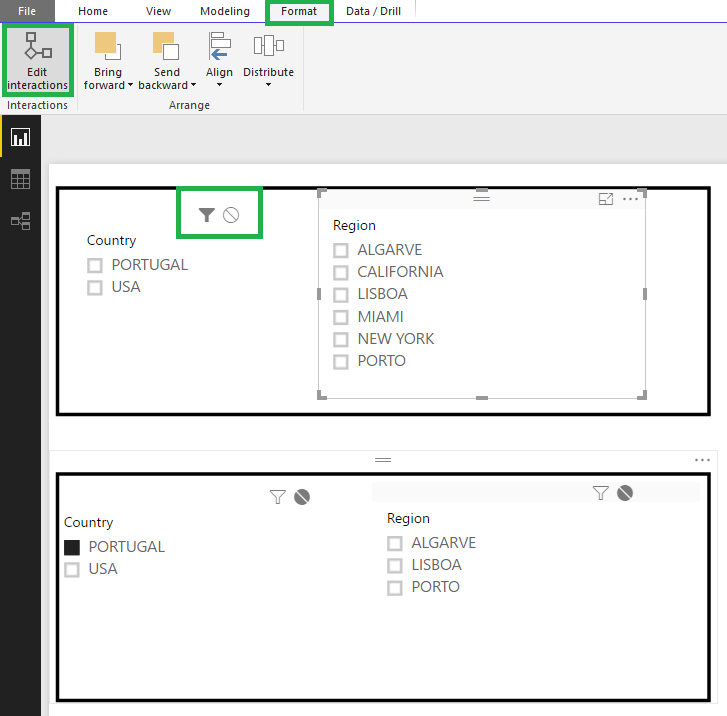
I suppose you have a single table with country / region when you add the filters/slicers to your report they are interacting with each other if you want them to act individually you need to change the option in the Edit Interactions:


Slicers.png


I have place this in slicers but the same thing happens in the filters on the visual/page/report level, however if you don't have a connection between the two columns first of all you need to add a relationship or make a table with a link between the two columns you want to use as a connect filters and then use the solution above.


Regards,

MFelix


Regards

Miguel Félix


Did I answer your question? Mark my post as a solution!

Proud to be a Super User!

Check out my blog: Power BI em Português


View solution in original post

saranyasaran
Regular Visitor

i am creating a filter which will be linked to another filter.

Eg : i created 2 filters say Country and Region. so if i click on Country filter, the region filter should change accordingly based on the country filter selection. How is this possible in Power BI desktop? Any idea?

View solution in original post

2 REPLIES 2
MFelix
Super User
Super User

Hi  @saranyasaran,


I suppose you have a single table with country / region when you add the filters/slicers to your report they are interacting with each other if you want them to act individually you need to change the option in the Edit Interactions:


Slicers.png


I have place this in slicers but the same thing happens in the filters on the visual/page/report level, however if you don't have a connection between the two columns first of all you need to add a relationship or make a table with a link between the two columns you want to use as a connect filters and then use the solution above.


Regards,

MFelix


Regards

Miguel Félix


Did I answer your question? Mark my post as a solution!

Proud to be a Super User!

Check out my blog: Power BI em Português


saranyasaran
Regular Visitor

i am creating a filter which will be linked to another filter.

Eg : i created 2 filters say Country and Region. so if i click on Country filter, the region filter should change accordingly based on the country filter selection. How is this possible in Power BI desktop? Any idea?

Helpful resources

Announcements
November Power BI Update Carousel

Power BI Monthly Update - November 2025

Check out the November 2025 Power BI update to learn about new features.

Fabric Data Days Carousel

Fabric Data Days

Advance your Data & AI career with 50 days of live learning, contests, hands-on challenges, study groups & certifications and more!

FabCon Atlanta 2026 carousel

FabCon Atlanta 2026

Join us at FabCon Atlanta, March 16-20, for the ultimate Fabric, Power BI, AI and SQL community-led event. Save $200 with code FABCOMM.

Top Solution Authors
Top Kudoed Authors