cancel
Showing results for 
Search instead for 
Did you mean: 

Get Fabric Certified for FREE during Fabric Data Days. Don't miss your chance! Request now

Reply
vijay27
New Member

Connect Oracle Database

Hi, 


I am connected to the Oracle database, and trying to extract some information from the DB. 


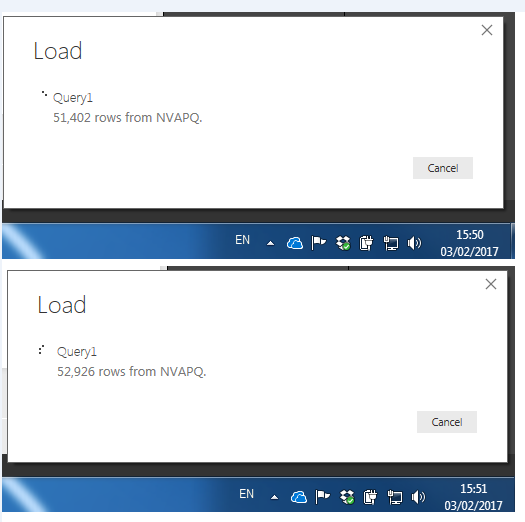
The SQL developer returns the rows in 2 hours, about 17 million rows, however Power BI took me 6 days to load the same rows.


This is the Power BI speed, can someone comment on why it is this slow, 


Image below with timestamp, 500 rows / minute , at this speed it will take more than 2 weeks.

Rate.png


5 REPLIES 5
ayup
Helper I
Helper I

Hi there


Did you manage to overcome the problem in retrieving data from an Oracle DB?


I am experiencing very similar issues concerning the query of data from Oracle, although with significantly fewer records involved.  When fetching rows via SQL Developer, I can output the result set from my query (approx 68k rows) in less than a minute.  However, in Power BI, this takes more than half an hour due to the small number of records (<20) that are fetched at a time.

Hi there


I have imported data before from Oracle and importing a few million rows took a few minutes.


So I would suggest making sure that the version of the Oracle Client that you have installed on your PC matches the same version of your Oracle installation?


Did I answer your question? Mark my post as a solution!

Proud to be a Super User!


Power BI Blog

v-haibl-msft
Microsoft Employee
Microsoft Employee

@vijay27


Have you tried to use Direct Query instead of Import mode? We recommend using Direct Query if the dataset is very large.


Best Regards,

Herbert

HI Herbert, 


Two things here, 


- I have tried the direct query as well, but no impact, it still takes 4-5 days to load 17mln rows (I am evaluating options to connect Oracle to Azure DL and use Power BI with Azure, instead of direct with Oracle


- Also, if direct query qorks, that does not solve our problem since we have a 200+ users who will use the dashboard, and 95% of them do not have pro access, they only need read only.


Thoughts 


Thanks,

Vijay

@vijay27


Have you tried to install PBI Desktop in the same machine where your Oracle database locates? Not sure if the network performance may affect the loading time.


Best Regards,

Herbert

Helpful resources

Announcements
November Power BI Update Carousel

Power BI Monthly Update - November 2025

Check out the November 2025 Power BI update to learn about new features.

Fabric Data Days Carousel

Fabric Data Days

Advance your Data & AI career with 50 days of live learning, contests, hands-on challenges, study groups & certifications and more!

FabCon Atlanta 2026 carousel

FabCon Atlanta 2026

Join us at FabCon Atlanta, March 16-20, for the ultimate Fabric, Power BI, AI and SQL community-led event. Save $200 with code FABCOMM.

Top Solution Authors
Top Kudoed Authors