cancel
Showing results for 
Search instead for 
Did you mean: 

Get Fabric Certified for FREE during Fabric Data Days. Don't miss your chance! Request now

Reply
Chanleakna123
Post Prodigy
Post Prodigy

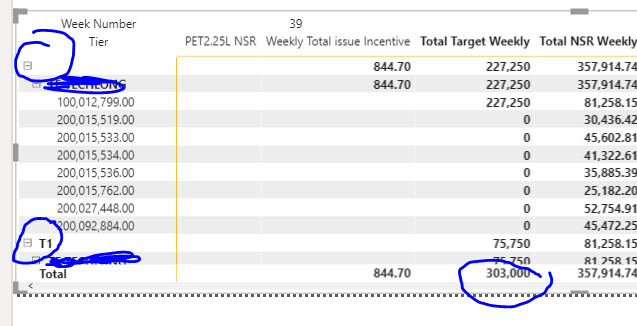
Condtion with Total Row in each Customer ( Group Customers ) Apply to 1 Tier

Hi , i have Group Customer Name , Means some customer has 10 Outlets , and some has only 1 , 

and i would like to create a condition , with Tottal Target NSR , i am using metric visualization 

i am using below measure , but it seems not work , even i change to Column , it's also not right. the result turns out wrong dramatically. 

 
Tier. = IF('Target Weekly Stability'[Total Target Weekly]>=70000,"T1",IF('Target Weekly Stability'[Total Target Weekly]>=16000,"T2",IF('Target Weekly Stability'[Total Target Weekly]>=3000,"T3")))


Capture2.PNG

3 REPLIES 3
Fowmy
Super User
Super User

@Chanleakna123 

Can you try this measure:

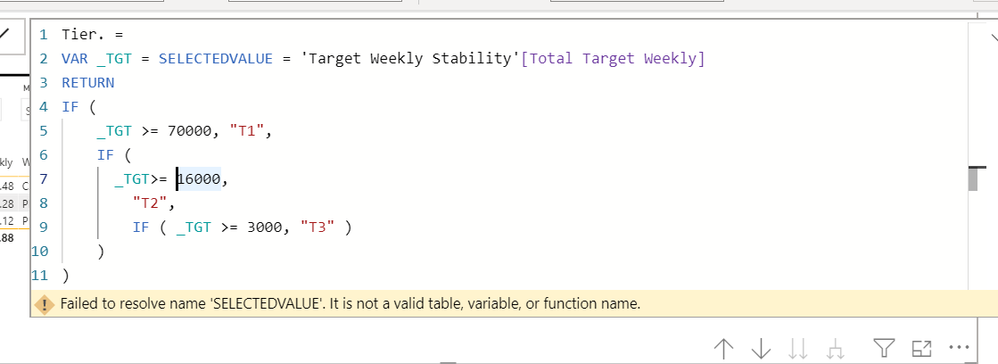
Tier. =

VAR _TGT = SELECTEDVALUE = 'Target Weekly Stability'[Total Target Weekly] RETURN
IF (
    _TGT >= 70000, "T1",
    IF (
      _TGT>= 16000,
        "T2",
        IF ( _TGT >= 3000, "T3" )
    )
)


________________________

If my answer was helpful, please consider Accept it as the solution to help the other members find it

Click on the Thumbs-Up icon if you like this reply 🙂

YouTube  LinkedIn

Did I answer your question? Mark my post as a solution! and hit thumbs up


Subscribe and learn Power BI from these videos

Website LinkedIn PBI User Group

hi , it doesn't work @Fowmy 


Capture1.PNG

Hi @Chanleakna123 ,


Measure cannot be added to matrix visual as row.

The calculated column cannot contain measure, which will result in incorrect calculation.

The calculated column is calculated statically while the measure is calculated dynamically.DAX measure are based on row context so any given value from slicers, filters, interactions with other visualizations, variables, relationships and so on can influence your result.

Maybe you could consider changing [total target weekly] to a calculated column, and then creating a calculated column based on [total target weekly] to add it to row of matrix.


Best Regards,
Liang
If this post helps, then please consider Accept it as the solution to help the other members find it more quickly.

Helpful resources

Announcements
November Power BI Update Carousel

Power BI Monthly Update - November 2025

Check out the November 2025 Power BI update to learn about new features.

Fabric Data Days Carousel

Fabric Data Days

Advance your Data & AI career with 50 days of live learning, contests, hands-on challenges, study groups & certifications and more!

FabCon Atlanta 2026 carousel

FabCon Atlanta 2026

Join us at FabCon Atlanta, March 16-20, for the ultimate Fabric, Power BI, AI and SQL community-led event. Save $200 with code FABCOMM.

Top Solution Authors
Top Kudoed Authors