cancel
Showing results for 
Search instead for 
Did you mean: 

Try your skills in the Power BI Dataviz World Championship! Round one ends June 26. Join now

Reply
Anonymous
Not applicable

Conditionally Format a Visual Table by referencing multiple columns names within a Table?

Hello everyone, 


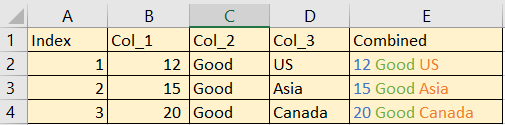
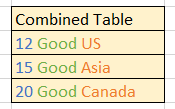
Any ideas how to format a table column through dax to obtain column E by referencing columns 1, 2, & 3? My search has lead to conditionally format the values within the table. Or more specifically, just format the colors of colume E in a visual table?


This seems to be done by evaluating the values from only Col_1 or formatting via specific words like "car", "bus", "train" like Col_3, but this doesn't seem like applicable solution in this case where the desired formatted column consist of 3 columns indivudal columns combined. 


Examples found conditionally formatting a column:

https://community.powerbi.com/t5/Desktop/Conditional-formatting-multiple-values-in-a-single-column/t...


Power BI Conditional Formatting By Another Column - YouTube

https://www.youtube.com/watch?v=BbuikATa3ow


Example 1.PNG


Desired Table Visualization Result:

Combined Table.PNG


1 ACCEPTED SOLUTION
v-yingjl
Community Support
Community Support

Hi @Anonymous ,

As far as I know, currently conditional format is applied for the whole field in the column, not for part of fields so it is not supported in power bi desktop by using dax and conditional format.


Perhaps you can submit the requirement to ideas and add your comments there to make this feature coming sooner: https://ideas.powerbi.com/forums/265200-power-bi-ideas

It is a place for customers provide feedback about Microsoft Office products . What’s more, if a feedback is high voted there by other customers, it will be promising that Microsoft Product Team will take it into consideration when designing the next version in the future.


Best Regards,
Community Support Team _ Yingjie Li
If this post helps, then please consider Accept it as the solution to help the other members find it more quickly.

View solution in original post

3 REPLIES 3
v-yingjl
Community Support
Community Support

Hi @Anonymous ,

As far as I know, currently conditional format is applied for the whole field in the column, not for part of fields so it is not supported in power bi desktop by using dax and conditional format.


Perhaps you can submit the requirement to ideas and add your comments there to make this feature coming sooner: https://ideas.powerbi.com/forums/265200-power-bi-ideas

It is a place for customers provide feedback about Microsoft Office products . What’s more, if a feedback is high voted there by other customers, it will be promising that Microsoft Product Team will take it into consideration when designing the next version in the future.


Best Regards,
Community Support Team _ Yingjie Li
If this post helps, then please consider Accept it as the solution to help the other members find it more quickly.
mahoneypat
Microsoft Employee
Microsoft Employee

You could do it with svg and an image url measure/column but it may not be worth it.

SVG in Power BI - Part 4 - Adding Text - Hat Full of Data %


Regards,

Pat


Did I answer your question? Mark my post as a solution! Kudos are also appreciated!

To learn more about Power BI, follow me on Twitter or subscribe on YouTube.


@mahoneypa HoosierBI on YouTube


CNENFRNL
Community Champion
Community Champion

Hi, @Anonymous , conditionally format applies to the whole field; you can't color a field partially so far.

BTW VBA does the trick, with Range.Characters() attribute.


Thanks to the great efforts by MS engineers to simplify syntax of DAX! Most beginners are SUCCESSFULLY MISLED to think that they could easily master DAX; but it turns out that the intricacy of the most frequently used RANKX() is still way beyond their comprehension!

DAX is simple, but NOT EASY!

Helpful resources

Announcements
Fabric Data Days is here Carousel

Data Days 2026

Don't miss out on Data Days, June 15 through August 7. Learn Fabric, Power BI, SQL, AI and more.

Power BI DataViz World Championships carousel

Power BI DataViz World Championships - June 2026

A new Power BI DataViz World Championship is coming this June! Don't miss out on submitting your entry.