
cancel
Showing results for 
Search instead for 
Did you mean: 

July 7 - July 17 | Round 2 of the Power BI Dataviz World Championships. Don't miss your chance! Learn more

Reply
SelvakumaranM
Frequent Visitor

Conditional values in calculated column

Hi Experts,


I have create a calcualted column like below

city group = SWITCH(
TRUE(),
SELECTEDVALUE(Orders[City - Copy]) in {"Columbus","San Francisco"},"Columbus/san",
SELECTEDVALUE(Orders[City - Copy]) in {"New York City","Clinton"},"New/Clinton",
SELECTEDVALUE(Orders[City - Copy]) in {"Texas","Dublin"},"Tex/Dub",
SELECTEDVALUE(Orders[City - Copy]) in {"Washington","Oregon"},"wash/oregon",
"NA")

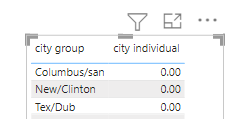
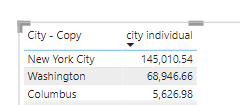
i need to take values from sales column for Dublin, Washington, Columbus and New York City only . when i create an IF condition and put in table, it shows zero values for all . Pls clarify

SelvakumaranM_0-1644679566648.png

SelvakumaranM_1-1644679660703.png


2 REPLIES 2
v-janeyg-msft
Community Support
Community Support

Hi, @SelvakumaranM 


First, calculated columns usually don't need to use SELECTEDVALUE(), you can directly use the column name to represent the value of the current row, just like @parry2k  wrote. Is your problem solved?


i need to take values from sales column for Dublin, Washington, Columbus and New York City only . when i create an IF condition and put in table, it shows zero values for all . 


But I don't know what you mean by demand in your last sentence. Your calculated column displayed the combined result, but you mentioned a series of single cities, can you explain it?


Did I answer your question? Please mark my reply as solution. Thank you very much.
If not, please feel free to ask me.


Best Regards,

Community Support Team _Janey

parry2k
Super User
Super User

@SelvakumaranM change your city group column

city group =
VAR __city = Orders[City - Copy]
RETURN
 SWITCH(
TRUE(),
__city in {"Columbus","San Francisco"},"Columbus/san",
__city  in {"New York City","Clinton"},"New/Clinton",
__city  in {"Texas","Dublin"},"Tex/Dub",
__city  in {"Washington","Oregon"},"wash/oregon",
"NA")


Follow us on LinkedIn and YouTube.gif to our YouTube channel


Learn about conditional formatting at Microsoft Reactor

My latest blog post The Power of Using Calculation Groups with Inactive Relationships (Part 1) (perytus.com) I would  Kudos if my solution helped. 👉 If you can spend time posting the question, you can also make efforts to give Kudos to whoever helped to solve your problem. It is a token of appreciation!


Visit us at https://perytus.com, your one-stop-shop for Power BI-related projects/training/consultancy.


Subscribe to the @PowerBIHowTo YT channel for an upcoming video on List and Record functions in Power Query!!

Learn Power BI and Fabric - subscribe to our YT channel - Click here: @PowerBIHowTo

If my solution proved useful, I'd be delighted to receive Kudos. When you put effort into asking a question, it's equally thoughtful to acknowledge and give Kudos to the individual who helped you solve the problem. It's a small gesture that shows appreciation and encouragement! ❤


Did I answer your question? Mark my post as a solution. Proud to be a Super User! Appreciate your Kudos 🙂
Feel free to email me with any of your BI needs.

Helpful resources

Announcements
FabCon and SQLCon Barcelona 2026

FabCon & SQLCon – Barcelona 2026

Join us in Barcelona for FabCon and SQLCon, the Fabric, Power BI, SQL, and AI community event. Save €200 with code FABCMTY200.

Fabric Community Sticker Design Challenge Barcelona Carousel

Fabric Community Sticker Challenge - Barcelona 2026

If you love stickers, then you will definitely want to check out our community sticker challenge, Barcelona edition!

July Power BI Update Carousel

Power BI Monthly Update - July 2026

Check out the July 2026 Power BI update to learn about new features.

Power BI DataViz World Championships carousel

Power BI DataViz World Championships - June 2026

A new Power BI DataViz World Championship is coming this June! Don't miss out on submitting your entry.

Top Solution Authors