cancel
Showing results for 
Search instead for 
Did you mean: 

We've captured the moments from FabCon & SQLCon that everyone is talking about, and we are bringing them to the community, live and on-demand. Starts on April 14th. Register now

Reply
jdciaravino
Regular Visitor

Conditional row calculation using a parameter

Hi All,


Did some researching on this but couldn't quite get the right answer. So figured I'd post this here.


Essentially I have year and sales data. (see below)Year and Sales.PNG

 I want to create a new column, which for the years 2017-2035 just duplicates the sales data, but for the year 2016 I want to take a percentage of the 2016 sales data based on a parameter the user can control. I will call this the inclusion portion of 2016. The parameter is number of days in 2016 to include "0-365" then divided by 365 to get a percentage.


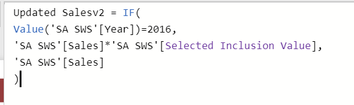
I tried this with a table calculation however I read that parameters do not work within table calculations and kept getting no result for 2016. I used the below DAX formula and syntax. but this gave me no result.


Dax - Row Parameter Formula.PNG


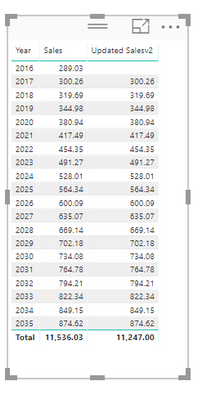
See below for my result

New Column Result.PNG

Any ideas how I would perform this calculation with a measure?


Please let me know if there is other data necessary to show to answer this question.


Regards

2 ACCEPTED SOLUTIONS
Greg_Deckler
Community Champion
Community Champion

You should just have to wrap your [Year] portion in an aggregation like MAX to make that a measure as well as wrapping any other reference to a column in some type of aggregation like SUM or MAX depending on what you are trying to do.


Follow on LinkedIn
@ me in replies or I'll lose your thread!!!
Instead of a Kudo, please vote for this idea
Become an expert!: Enterprise DNA
External Tools: MSHGQM
YouTube Channel!: Microsoft Hates Greg
Latest book!:
DAX For Humans

DAX is easy, CALCULATE makes DAX hard...

View solution in original post

Anonymous
Not applicable

@jdciaravino,

It seems that you are creating a calculated column rather than measure. Right click your table and select "New Measure", then apply the following DAX.


Measure = IF(MAX('SA SWS'[Year])=2016,MAX('SA SWS'[Sales])*'SA SWS'[Selectd Inclusion Value],MAX('SA SWS'[Sales]))


Regards,
Lydia

View solution in original post

2 REPLIES 2
Anonymous
Not applicable

@jdciaravino,

It seems that you are creating a calculated column rather than measure. Right click your table and select "New Measure", then apply the following DAX.


Measure = IF(MAX('SA SWS'[Year])=2016,MAX('SA SWS'[Sales])*'SA SWS'[Selectd Inclusion Value],MAX('SA SWS'[Sales]))


Regards,
Lydia

Greg_Deckler
Community Champion
Community Champion

You should just have to wrap your [Year] portion in an aggregation like MAX to make that a measure as well as wrapping any other reference to a column in some type of aggregation like SUM or MAX depending on what you are trying to do.


Follow on LinkedIn
@ me in replies or I'll lose your thread!!!
Instead of a Kudo, please vote for this idea
Become an expert!: Enterprise DNA
External Tools: MSHGQM
YouTube Channel!: Microsoft Hates Greg
Latest book!:
DAX For Humans

DAX is easy, CALCULATE makes DAX hard...

Helpful resources

Announcements
New to Fabric survey Carousel

New to Fabric Survey

If you have recently started exploring Fabric, we'd love to hear how it's going. Your feedback can help with product improvements.

Power BI DataViz World Championships carousel

Power BI DataViz World Championships - June 2026

A new Power BI DataViz World Championship is coming this June! Don't miss out on submitting your entry.

Join our Fabric User Panel

Join our Fabric User Panel

Share feedback directly with Fabric product managers, participate in targeted research studies and influence the Fabric roadmap.

March Power BI Update Carousel

Power BI Community Update - March 2026

Check out the March 2026 Power BI update to learn about new features.