Join us at FabCon Atlanta from March 16 - 20, 2026, for the ultimate Fabric, Power BI, AI and SQL community-led event. Save $200 with code FABCOMM.
Register now!The Power BI Data Visualization World Championships is back! Get ahead of the game and start preparing now! Learn more
Hi There
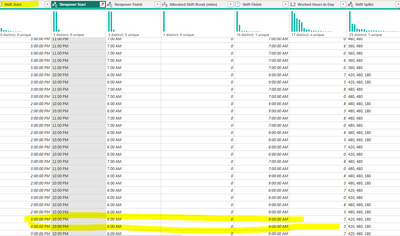
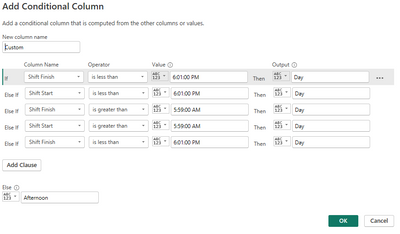
I have created a Conditional Column however I am still getting the outcome Day where the Shift starts after 3 but ends on the next day (it usually has data in the sleepover column.
How can I get the 3 pm to 11 pm component to be Afternoon
But the 7 am to 9 am component to be day.
Kind regards
Solved! Go to Solution.
Hi @Babycakes
You can put the following code to advanced editor
let
Source = Table.FromRows(Json.Document(Binary.Decompress(Binary.FromText("i45WMrYyMAAihQBfJR0lSyjH0VcpNhYA", BinaryEncoding.Base64), Compression.Deflate)), let _t = ((type nullable text) meta [Serialized.Text = true]) in type table [#"Shift Start" = _t, #"Shift Finish" = _t]),
#"Changed Type" = Table.TransformColumnTypes(Source,{{"Shift Start", type time}, {"Shift Finish", type time}}),
#"Added Custom" = Table.AddColumn(#"Changed Type", "Custom", each DateTime.From(Text.From([Shift Start]))),
#"Added Custom1" = Table.AddColumn(#"Added Custom", "Custom.1", each DateTime.From(Text.From([Shift Finish]))+#duration(1,0,0,0)),
#"Changed Type1" = Table.TransformColumnTypes(#"Added Custom1",{{"Custom", type datetime}, {"Custom.1", type datetime}}),
#"Added Custom2" = Table.AddColumn(#"Changed Type1", "Custom.2", each List.DateTimes([Custom],Duration.Hours([Custom.1]-[Custom])+1,#duration(0, 1, 0, 0))),
#"Expanded Custom.2" = Table.ExpandListColumn(#"Added Custom2", "Custom.2"),
#"Added Custom3" = Table.AddColumn(#"Expanded Custom.2", "Custom.3", each List.Max(
(Table.SelectRows(#"Expanded Custom.2",(x)=>x[Custom.2]>=[Custom] and x[Custom.2]<DateTime.FromText("00:00:00")+#duration(1,0,0,0))[Custom.2]))),
#"Added Custom4" = Table.AddColumn(#"Added Custom3", "Custom.4", each if [Custom.2]=[Custom.3] then 1 else if [Custom.2]=[Custom.1] then 2 else null),
#"Filtered Rows" = Table.SelectRows(#"Added Custom4", each ([Custom.4] <> null)),
#"Added Custom5" = Table.AddColumn(#"Filtered Rows", "Custom.5", each if [Custom.1]<>[Custom.2] then [Custom] else DateTime.FromText("7:00:00 AM")+#duration(1,0,0,0)),
#"Removed Columns" = Table.RemoveColumns(#"Added Custom5",{"Custom", "Custom.1", "Custom.3", "Custom.4"}),
#"Reordered Columns" = Table.ReorderColumns(#"Removed Columns",{"Shift Start", "Shift Finish", "Custom.5", "Custom.2"}),
#"Added Custom6" = Table.AddColumn(#"Reordered Columns", "Custom", each if [Custom.5]>=DateTime.FromText("15:00:00") and [Custom.2]<=DateTime.FromText("23:00:00") then "Afternoon" else "Day")
in
#"Added Custom6"
Best Regards!
Yolo Zhu
If this post helps, then please consider Accept it as the solution to help the other members find it more quickly.
Hi @Babycakes
You can put the following code to advanced editor
let
Source = Table.FromRows(Json.Document(Binary.Decompress(Binary.FromText("i45WMrYyMAAihQBfJR0lSyjH0VcpNhYA", BinaryEncoding.Base64), Compression.Deflate)), let _t = ((type nullable text) meta [Serialized.Text = true]) in type table [#"Shift Start" = _t, #"Shift Finish" = _t]),
#"Changed Type" = Table.TransformColumnTypes(Source,{{"Shift Start", type time}, {"Shift Finish", type time}}),
#"Added Custom" = Table.AddColumn(#"Changed Type", "Custom", each DateTime.From(Text.From([Shift Start]))),
#"Added Custom1" = Table.AddColumn(#"Added Custom", "Custom.1", each DateTime.From(Text.From([Shift Finish]))+#duration(1,0,0,0)),
#"Changed Type1" = Table.TransformColumnTypes(#"Added Custom1",{{"Custom", type datetime}, {"Custom.1", type datetime}}),
#"Added Custom2" = Table.AddColumn(#"Changed Type1", "Custom.2", each List.DateTimes([Custom],Duration.Hours([Custom.1]-[Custom])+1,#duration(0, 1, 0, 0))),
#"Expanded Custom.2" = Table.ExpandListColumn(#"Added Custom2", "Custom.2"),
#"Added Custom3" = Table.AddColumn(#"Expanded Custom.2", "Custom.3", each List.Max(
(Table.SelectRows(#"Expanded Custom.2",(x)=>x[Custom.2]>=[Custom] and x[Custom.2]<DateTime.FromText("00:00:00")+#duration(1,0,0,0))[Custom.2]))),
#"Added Custom4" = Table.AddColumn(#"Added Custom3", "Custom.4", each if [Custom.2]=[Custom.3] then 1 else if [Custom.2]=[Custom.1] then 2 else null),
#"Filtered Rows" = Table.SelectRows(#"Added Custom4", each ([Custom.4] <> null)),
#"Added Custom5" = Table.AddColumn(#"Filtered Rows", "Custom.5", each if [Custom.1]<>[Custom.2] then [Custom] else DateTime.FromText("7:00:00 AM")+#duration(1,0,0,0)),
#"Removed Columns" = Table.RemoveColumns(#"Added Custom5",{"Custom", "Custom.1", "Custom.3", "Custom.4"}),
#"Reordered Columns" = Table.ReorderColumns(#"Removed Columns",{"Shift Start", "Shift Finish", "Custom.5", "Custom.2"}),
#"Added Custom6" = Table.AddColumn(#"Reordered Columns", "Custom", each if [Custom.5]>=DateTime.FromText("15:00:00") and [Custom.2]<=DateTime.FromText("23:00:00") then "Afternoon" else "Day")
in
#"Added Custom6"
Best Regards!
Yolo Zhu
If this post helps, then please consider Accept it as the solution to help the other members find it more quickly.
The Power BI Data Visualization World Championships is back! Get ahead of the game and start preparing now!
| User | Count |
|---|---|
| 41 | |
| 38 | |
| 36 | |
| 30 | |
| 28 |
| User | Count |
|---|---|
| 129 | |
| 88 | |
| 79 | |
| 68 | |
| 63 |