

cancel
Showing results for 
Search instead for 
Did you mean: 

The Power BI Data Visualization World Championships is back! It's time to submit your entry. Live now!

Reply
Anonymous
Not applicable

Conditional formatting

Hi 

I have a risk table in my report, which it has conditional fomratting of background color, like this

Archiegh_0-1639010340588.png

when I use a filter to show some specific project in the table, some of colors will be removed, like this 

Archiegh_1-1639010416881.png

I need to have the colors being in the table permanently and and just icon moves or being filtered.  

how can I use the filter without impact on conditional formatting? 

Thanks 

6 REPLIES 6
Anonymous
Not applicable

Hi @Anonymous ,


I think a sample will make it easier for us to find the reason caused your problem. Could you share a sample file without sensitive data with us?


Best Regards,

Rico Zhou

amitchandak
Super User
Super User

@Anonymous , seem like you have used an option like show item with no data, that is why blank values are shown.


Conditional formatting does not work with blank values. You have to use +0 in a project to make sure nonblank values. Color them same as background so they are not displayed 


Share with Power BI Enthusiasts: Full Power BI Video (20 Hours) YouTube
Microsoft Fabric Series 60+ Videos YouTube
Microsoft Fabric Hindi End to End YouTube
Anonymous
Not applicable

No it is not blank 
I have an order iD column (1 to 5) and it is being shown based on the numbers. if you see the first image I setn, first raw is empty but conditional formatting is working 
to explain the conditional formatting 
columns very low has number 1 to 5 and next columns are same and then I choos different colour for each column 
but when I choose filter, some of colors will be deleted 

@Anonymous , can you share your conditional formatting measure

Share with Power BI Enthusiasts: Full Power BI Video (20 Hours) YouTube
Microsoft Fabric Series 60+ Videos YouTube
Microsoft Fabric Hindi End to End YouTube
Anonymous
Not applicable

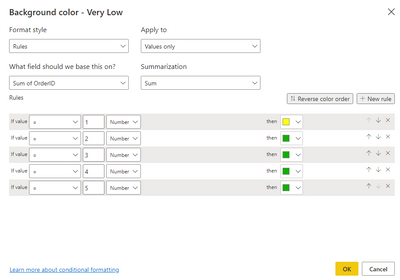
Hi, I have a screenshot one of columns 

Archiegh_0-1639530396810.png

For your information, OrderID includes 1 to 5 only. 
please let me know what else info you need 

Anonymous
Not applicable

Hi @Anonymous ,


From your screenshot, I think you set color by OrderID. However I could only see Yellow and Green in this conditonal formatting. In your first screenshot I know you have orange and red color as well. I couldn't find them in this screenshot.

And I am confused about your data model.  Does your table contains three columns, Risk Rating(Almost Certain, Likely...) ,Degree(Low, High...) and OrderID.

Could you share a sample file without sensitive data with us? And show us a screenshot of the result you want.

This will make it easier for us to solve your problem.


Best Regards,
Rico Zhou


If this post helps, then please consider Accept it as the solution to help the other members find it more quickly.

Helpful resources

Announcements
Power BI DataViz World Championships

Power BI Dataviz World Championships

The Power BI Data Visualization World Championships is back! It's time to submit your entry.

December 2025 Power BI Update Carousel

Power BI Monthly Update - December 2025

Check out the December 2025 Power BI Holiday Recap!

FabCon Atlanta 2026 carousel

FabCon Atlanta 2026

Join us at FabCon Atlanta, March 16-20, for the ultimate Fabric, Power BI, AI and SQL community-led event. Save $200 with code FABCOMM.