cancel
Showing results for 
Search instead for 
Did you mean: 

The Power BI Data Visualization World Championships is back! Get ahead of the game and start preparing now! Learn more

Reply
atasgao
Helper II
Helper II

Conditional formatting on multiple text column

Hi Everyone, 

I am creating a matrix visual in Power BI. Where I have to do the conditional formating by text. 

So,

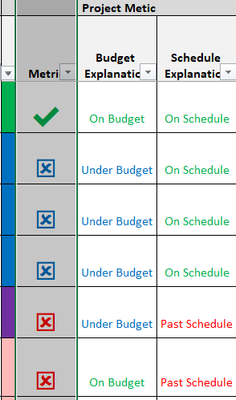
1. Schedule Explanationcolumn the fields text should be with respective colore On Schedule = green,  past schedule = red, and Not included in metric = Black 

2. In Metric column if the symbol = ✖️ and the schedule explanation = past schedule the I want the ✖️ to be in red or else blue 

3. The column next to metric has condition to get a color bar  ie Budget explanation = Under Budget and schedule explanation = past schedule then the column will be blue. 


I have attached a screenshot of the excel sheet. 


atasgao_0-1628644975936.png

Is it possible to do that in Power BI?

Thanks in advance for your Help


1 ACCEPTED SOLUTION
amitchandak
Super User
Super User

@atasgao , Based on what I got so far.  You can create unichar icon and use conditional formatting using measure. Example of both. Please note you have to get the correct unichar from the list and condition based on your requirement


////Arrow
Arrow =
var _change =[Net Sales YTD]-[Net Sales LYTD]
return
SWITCH (
TRUE(),
_change > 0, UNICHAR(9650),
_change = 0, UNICHAR(9654),
_change < 0, UNICHAR(9660)
)


/////Arrow Color
Arrow color =
var _change =[Net Sales YTD]-[Net Sales LYTD]
return
SWITCH (
TRUE(),
_change > 0, "green",
_change = 0, "blue",
_change < 0, "red"
)


refer

UNICHAR - Tool for Custom Icon Formatting: https://www.youtube.com/watch?v=veCtfP8IhbI&list=PLPaNVDMhUXGaaqV92SBD5X2hk3TMNlHhb&index=50


list of unichar

https://exceleratorbi.com.au/dax-unichar-function-power-bi/


Also, check if needed

https://exceleratorbi.com.au/conditional-formatting-using-icons-in-power-bi/
https://community.powerbi.com/t5/Desktop/FORMAT-icon-set-for-use-in-a-data-card/td-p/811692

Share with Power BI Enthusiasts: Full Power BI Video (20 Hours) YouTube
Microsoft Fabric Series 60+ Videos YouTube
Microsoft Fabric Hindi End to End YouTube

View solution in original post

2 REPLIES 2
amitchandak
Super User
Super User

@atasgao , Based on what I got so far.  You can create unichar icon and use conditional formatting using measure. Example of both. Please note you have to get the correct unichar from the list and condition based on your requirement


////Arrow
Arrow =
var _change =[Net Sales YTD]-[Net Sales LYTD]
return
SWITCH (
TRUE(),
_change > 0, UNICHAR(9650),
_change = 0, UNICHAR(9654),
_change < 0, UNICHAR(9660)
)


/////Arrow Color
Arrow color =
var _change =[Net Sales YTD]-[Net Sales LYTD]
return
SWITCH (
TRUE(),
_change > 0, "green",
_change = 0, "blue",
_change < 0, "red"
)


refer

UNICHAR - Tool for Custom Icon Formatting: https://www.youtube.com/watch?v=veCtfP8IhbI&list=PLPaNVDMhUXGaaqV92SBD5X2hk3TMNlHhb&index=50


list of unichar

https://exceleratorbi.com.au/dax-unichar-function-power-bi/


Also, check if needed

https://exceleratorbi.com.au/conditional-formatting-using-icons-in-power-bi/
https://community.powerbi.com/t5/Desktop/FORMAT-icon-set-for-use-in-a-data-card/td-p/811692

Share with Power BI Enthusiasts: Full Power BI Video (20 Hours) YouTube
Microsoft Fabric Series 60+ Videos YouTube
Microsoft Fabric Hindi End to End YouTube

@amitchandak How to do conditional formatting on the unicodes


atasgao_1-1628810166891.pngatasgao_2-1628810190660.png

Multiple conditions are there for the unicodes. 


Thanks!


Helpful resources

Announcements
Power BI DataViz World Championships

Power BI Dataviz World Championships

The Power BI Data Visualization World Championships is back! Get ahead of the game and start preparing now!

December 2025 Power BI Update Carousel

Power BI Monthly Update - December 2025

Check out the December 2025 Power BI Holiday Recap!

FabCon Atlanta 2026 carousel

FabCon Atlanta 2026

Join us at FabCon Atlanta, March 16-20, for the ultimate Fabric, Power BI, AI and SQL community-led event. Save $200 with code FABCOMM.