Join us at FabCon Atlanta from March 16 - 20, 2026, for the ultimate Fabric, Power BI, AI and SQL community-led event. Save $200 with code FABCOMM.
Register now!The Power BI Data Visualization World Championships is back! It's time to submit your entry. Live now!
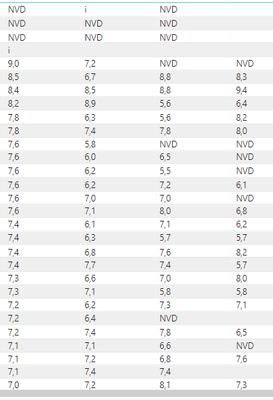
I tried to apply conditional formatting to analyze marks (numbers and text combined, see picture below). In Microsoft Excel it is possible to analyze those combined data (example color green for NVD and color red for the marks below 6,0). In Power BI you have to define with Power BI Query what type of data is in the column (number or text or date, etc.) a combination of text and numbers is not possible. When returning to report and the use of conditional formatting the function does not work. Is there another option to apply conditional formatting to combined data (text/numbers) in one column)?
Solved! Go to Solution.
Hi,
There is an alternative way you can get your desired solution.
I couldn't download the pbix file because I have no Google account, can you send it to me by e-mail or drobox. I found the "New measure" option but I do not know which algorithm to type. Measure = Format colour green if "NVD" and Format colour red if marks < 6,0. I hope you can place the algorithm in the discussion. I also found the https://docs.microsoft.com/nl-nl/power-bi/desktop-tutorial-create-measures, some examples in Dutch but the formula explanation of Conditional formatting is not sufficient.
The Power BI Data Visualization World Championships is back! It's time to submit your entry.
Check out the January 2026 Power BI update to learn about new features.
| User | Count |
|---|---|
| 60 | |
| 49 | |
| 30 | |
| 25 | |
| 23 |
| User | Count |
|---|---|
| 130 | |
| 103 | |
| 58 | |
| 39 | |
| 31 |