
Join us at FabCon Atlanta from March 16 - 20, 2026, for the ultimate Fabric, Power BI, AI and SQL community-led event. Save $200 with code FABCOMM.
Register now!The Power BI Data Visualization World Championships is back! Get ahead of the game and start preparing now! Learn more
Hi
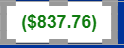
Why is my conditional formatting not working.
I want it this way:
Greater than 0 = Green
Less than 0 = Red
0 = Black
Hi @samnaw ,
Changes the second condition to > 0 and <= Max
Thanks ,
Pratyasha Samal
Has this post solved your problem? Please Accept as Solution so that others can find it quickly and to let the community know your problem has been solved.
If you found this post helpful, please give Kudos C
Proud to be a Super User!
One small thing is line 2 should just be '> 0' instead of '>=0'. This shouldn't be your issue though.
Ensure the field you're evaluating these rules with is the same one that is being displayed.
Hi @samnaw ,
Changes the second condition to '> 0' and '<= Max' instead of ''>=0' and '<=Max' .
Thanks ,
Pratyasha Samal
Has this post solved your problem? Please Accept as Solution so that others can find it quickly and to let the community know your problem has been solved.
If you found this post helpful, please give Kudos C
Proud to be a Super User!
Check out the November 2025 Power BI update to learn about new features.
Advance your Data & AI career with 50 days of live learning, contests, hands-on challenges, study groups & certifications and more!