FabCon is coming to Atlanta
Join us at FabCon Atlanta from March 16 - 20, 2026, for the ultimate Fabric, Power BI, AI and SQL community-led event. Save $200 with code FABCOMM.
Register now!- Power BI forums
- Get Help with Power BI
- Desktop
- Service
- Report Server
- Power Query
- Mobile Apps
- Developer
- DAX Commands and Tips
- Custom Visuals Development Discussion
- Health and Life Sciences
- Power BI Spanish forums
- Translated Spanish Desktop
- Training and Consulting
- Instructor Led Training
- Dashboard in a Day for Women, by Women
- Galleries
- Data Stories Gallery
- Themes Gallery
- Contests Gallery
- QuickViz Gallery
- Quick Measures Gallery
- Visual Calculations Gallery
- Notebook Gallery
- Translytical Task Flow Gallery
- TMDL Gallery
- R Script Showcase
- Webinars and Video Gallery
- Ideas
- Custom Visuals Ideas (read-only)
- Issues
- Issues
- Events
- Upcoming Events
The Power BI Data Visualization World Championships is back! Get ahead of the game and start preparing now! Learn more
- Power BI forums
- Forums
- Get Help with Power BI
- Desktop
- Conditional formatting help required?
- Subscribe to RSS Feed
- Mark Topic as New
- Mark Topic as Read
- Float this Topic for Current User
- Bookmark
- Subscribe
- Printer Friendly Page


- Mark as New
- Bookmark
- Subscribe
- Mute
- Subscribe to RSS Feed
- Permalink
- Report Inappropriate Content
Conditional formatting help required?
Hi All,
I Seem to be stuck at what should be quiet a simple task.
I have a table with four columns (fields) per row. All i want to is highlight each time the value in column 1 is less than any of the other 3 column valves.
As always any help would be greatly appreciated
KR
Solved! Go to Solution.


- Mark as New
- Bookmark
- Subscribe
- Mute
- Subscribe to RSS Feed
- Permalink
- Report Inappropriate Content
Hi @dmoggie
You can create the following Measure
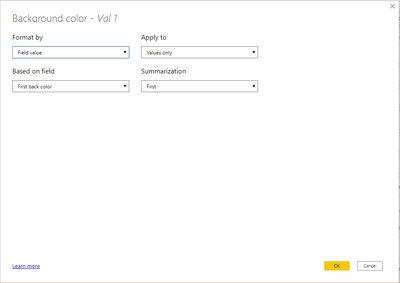
back color = if(COALESCE([Val 1]<[Val 2], [Val 1]<[Val 3], [Val 1]<[Val 4])= BLANK(), "#FFFFFF", "#008000")then use the Format by Field Value type of conditional formatting
Linkt to Sample pbix, sample.pbix
Hope this Helps,
Richard
Did I answer your question? Mark my post as a solution!
Did my answers help arrive at a solution? Give it a kudos by clicking the Thumbs Up!
I hope this helps,
Richard
Did I answer your question? Mark my post as a solution! Kudos Appreciated!
Proud to be a Super User!
- Mark as New
- Bookmark
- Subscribe
- Mute
- Subscribe to RSS Feed
- Permalink
- Report Inappropriate Content
Hi @dmoggie
You can create the following Measure
back color = if(COALESCE([Val 1]<[Val 2], [Val 1]<[Val 3], [Val 1]<[Val 4])= BLANK(), "#FFFFFF", "#008000")then use the Format by Field Value type of conditional formatting
Linkt to Sample pbix, sample.pbix
Hope this Helps,
Richard
Did I answer your question? Mark my post as a solution!
Did my answers help arrive at a solution? Give it a kudos by clicking the Thumbs Up!
I hope this helps,
Richard
Did I answer your question? Mark my post as a solution! Kudos Appreciated!
Proud to be a Super User!
- Mark as New
- Bookmark
- Subscribe
- Mute
- Subscribe to RSS Feed
- Permalink
- Report Inappropriate Content
Wow so many quick replies, what a great forum. I didnt know you could resolve in all these different ways
@tex628 thanks.
This was the missing bit for me. Many thanks @richbenmintz
Kind Regards


- Mark as New
- Bookmark
- Subscribe
- Mute
- Subscribe to RSS Feed
- Permalink
- Report Inappropriate Content
Hi @dmoggie ,
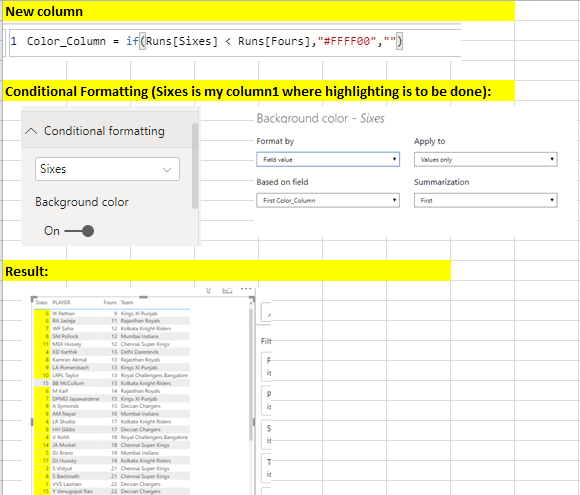
Follow the below steps:
1. Create a new column with below condition:


- Mark as New
- Bookmark
- Subscribe
- Mute
- Subscribe to RSS Feed
- Permalink
- Report Inappropriate Content
Assuming that it's measures you have it should be something along the lines of:
Measure =
IF( [Measure 1] < [Measure 2] , 1 ,
IF( [Measure 1] < [Measure 3] , 1 ,
IF( [Measure 1] < [Measure 4] , 1 , BLANK()
)))
If you're just column aggregating i would recommend creating 4 measures instead:
Measure 1 = SUM(Table[Column1])etc.
Finally apply conditional formatting to Measure 1 and use the "Based on field" condition:
Where you choose the measure written above with the condition 1 = Colored
Br,
J

Connect on LinkedIn

- Mark as New
- Bookmark
- Subscribe
- Mute
- Subscribe to RSS Feed
- Permalink
- Report Inappropriate Content
Hi @dmoggie - create a measure or a column (depending on what your values are already), that produces 1 if your condition is met and 0 if it doesn't. Then do conditional formatting on that field, but using the value of the new measure/column.
Hope this helps
David

- Mark as New
- Bookmark
- Subscribe
- Mute
- Subscribe to RSS Feed
- Permalink
- Report Inappropriate Content
@dmoggie , create a color measure like this and use that in conditional formatting with "Field" option
color =
switch ( true(),
FIRSTNONBLANK(Table[commodity],"NA") ="commodity1" && sum(Table[Value]) >500,"lightgreen",
FIRSTNONBLANK(Table[commodity],"NA") ="commodity2" && sum(Table[Value]) >1000,"lightgreen",
/// Add more conditions
"red"
)
https://radacad.com/dax-and-conditional-formatting-better-together-find-the-biggest-and-smallest-num...
https://docs.microsoft.com/en-us/power-bi/desktop-conditional-table-formatting#color-by-color-values
- Mark as New
- Bookmark
- Subscribe
- Mute
- Subscribe to RSS Feed
- Permalink
- Report Inappropriate Content
Hi @dmoggie,
Can you provide some sample data and a desired outcome
I hope this helps,
Richard
Did I answer your question? Mark my post as a solution! Kudos Appreciated!
Proud to be a Super User!

Helpful resources

Power BI Dataviz World Championships
The Power BI Data Visualization World Championships is back! Get ahead of the game and start preparing now!

Power BI Monthly Update - December 2025
Check out the December 2025 Power BI Holiday Recap!

FabCon Atlanta 2026
Join us at FabCon Atlanta, March 16-20, for the ultimate Fabric, Power BI, AI and SQL community-led event. Save $200 with code FABCOMM.

| User | Count |
|---|---|
| 38 | |
| 35 | |
| 33 | |
| 32 | |
| 29 |


| User | Count |
|---|---|
| 134 | |
| 96 | |
| 78 | |
| 67 | |
| 65 |


