cancel
Showing results for 
Search instead for 
Did you mean: 

View all the Fabric Data Days sessions on demand. View schedule

Reply
kb177
Helper II
Helper II

Conditional formatting for matrix visual

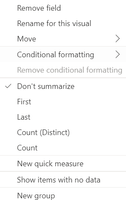
I'm trying to use conditional formatting in matrix visual but the option is no available, but when i change it to table visual its showing.

kb177_0-1701776533205.png

kb177_1-1701776548594.png


has the option been removed for matrix visual ?

Installed  Version: 2.122.1066.0 64-bit (October, 2023)

2 ACCEPTED SOLUTIONS
danextian
Super User
Super User

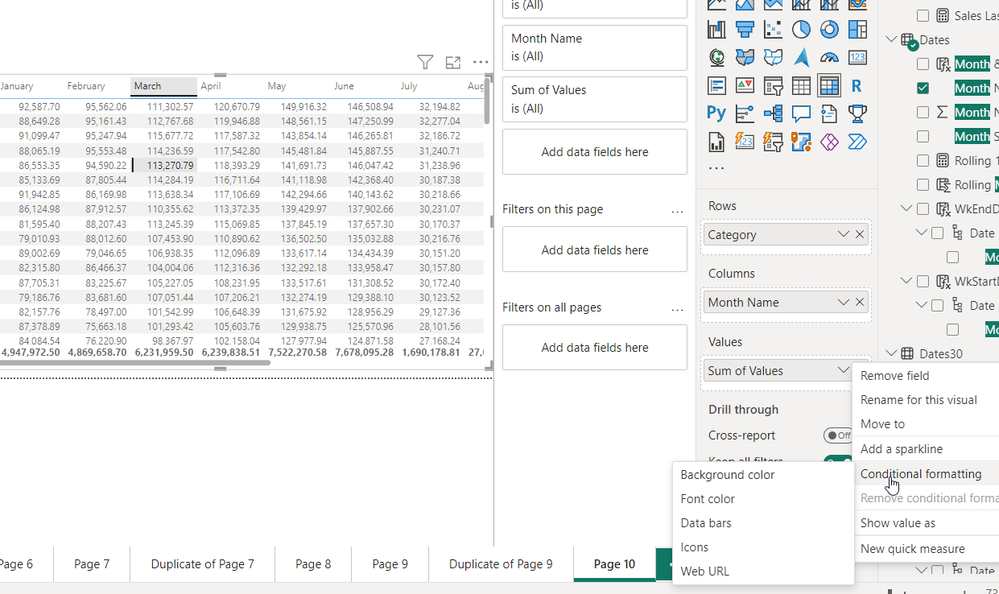
Hi @kb177 ,


The option should available from the down arrow of a matrix value.

danextian_0-1701776813876.png


Dane Belarmino | Microsoft MVP | Proud to be a Super User!

Did I answer your question? Mark my post as a solution!


"Tell me and I’ll forget; show me and I may remember; involve me and I’ll understand."
Need Power BI consultation, get in touch with me on LinkedIn or hire me on UpWork.
Learn with me on YouTube @DAXJutsu or follow my page on Facebook @DAXJutsuPBI.

View solution in original post

Anonymous
Not applicable

Hi @kb177 ,

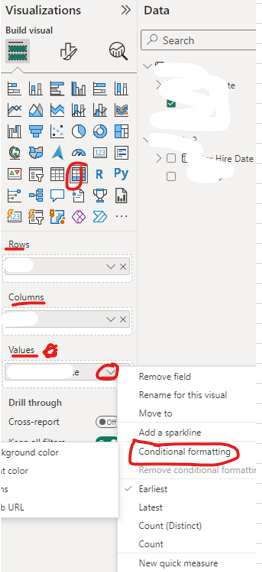
Thanks for reaching out to us with your problem on conditional formatting of matrix visual. The conditional formatting can be applied to any field on the table visual. However, it can be only applied to Values filed of matrix visual when apply the conditional formatting for the matrix visual. Please check whether you select Columns field or Row field of matrix visual, hence you can't find that option...

Apply conditional table formatting in Power BI - Power BI | Microsoft Learn

vyiruanmsft_0-1703755266424.png

Best Regards

View solution in original post

2 REPLIES 2
Anonymous
Not applicable

Hi @kb177 ,

Thanks for reaching out to us with your problem on conditional formatting of matrix visual. The conditional formatting can be applied to any field on the table visual. However, it can be only applied to Values filed of matrix visual when apply the conditional formatting for the matrix visual. Please check whether you select Columns field or Row field of matrix visual, hence you can't find that option...

Apply conditional table formatting in Power BI - Power BI | Microsoft Learn

vyiruanmsft_0-1703755266424.png

Best Regards

danextian
Super User
Super User

Hi @kb177 ,


The option should available from the down arrow of a matrix value.

danextian_0-1701776813876.png


Dane Belarmino | Microsoft MVP | Proud to be a Super User!

Did I answer your question? Mark my post as a solution!


"Tell me and I’ll forget; show me and I may remember; involve me and I’ll understand."
Need Power BI consultation, get in touch with me on LinkedIn or hire me on UpWork.
Learn with me on YouTube @DAXJutsu or follow my page on Facebook @DAXJutsuPBI.

Helpful resources

Announcements
November Power BI Update Carousel

Power BI Monthly Update - November 2025

Check out the November 2025 Power BI update to learn about new features.

Fabric Data Days Carousel

Fabric Data Days

Advance your Data & AI career with 50 days of live learning, contests, hands-on challenges, study groups & certifications and more!

FabCon Atlanta 2026 carousel

FabCon Atlanta 2026

Join us at FabCon Atlanta, March 16-20, for the ultimate Fabric, Power BI, AI and SQL community-led event. Save $200 with code FABCOMM.

Top Solution Authors
Top Kudoed Authors