
cancel
Showing results for 
Search instead for 
Did you mean: 

The Power BI Data Visualization World Championships is back! Get ahead of the game and start preparing now! Learn more

Reply
Anonymous
Not applicable

Conditional formatting for Card Visual based on Text values

Hi, 


I have a card visual in my report where I display some operational statuses, so the callout value is text. 

Alienvolm_0-1654106470035.png


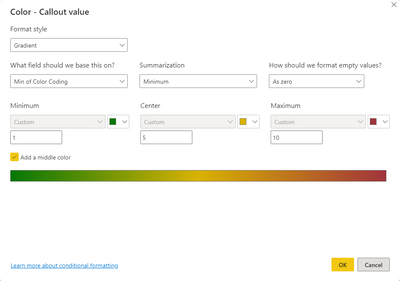
I need to color code those values so they are more easily seen in the report page. To do that, I have created a calculated column, assigning a value on a scale from 1 to 10 based on values, and then assigned Conditional Formatting to the callout value based on that scale. 


However, I don't seem to find a way to use the values without a summarization:

Alienvolm_1-1654106535780.png

Any suggestions on how to solve this problem? 


Thanks! 


1 ACCEPTED SOLUTION
Anonymous
Not applicable

@Anonymous the point is, you must insert in the conditional formatting a measure which retrieves a single value of the calculated column.

So, you must create a function which retrieves the MAX value of the calculated column. For example:

CALCULATE(MAX('TableName'[Color Coding]),"apply here any filter table function if necessary")

If the function above doesn`t work or you don`t understand, post a image of how you are filtering your visualization because how you filter will determine what values are retrieved from the colum "Color Coding"

View solution in original post

5 REPLIES 5
Anonymous
Not applicable

@Anonymous the point is, you must insert in the conditional formatting a measure which retrieves a single value of the calculated column.

So, you must create a function which retrieves the MAX value of the calculated column. For example:

CALCULATE(MAX('TableName'[Color Coding]),"apply here any filter table function if necessary")

If the function above doesn`t work or you don`t understand, post a image of how you are filtering your visualization because how you filter will determine what values are retrieved from the colum "Color Coding"

Anonymous
Not applicable

@Anonymous,


Solved! I didn't notice that I could use a measure! 


This works just fine! 

Color = 
CALCULATE(
    MIN(Teamsissuenotifications[Color Coding]), 
    FILTER(Teamsissuenotifications, MAX(Teamsissuenotifications[Timestamp]))
)

 Thanks! 

Anonymous
Not applicable

Glad to have helped!


Cheers!

Anonymous
Not applicable

@Alienvol, firstly I'd suggesting posting a sample of your data and data model in order to figure out the data structure.

Well, the way to retrieve a single value from a measure (scalar value) without summarizing it, it is to apply MAX, MIN and apply a filter table function within the table expression of these functions.


Anonymous
Not applicable

@Anonymous, 


Thanks for the reply. 


This is a snapshot of the table: 

Alienvolm_0-1654113691059.png

As mentioned, the last field, "Color coding" is a calculated column that assigns a number from 1 to 10 based on the "Status" field. 


The Card retrieves the last "Status" from the table. What's not clear to me is if the filtering on the card reflects in the Conditional Formatting function or if the function applies to the values of the entire table. 


I hope this helps! 


Helpful resources

Announcements
Power BI DataViz World Championships

Power BI Dataviz World Championships

The Power BI Data Visualization World Championships is back! Get ahead of the game and start preparing now!

December 2025 Power BI Update Carousel

Power BI Monthly Update - December 2025

Check out the December 2025 Power BI Holiday Recap!

FabCon Atlanta 2026 carousel

FabCon Atlanta 2026

Join us at FabCon Atlanta, March 16-20, for the ultimate Fabric, Power BI, AI and SQL community-led event. Save $200 with code FABCOMM.