Join us at FabCon Atlanta from March 16 - 20, 2026, for the ultimate Fabric, Power BI, AI and SQL community-led event. Save $200 with code FABCOMM.
Register now!The Power BI Data Visualization World Championships is back! Get ahead of the game and start preparing now! Learn more
Hello,
New to Power BI. Wanting to format a table's column cells based on the cell value, not the column count.
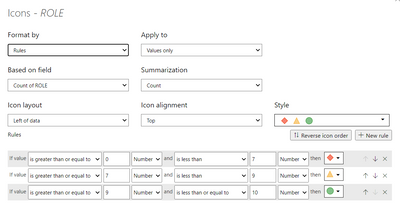
I want any value 0-6 to be the red icon, value 7 or 8 to be the yellow icone, and value 9 or 10 to be the green icon. Right now, it's considering the COUNT instead of the cell values to determine conditional formatting.
See screenshots below. All I can find is the option to format based on COUNT, not cell value? Can anyone help please?
Solved! Go to Solution.
Hi @kyliejones
Check your ROLE column type, is it TEXT? if yes, change that to whole number then try again to set your conditional formatting.
If this post helps, please consider accepting it as the solution to help the other members find it more quickly.
Appreciate your Kudos!!
Yes, I didn't have the column types correct. Fixed, thank you!
Hi @kyliejones
Check your ROLE column type, is it TEXT? if yes, change that to whole number then try again to set your conditional formatting.
If this post helps, please consider accepting it as the solution to help the other members find it more quickly.
Appreciate your Kudos!!
But whereas in my case the column has Text and the Text need to be shown in icons but the conditional formating is taking it as count.
Check out the November 2025 Power BI update to learn about new features.
Advance your Data & AI career with 50 days of live learning, contests, hands-on challenges, study groups & certifications and more!