cancel
Showing results for 
Search instead for 
Did you mean: 

The Power BI Data Visualization World Championships is back! Get ahead of the game and start preparing now! Learn more

Reply
veng2002
Frequent Visitor

Conditional formatting based on column

Hi, 

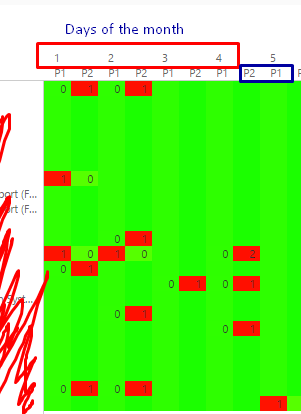
I built my matrix with columns as each day of the month and also the two priorities I'm working with (P1 and P2).

And I have two problems:

1) Since I have each day of the week and two priorities, each day has two columns below...

2) I get a 0 value written when the value in the adjacent column is 1 or more.

Current scenarioCurrent scenario


What I want to approach and can't think of, is:

1) not get a zero when the value next to it is +1 or 1.

2) avoid having the two priorities there  resulting on each day with two columns (removing on of the priorities is not the answer, sorry 😞 ) As you can see from the sample data, if I have a P2 I dont have a P1 and VS.

On my ideal world, I would have the column of the day, and if I have a P2 it will be yellow, and If I get a P1 it'll be red. Any ideas on how this could be done?

Thanks in advanced!

1 REPLY 1
v-qiuyu-msft
Community Support
Community Support

Hi @veng2002,


1) not get a zero when the value next to it is +1 or 1.


Which value do you use drag to matrix value? I guess the o value in the matrix from the table. If possible, please share some sample data. 


2) avoid having the two priorities there  resulting on each day with two columns (removing on of the priorities is not the answer, sorry Smiley Sad ) As you can see from the sample data, if I have a P2 I dont have a P1 and VS.

On my ideal world, I would have the column of the day, and if I have a P2 it will be yellow, and If I get a P1 it'll be red. Any ideas on how this could be done?


Conditional Formatting can be used for field or measure you place on the Matrix Values section, it can't be used based on column or row group. 


Best Regards,
Qiuyun Yu 


Community Support Team _ Qiuyun Yu
If this post helps, then please consider Accept it as the solution to help the other members find it more quickly.

Helpful resources

Announcements
Power BI DataViz World Championships

Power BI Dataviz World Championships

The Power BI Data Visualization World Championships is back! Get ahead of the game and start preparing now!

December 2025 Power BI Update Carousel

Power BI Monthly Update - December 2025

Check out the December 2025 Power BI Holiday Recap!

FabCon Atlanta 2026 carousel

FabCon Atlanta 2026

Join us at FabCon Atlanta, March 16-20, for the ultimate Fabric, Power BI, AI and SQL community-led event. Save $200 with code FABCOMM.