- Power BI forums
- Get Help with Power BI
- Desktop
- Service
- Report Server
- Power Query
- Mobile Apps
- Developer
- DAX Commands and Tips
- Custom Visuals Development Discussion
- Health and Life Sciences
- Power BI Spanish forums
- Translated Spanish Desktop
- Training and Consulting
- Instructor Led Training
- Dashboard in a Day for Women, by Women
- Galleries
- Data Stories Gallery
- Themes Gallery
- Contests Gallery
- QuickViz Gallery
- Quick Measures Gallery
- Visual Calculations Gallery
- Notebook Gallery
- Translytical Task Flow Gallery
- TMDL Gallery
- R Script Showcase
- Webinars and Video Gallery
- Ideas
- Custom Visuals Ideas (read-only)
- Issues
- Issues
- Events
- Upcoming Events
Learn from the best! Meet the four finalists headed to the FINALS of the Power BI Dataviz World Championships! Register now
- Power BI forums
- Forums
- Get Help with Power BI
- Desktop
- Conditional columns
- Subscribe to RSS Feed
- Mark Topic as New
- Mark Topic as Read
- Float this Topic for Current User
- Bookmark
- Subscribe
- Printer Friendly Page

- Mark as New
- Bookmark
- Subscribe
- Mute
- Subscribe to RSS Feed
- Permalink
- Report Inappropriate Content
Conditional columns
I have a report im working on and the user wants me to add a contional column that places OVERDUE for any date that isnt the current date. I was able to create the coulmn, but I was only able to enter a single date. How can I tell it to change daily so that todays date would be blank and eveything after is OVERDUE?
Thank you
Solved! Go to Solution.
- Mark as New
- Bookmark
- Subscribe
- Mute
- Subscribe to RSS Feed
- Permalink
- Report Inappropriate Content
Hi @Anonymous ,
Create a custom column in Power Query like below.
if [date]<=Date.From(DateTime.LocalNow()) then "due" else ""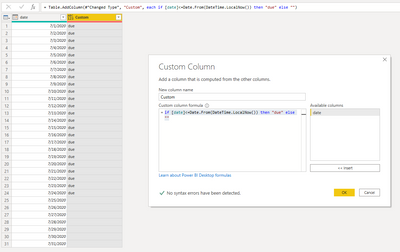
When you refresh the dataset, the column will be changed.
Best Regards,
Jay


- Mark as New
- Bookmark
- Subscribe
- Mute
- Subscribe to RSS Feed
- Permalink
- Report Inappropriate Content

- Mark as New
- Bookmark
- Subscribe
- Mute
- Subscribe to RSS Feed
- Permalink
- Report Inappropriate Content
HI @Anonymous ,
I understand very little of what you are trying to achieve.
Can you share some sample data or screesnhots to understand your issue easily?
Thanks,
Pragati
- Mark as New
- Bookmark
- Subscribe
- Mute
- Subscribe to RSS Feed
- Permalink
- Report Inappropriate Content
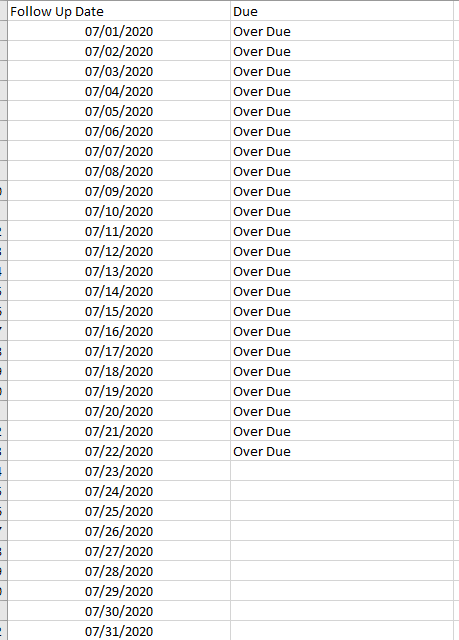
Here you go I placed teh data in excel. I removed a lot of the other data elements, but you can see what im trying to do. Basically the file refershes each day. Uses a column in PBI called FOLLOW UP DATE this houses dates of the files. I wanted to build a conditional column to call out all over due files...files that have dates prior to todays date each day so tomorrow anything marked 7/23 would now have the over due tag.
- Mark as New
- Bookmark
- Subscribe
- Mute
- Subscribe to RSS Feed
- Permalink
- Report Inappropriate Content
Hi @Anonymous ,
Create a custom column in Power Query like below.
if [date]<=Date.From(DateTime.LocalNow()) then "due" else ""
When you refresh the dataset, the column will be changed.
Best Regards,
Jay
- Mark as New
- Bookmark
- Subscribe
- Mute
- Subscribe to RSS Feed
- Permalink
- Report Inappropriate Content
GM @Anonymous
Im using the code you gave me above and it works to bring back the due and over due. Im running into an issue now that when the date field im bouncing off is empty it gives me an error in the custom column.
I tried removing Errors, but then it takes thoserows out of the data and we still need to see those. How can I go about adding something telling it if the value is NULL in the date feild say blank or show a blank value in the custom column?
Thanks for the help in advance!
- Mark as New
- Bookmark
- Subscribe
- Mute
- Subscribe to RSS Feed
- Permalink
- Report Inappropriate Content
I figured if the conditon said if [RESOLVER_FOLLOW_UP_DATE]<Date.From(DateTime.LocalNow()) then "Over Due" else "Not Due" it would put that for a row that may be blank, but it doesnt and shows error for fields with no date.
- Mark as New
- Bookmark
- Subscribe
- Mute
- Subscribe to RSS Feed
- Permalink
- Report Inappropriate Content
Thanks this seemed to work, but 1 issue im running into is all the blanks in the query editer are coming back showing NULL, so when I refresh the data it keeps flagging those as errors. Anything I can add in the code to make blanks blank and not say NULL?
- Mark as New
- Bookmark
- Subscribe
- Mute
- Subscribe to RSS Feed
- Permalink
- Report Inappropriate Content
I have files coming in to my report daily, for each file that is not the current date needs to be marked overdue. Basically anything that is not the current date would be over due. So today anything 7/22 and prior is over due then tomorrow anyhting 7/23 prior would be flagged and so on.
Helpful resources

Power BI DataViz World Championships - June 2026
A new Power BI DataViz World Championship is coming this June! Don't miss out on submitting your entry.

Join our Fabric User Panel
Share feedback directly with Fabric product managers, participate in targeted research studies and influence the Fabric roadmap.

Power BI Community Update - March 2026
Check out the March 2026 Power BI update to learn about new features.

| User | Count |
|---|---|
| 47 | |
| 36 | |
| 27 | |
| 15 | |
| 15 |


| User | Count |
|---|---|
| 58 | |
| 56 | |
| 38 | |
| 21 | |
| 21 |


