cancel
Showing results for 
Search instead for 
Did you mean: 

A new Data Days event is coming soon! This time we’re going bigger than ever. Fabric, Power BI, SQL, AI and more. Don't miss out.

Reply
Syndicate_Admin
Administrator
Administrator

Conditional column

Hello!

Let's see if anyone can help me. I tell you:

I have a column named STEPNAME and another STATECODENAME.

I need to create a conditional column that meets the following:

1. [Statecodename] = "Won" ----> "Earned"

2. [Statecodename] = "Lost" ----> "Lost"

3. [Statecodename] = "Open" and [Stepname] = "3" ----> "Qualified"

4. [Statecodename] = "Open" and [Stepname] = "4" ----> "Qualified"

5. [Statecodename] = "Open" and [Stepname] = "5"----> "Qualified"

I had tried this formula, but the "Qualified" returns them to me as null and it is not correct:

= each if [statecodename] = "Canada" then "Canada"

else if [statecodename] = "Perdida" then "Perdida"

else if [statecodename] = "Abierta" & [Stepname] = "3" then "Cualificada"

else if [statecodename] = "Abierta" & [Stepname] = "4" then "Cualificada"

else if [statecodename] = "Abierta" & [Stepname] = "5" then "Cualificada"

else null)

I need this conditional column to put as a legend on a chart.

How can I make a formula that fulfills all this and that I get in a column those that are WON, LOST and QUALIFIED?

Thanks in advance and greetings!

1 ACCEPTED SOLUTION
johncolley
Solution Sage
Solution Sage

Hi,


The following calculated column logic works:

Calculated Col = 
IF(
Statecode[Statecodename] = "Won", "Won",
IF(Statecode[Statecodename] = "Lost", "Lost",
IF(Statecode[Statecodename] = "Open" && Statecode[Stepname] = 3, "Qualified",
IF(Statecode[Statecodename] = "Open" && Statecode[Stepname] = 4, "Qualified",
IF(Statecode[Statecodename] = "Open" && Statecode[Stepname] = 5, "Qualified", "Null")))))

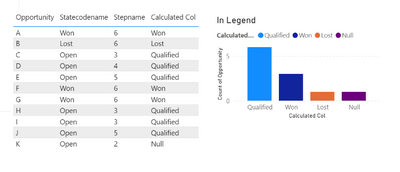
Below is the returned results with some dummy data.


johncolley_0-1654041445261.png


View solution in original post

2 REPLIES 2
v-yalanwu-msft
Community Support
Community Support

Hi, @Syndicate_Admin ;

I think johncolley's answer is correct, here is a more concise method by the way.


Calculated Col =
SWITCH (
    Statecode[Statecodename],
    "Won", "Won",
    "Lost", "Lost",
    "Open",
        IF ( Statecode[Stepname] = 3 || [Stepname] = 4 || [Stepname] = 5, "Qualified" )
)


Best Regards,
Community Support Team _ Yalan Wu
If this post helps, then please consider Accept it as the solution to help the other members find it more quickly.


johncolley
Solution Sage
Solution Sage

Hi,


The following calculated column logic works:

Calculated Col = 
IF(
Statecode[Statecodename] = "Won", "Won",
IF(Statecode[Statecodename] = "Lost", "Lost",
IF(Statecode[Statecodename] = "Open" && Statecode[Stepname] = 3, "Qualified",
IF(Statecode[Statecodename] = "Open" && Statecode[Stepname] = 4, "Qualified",
IF(Statecode[Statecodename] = "Open" && Statecode[Stepname] = 5, "Qualified", "Null")))))

Below is the returned results with some dummy data.


johncolley_0-1654041445261.png


Helpful resources

Announcements
May Power BI Update Carousel

Power BI Monthly Update - May 2026

Check out the May 2026 Power BI update to learn about new features.

Fabric SQL PBI Data Days

Data Days 2026 coming soon!

Sign up to receive a private message when registration opens and key events begin.

New to Fabric survey Carousel

New to Fabric Survey

If you have recently started exploring Fabric, we'd love to hear how it's going. Your feedback can help with product improvements.

Power BI DataViz World Championships carousel

Power BI DataViz World Championships - June 2026

A new Power BI DataViz World Championship is coming this June! Don't miss out on submitting your entry.